


Minimalist Buttons
- By
This texture pack retextures the new touch control buttons to a minimalist design making it more less eye catching, great for pvp, and simply cleaner. Just like in Pojav Launcher's touch controls UI, I took inspiration from it and adapted the style in MCPE's new costumizeable touch controls.
Before:
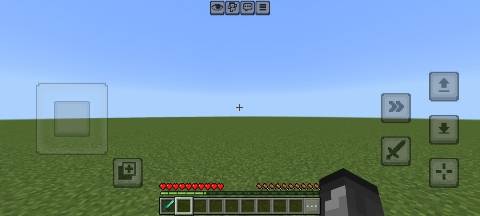
After:
"Perspective" and "Pick Block" buttons are changed too.
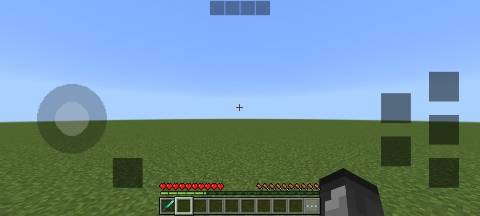
I didn't include the dpads because they we're messy to play around with so i just made them invisible instead.
Before:
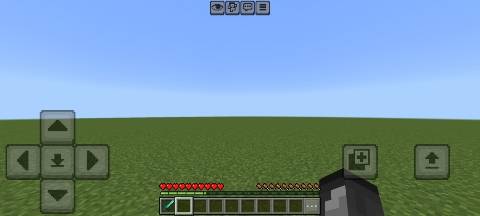
After:
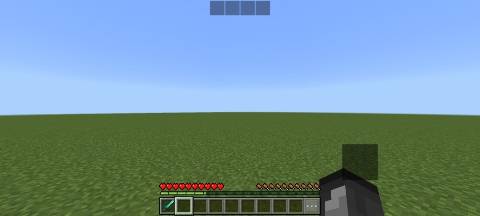
As seen in the screensot, I also retextured the Interact button above the hotbar. (This appears when you face your crosshair to Feed, Trade, or Ride an entity.)
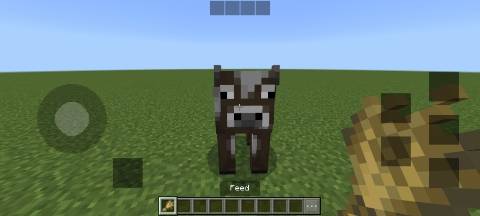
Here is a video preview showing the textures in game with having the touch controls customized:
Possible questions users might ask:
Q1: Why when using custom texture packs with a custom hotbar, It stays the same as default?
: The image file in the pack called "gui.png" has the pause/menu, chat, emote, and interact button which are seen at the top middle of your screen. So having this pack above your custom packs with gui files overwrites it. You can whatsover delete/rename that file to have your pack work, but doing that also removes those textures.
Q2: Why is the potion effects menu glitched/bugged?
: This has always been a problem way back from old versions too, again the "gui.png" file somewhat overwrites these textures and a solution for that problem is putting the Minimalist Button Pack below your pack or having another texture pack to fix that issue.
Recommendations:
Setting the buttons and joystick opacity to 15% makes them unobstructive and helps u better see in game.
Note:
•Feel free to customize the pack for whatever preffered edit of it you want.
•You are NOT allowed to republish the pack.
•You may showcase the pack for a video but remember to put this website link and not on any shortcut link like Mediafire, Linkvertise, etc.
The Minimalist Buttons Team
