promotional bannermobile promotional banner

HSD Full High-Definition Shader | MCPE

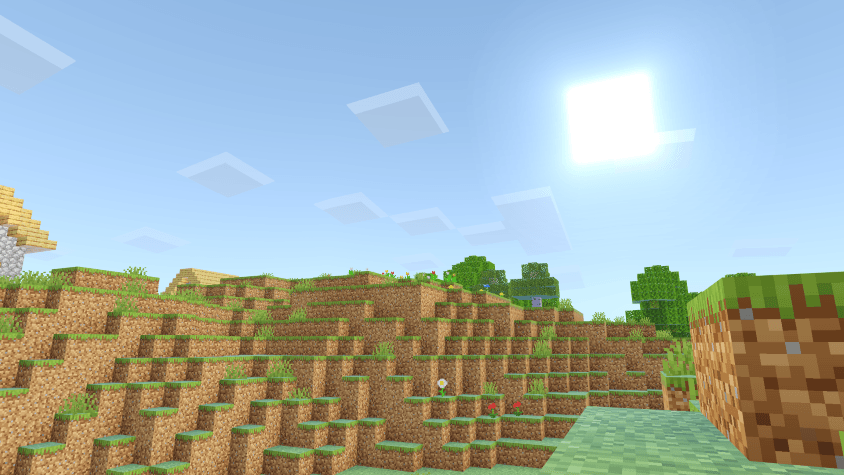
Could be the best shader for MCPE? This shader is an import for the shader HSD v1.2.5


Supports 1.21.100 (above)

For "Windows, Android and iOS" Download from the link provided!


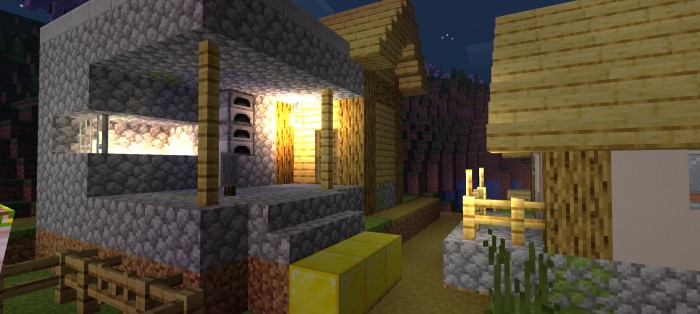
The FHD Shader is a beautiful and smooth shader for Minecraft Bedrock that I created to revive the older HSD Shader. Since HSD Shader stopped working with Minecraft's new updates, I made FHD Shader to keep that great look alive. It has brighter colors, realistic lighting, and smooth shadows, all without slowing down the game. If you’re looking for a shader that looks amazing and still runs well, FHD Shader is perfect.

This shader will not work without using required patches! Please read the installation guide before downloading.


Features

  • Aesthetic Color Upgrades – Balanced, vibrant visuals
  • Redesigned Clouds – Natural and dynamic skies
  • Enhanced End & Nether – Mystical and fiery worlds reimagined
  • Improved Underwater Look – Greater depth and realism
  • Metallic & Rough Reflections – Lifelike surfaces and textures
  • Refined Night Sky – Sharper, more immersive stars
  • Revamped Water System – Next-level realism
  • Built-in Normal Mapping – Added surface detail
  • High-Quality Sun Bloom – Stunning light effects
  • Glowing Ores – Easier to spot, more vibrant
  • Swaying Plants – Natural movement and life
  • Sharper, Realistic Shadows – Defined and immersive
  • ...and much more!


Installation

Disclaimer: Minecraft Bedrock does not officially support loading custom shaders. The following are unofficial methods for loading shaders.

Android

1. Install MB Loader APK.
2. Import the resource pack to Minecraft and activate it in global resources.
3. Launch Minecraft through MB Loader APK.

Windows

  1. Use BetterRenderDragon to enable MaterialBinLoader.
  2. Import the resource pack and activate it in global resources.
 

If BetterRenderDragon does not support your Minecraft version, use this Matject tool instead to install shaders.

Linux (x86_64 arch)

This method is for mcpelauncher-manifest.
1. Install mcpelauncher-materialbinloader-mod.
2. Import the resource pack and activate it in global resources.

*iOS

Sorry. There isn't an easy method to install shaders on iOS devices. You either require jailbreak or would have to install an untrusted IPA.


For "Windows, Android and iOS" Download from the link provided!


NOTE:

Mojang broke all the shaders in the latest version, 1.21.101. The latest release of my shaders is just a temporary fix and won't work for most devices. But hopefully, I'll find a better solution later, or we can wait for Mojang or the shader community to find another way to fix it.
 
The only thing I could recommend if you really want to use shaders is to downgrade Minecraft to 1.21.94.
Anyways thank you very much for 216.2K downloads in curseforge! ;)


The HSD Full High-Definition Shader | MCPE Team

profile avatar
  • 74
    Followers
  • 7
    Projects
  • 2.1M
    Downloads

More from Azion_StudiosView all

  • SmooTea Shader | Low End Shader project image

    SmooTea Shader | Low End Shader

    • 432.8K
    • Texture Packs

    Makes Minecraft Good without Sacrificing Performance!

    • 432.8K
    • May 15, 2026
    • Texture Packs
    • +2
  • Glow Em All Shader | Glowing Ores project image

    Glow Em All Shader | Glowing Ores

    • 850.5K
    • Texture Packs

    Lights up ores, blocks, and caves because, mining should glow! Want it more technical, gamer-style, or clean and pro? I can tweak it.

    • 850.5K
    • May 15, 2026
    • Texture Packs
    • +2
  • AziFy Truly Default Shader OPTIMIZED | AFTD project image

    AziFy Truly Default Shader OPTIMIZED | AFTD

    • 338.0K
    • Texture Packs

    The Classic vanilla Minecraft look is improved by this AziFy Truly Default Shader, which works at delivering realistic graphics or visuals without making the game heavy.

    • 338.0K
    • May 15, 2026
    • Texture Packs
    • +4
  • AziFy Revive Shader | AFR project image

    AziFy Revive Shader | AFR

    • 378.2K
    • Texture Packs

    Azify shader is an MCBE shader that Enhances the vanilla Experience focusing on visuals and clarity.

    • 378.2K
    • May 15, 2026
    • Texture Packs
    • +4
  • SmooTea Shader | Low End Shader project image

    SmooTea Shader | Low End Shader

    • 432.8K
    • Texture Packs

    Makes Minecraft Good without Sacrificing Performance!

    • 432.8K
    • May 15, 2026
    • Texture Packs
    • +2
  • Glow Em All Shader | Glowing Ores project image

    Glow Em All Shader | Glowing Ores

    • 850.5K
    • Texture Packs

    Lights up ores, blocks, and caves because, mining should glow! Want it more technical, gamer-style, or clean and pro? I can tweak it.

    • 850.5K
    • May 15, 2026
    • Texture Packs
    • +2
  • AziFy Truly Default Shader OPTIMIZED | AFTD project image

    AziFy Truly Default Shader OPTIMIZED | AFTD

    • 338.0K
    • Texture Packs

    The Classic vanilla Minecraft look is improved by this AziFy Truly Default Shader, which works at delivering realistic graphics or visuals without making the game heavy.

    • 338.0K
    • May 15, 2026
    • Texture Packs
    • +4
  • AziFy Revive Shader | AFR project image

    AziFy Revive Shader | AFR

    • 378.2K
    • Texture Packs

    Azify shader is an MCBE shader that Enhances the vanilla Experience focusing on visuals and clarity.

    • 378.2K
    • May 15, 2026
    • Texture Packs
    • +4