Glowing Ores PBR
- By
Description
⛏️ Glowing Ores (Bedrock Edition) by PeakMC6725
See your ores clearly while keeping Minecraft's vanilla look.
Want to make ores easier to spot without changing their original appearance?
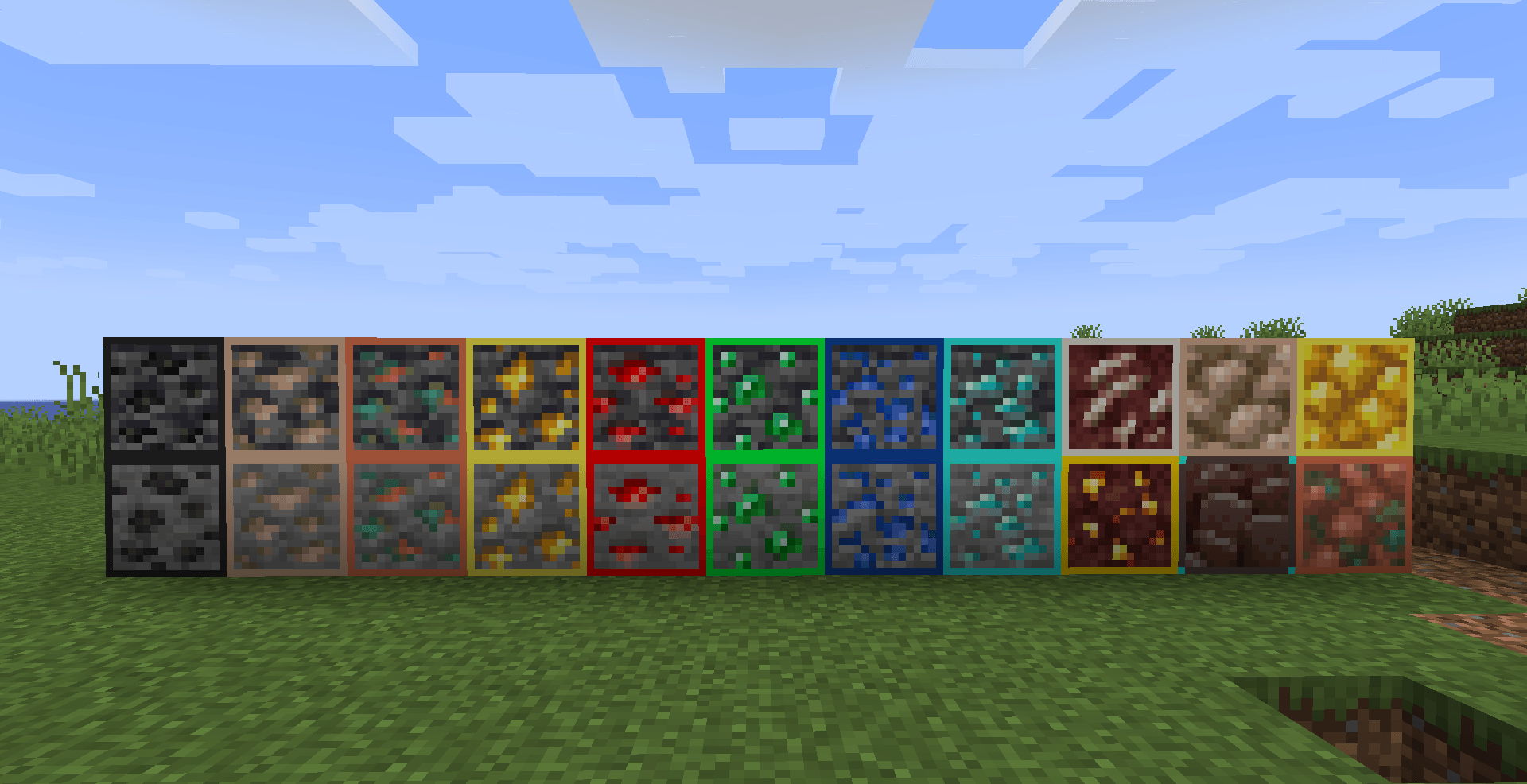
Glowing Ores is a 16x utility resource pack fully rebuilt for Bedrock Edition. It adds a thin, 1-pixel, color-matched border around every vanilla ore block.
The original ore textures and surrounding stone remain completely untouched. Only the borders are added, keeping the familiar vanilla appearance while making ores stand out clearly.
With a compatible PBR/RTX Deferred rendering setup, the outlines can also glow beautifully in dark caves!
✨ FEATURES
- 16x Resolution: Uses Minecraft's standard 16x texture resolution.
- 1-Pixel Outlines: Adds a thin, color-matched border around every vanilla ore.
- Vanilla Interiors: Original ore interiors and surrounding stone remain untouched.
- Color-Matched Borders: Each ore has its own carefully selected border color.
- Native PBR/RTX Support: Built from the ground up using Bedrock's official .texture_set.json files and custom MER maps.
- Raw Metal Blocks: Raw iron, raw copper, and raw gold blocks receive matching outlines.
- Deepslate Support: Includes all deepslate ore variants.
🎨 ORE BORDER COLORS
Each ore uses its own border color to help distinguish it from other ores.
|
Ore / Block |
Border Color |
Hex Code |
|
Coal Ore |
Dark Gray |
#262626 |
|
Iron Ore |
Light Brown |
#D8AF93 |
|
Copper Ore |
Orange |
#E0734D |
|
Gold Ore |
Yellow |
#FCEE4B |
|
Redstone Ore |
Red |
#FF0000 |
|
Lapis Lazuli Ore |
Blue |
#1044A1 |
|
Diamond Ore |
Cyan |
#29F3E8 |
|
Emerald Ore |
Green |
#00FF3C |
|
Nether Quartz Ore |
Off-White |
#E8E3D9 |
|
Nether Gold Ore |
Gold |
#FFD700 |
|
Ancient Debris |
Brown with Cyan Corners |
#594742 |
|
Raw Iron Block |
Matching Iron |
#D8AF93 |
|
Raw Copper Block |
Matching Copper |
#E0734D |
|
Raw Gold Block |
Matching Gold |
#FCEE4B |
💡 GLOWING OUTLINES (RTX / PBR)
The outlines can glow in dark caves, but glowing requires a Bedrock version that supports RenderDragon PBR / Deferred Technical Preview, alongside a compatible PBR shader or RTX resource pack.
- Border-Only Glow: Only the colored borders glow. The original ore interiors and surrounding blocks remain unchanged.
- Without Shaders: If you are not running a PBR preset, the outlines still work as normal, highly visible, high-contrast borders without the glowing effect.
🛠️ INSTALLATION INSTRUCTIONS
- Download the pack: Get the .mcpack file from the Files tab.
- Open the file: Double-click or open the .mcpack file on your device.
- Import into Minecraft: Minecraft Bedrock should launch automatically and import the pack.
- Activate the pack: Go to Settings → Global Resources → Active Packs and enable Glowing Ores.
- Enable Deferred Graphics: Make sure your video settings have Deferred Technical Preview graphics mode enabled if you want to experience the glowing PBR effects!
❓ FREQUENTLY ASKED QUESTIONS
Does this pack affect performance?
This is a lightweight, optimized 16x resource pack with no measurable impact on frame rates.
Is this pack allowed on multiplayer servers?
It is fully client-side. However, always review your specific server's rules regarding ore-visibility enhancements.
Why aren't my outlines glowing?
The outlines display clearly under default graphics, but the emissive glow requires a device capable of running Bedrock's PBR / Deferred lighting pipelines with an active compatible PBR pack.
Do the original ore textures change?
No! The interiors and surrounding terrain stay completely vanilla. Only a 1-pixel border is mapped onto the ore faces.
👤 CREATED BY
PeakMC6725
A Minecraft creator making resource packs, datapacks, mods, maps, and other projects for the community.
Thanks for checking out Glowing Ores!
Glowing Ores by PeakMC6725 is not an official Minecraft product. It is not approved by, associated with, or endorsed by Mojang or Microsoft.
Glowing Ores PBR Team