![Glowing Ore[Vibrant Visual] logo](https://media.forgecdn.net/avatars/thumbnails/2068/715/64/64/639259001114265284.png)

LEGACY VISUAL
- 2.9K
- Texture Packs
LEGACY VISUAL, is a Vibrant Visual pack that enhance the game
- 2.9K
- September 22, 2026
![X Ray Extra[with night vision] project image](https://media.forgecdn.net/avatars/thumbnails/1805/664/256/256/639142640886784168.png)

LEGACY VISUAL
- 2.9K
- Texture Packs
LEGACY VISUAL, is a Vibrant Visual pack that enhance the game
- 2.9K
- September 22, 2026


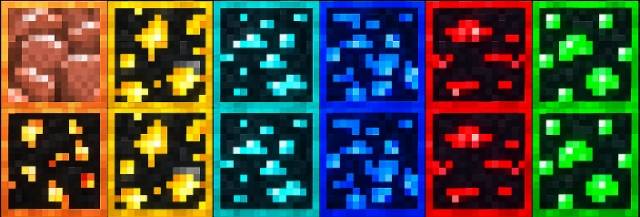
Glowing Ore - Vibrant Visual
Make your ores stand out with vibrant, emissive visuals designed specifically for Minecraft Bedrock’s Vibrant Visuals. This pack enhances ore visibility while keeping the clean, vanilla Minecraft aesthetic.
✨ Features
• Vibrant glowing ore textures
• Supports Overworld and Deepslate ores
• Separate textures for Deepslate ores
• Designed specifically for Vibrant Visuals
• Clean vanilla-style appearance
• Lightweight and optimized
⚠️ Requirement: Vibrant Visuals must be enabled for the glowing effects to work correctly.
📥 Installation
1. Download the Glowing Ores – Vibrant Visuals ".mcpack" file.
2. Open the ".mcpack" file with Minecraft Bedrock.
3. Minecraft will automatically import the resource pack.
4. Go to Settings → Global Resources or your world's Resource Packs.
5. Activate Glowing Ores – Vibrant Visuals.
6. Make sure Vibrant Visuals is enabled in your video/graphics settings.
7. Enter your world and enjoy the glowing ores! ✨
Made by AyonPlayz



LEGACY VISUAL, is a Vibrant Visual pack that enhance the game
LEGACY VISUAL, is a Vibrant Visual pack that enhance the game