promotional bannermobile promotional banner

Clean Coords

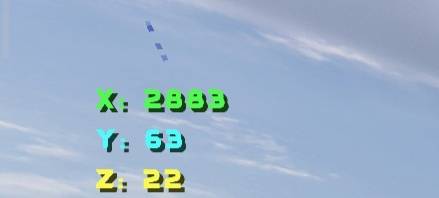
It is a straightforward, no-frills texture pack that displays your coordinates in the top-left corner, split vertically and even color-coded.
IMG_20260719_124854.jpg

IMG_20260719_124854.jpg

Description

How To Active?

Why problem?

Step 1: Activate the pack in the "Resource Packs" section of your game world and place it at the very top of the list. Step 2: Game > Settings > Resource Packs – Activate it and position it at the top. Solution! If you encounter any bugs, glitches, or issues, try the following: - Disable the pack and then re-enable it. - Save and exit the game or world, then re-enter. Note: Works with all modded versions of the Bedrock edition. (APK/XAPK/Beta/Final/Xbox/PlayStation/PC Bedrock/MCPE) Requires version 1.16.100 or higher.

The Clean Coords Team

profile avatar
  • 2
    Projects
  • 26
    Downloads

Minecraft Bedrock player grinding to improve every day. Still learning, always building. Let's play! 🧱"

More from Snowa_Bedrockk7