🌑 BLIND MOON SHADER
A Dark • Cinematic • Vibrant Minecraft Bedrock Visual Experience
✨ Created & Maintained by PrabhatPie
━━━━━━━━━━━━━━◆━━━━━━━━━━━━━━
🌕 EXPERIENCE MINECRAFT UNDER THE BLIND MOON.
Blind Moon Shader is a carefully designed Minecraft Bedrock visual experience created to transform the atmosphere of your world with darker environments, cinematic presentation, immersive lighting and a unique moon-inspired visual identity.
━━━━━━━━━━━━━━◆━━━━━━━━━━━━━━
⚡ Designed for Exploration • Survival • Building • Screenshots • Cinematics • Content Creation
🛒 PRABHATPIE PREMIUM SHOP
💎
PREMIUM MINECRAFT CREATIONS 💎
✨ SHADERS • VISUALS • PREMIUM PROJECTS ✨
Want an even more advanced visual experience? Visit the official
PrabhatPie Premium Shop to explore premium Minecraft shaders, visual projects and other digital creations.
🌌 PREMIUM SHADERS
💠 Premium Visual Experiences
🌙 Enhanced Atmosphere
🎬 Cinematic Visuals
✨ Carefully Designed Effects
🛠️ Content-Creator Friendly Projects
🚀 Premium Releases & Updates
❤️ Every purchase supports the continued development, testing and improvement of PrabhatPie's Minecraft projects.
🌑 BLIND MOON SHADER
A new visual atmosphere. A darker world. A different Minecraft.
Blind Moon Shader is built for players who want their Minecraft Bedrock worlds to feel more
atmospheric, cinematic, immersive and visually polished while still keeping the familiar Minecraft experience.
Instead of simply changing a few textures, Blind Moon focuses on the
overall mood and presentation of your world.
From peaceful nights to dramatic landscapes, forests, mountains, oceans and massive builds, the goal is simple:
Make every moment of Minecraft feel more cinematic.
🌕 01 — ABOUT BLIND MOON SHADER
🌑 A DARKER VISUAL EXPERIENCE
Blind Moon Shader is a Minecraft Bedrock visual project created and maintained by PrabhatPie.
The project is designed around atmosphere, lighting, environmental presentation and cinematic visuals.
“Make Minecraft feel different without losing what makes Minecraft recognizable.”
Blind Moon is suitable for:
- 🌲 Exploration
- 🏠 Survival worlds
- 🏗️ Building
- 🌊 Ocean adventures
- ⛰️ Mountains
- 🌌 Night exploration
- 🎬 Cinematic videos
- 📸 Screenshots
- 🎥 Content creation
- 🗺️ Adventure maps
- ✨ Showcase worlds
🌙 02 — THE BLIND MOON EXPERIENCE
Blind Moon is built around a
dark moon-inspired visual identity.
The objective is not to make everything completely dark. Instead, the visual experience is designed to create a stronger difference between:
☀️ Day → 🌅 Sunset → 🌙 Night → 🌑 Deep Atmosphere
This creates a more noticeable mood change throughout your Minecraft world.
Imagine exploring a forest after sunset.
The sky becomes darker.
The environment becomes more atmospheric.
Your builds become more dramatic.
And the world begins to feel completely different.
That is the type of experience Blind Moon is designed around.
✨ 03 — VISUAL DESIGN PHILOSOPHY
Blind Moon follows four main design principles:
🌑 ATMOSPHERE
The environment should feel alive and immersive instead of flat.
🎨 VISUAL DEPTH
Different environments should have their own visual identity.
🎬 CINEMATIC PRESENTATION
The shader should look impressive when recording videos or taking screenshots.
🧱 MINECRAFT IDENTITY
Blind Moon should enhance Minecraft rather than completely remove its recognizable visual style.
🔥 04 — MAIN FEATURES
🌑 BLIND MOON HIGHLIGHTS
🌙 Dark Moon-Inspired Atmosphere
✨ Cinematic Visual Presentation
🌌 Immersive Environment
🌅 Enhanced Day & Night Mood
🌲 Atmospheric Exploration
🏔️ Beautiful Landscape Presentation
🌊 Enhanced World Immersion
🎬 Content Creator Friendly
📸 Screenshot Friendly
🏠 Building Friendly
⛏️ Survival Friendly
⚡ Multiple Visual Profiles
🌌 05 — ATMOSPHERE & LIGHTING
One of the most important parts of Blind Moon is the atmosphere.
Minecraft contains many different environments, including:
- Forests
- Plains
- Mountains
- Oceans
- Rivers
- Villages
- Caves
- Snowy areas
- Deserts
- Nether environments
- Large player-built cities
Blind Moon is designed to make these locations feel more visually interesting.
🌅 SUNSET
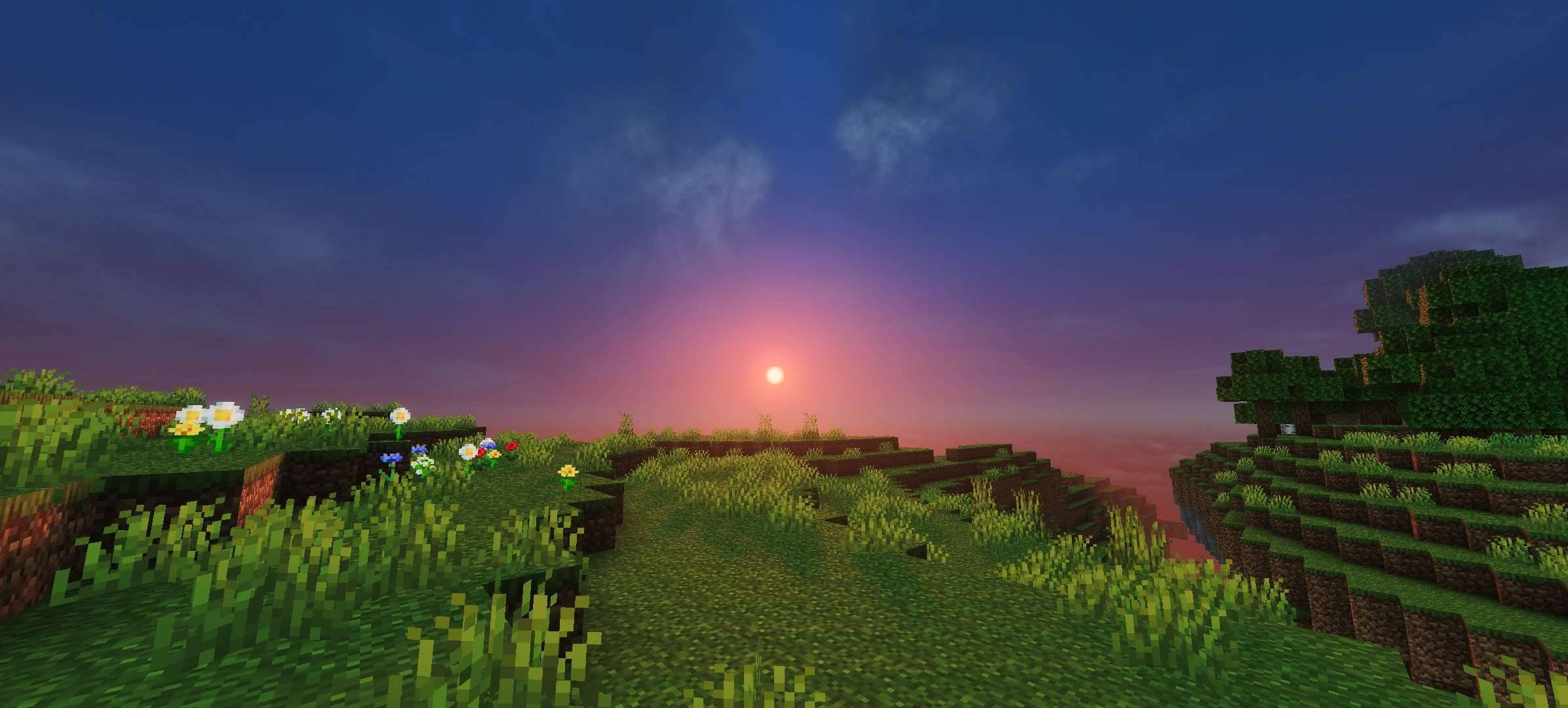
Sunset is one of the best times to capture cinematic screenshots.
Try standing on a mountain, watching a village from a distance or looking across an ocean during sunset.
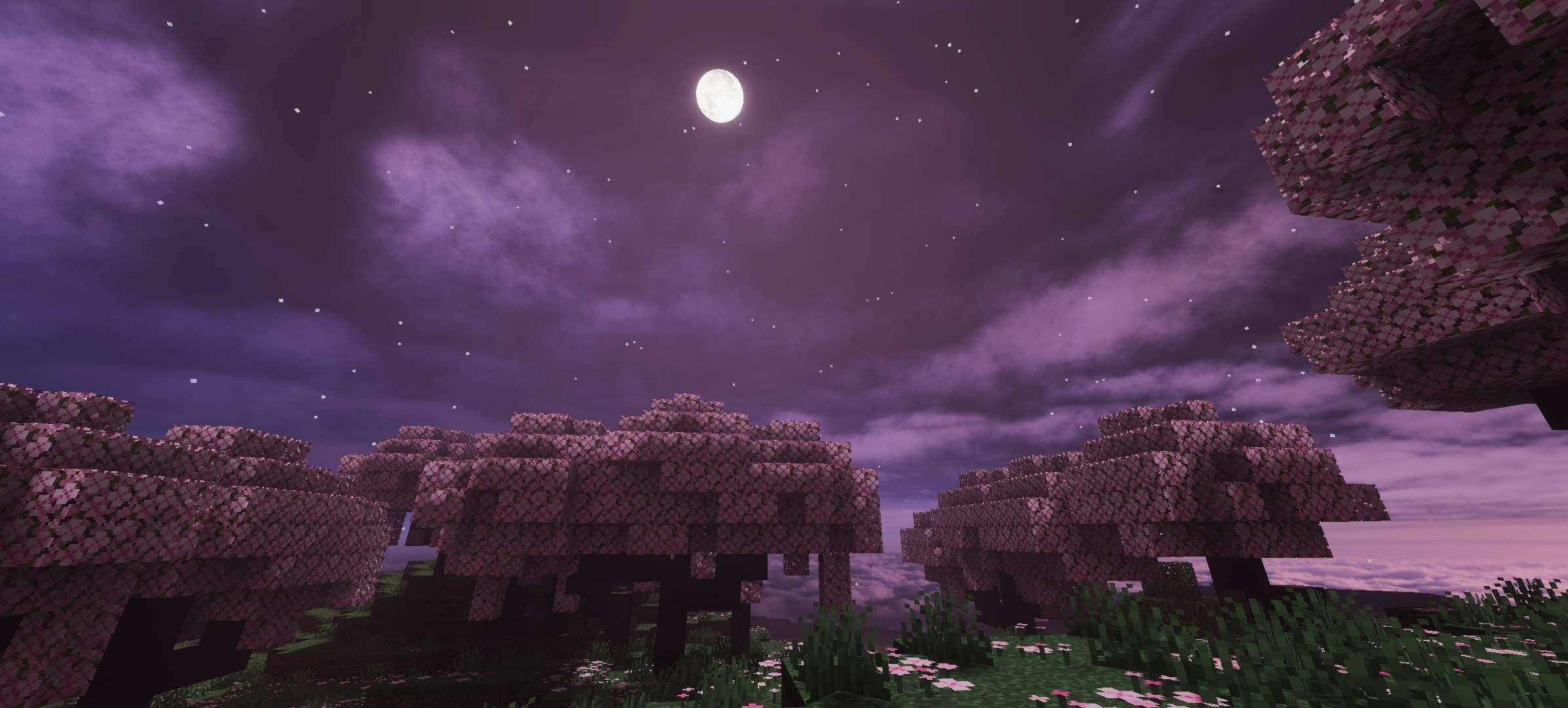
🌙 NIGHT
Nighttime is where the Blind Moon identity becomes especially noticeable.
The darker atmosphere can create a mysterious and cinematic feeling while exploring your world.
🌲 FORESTS
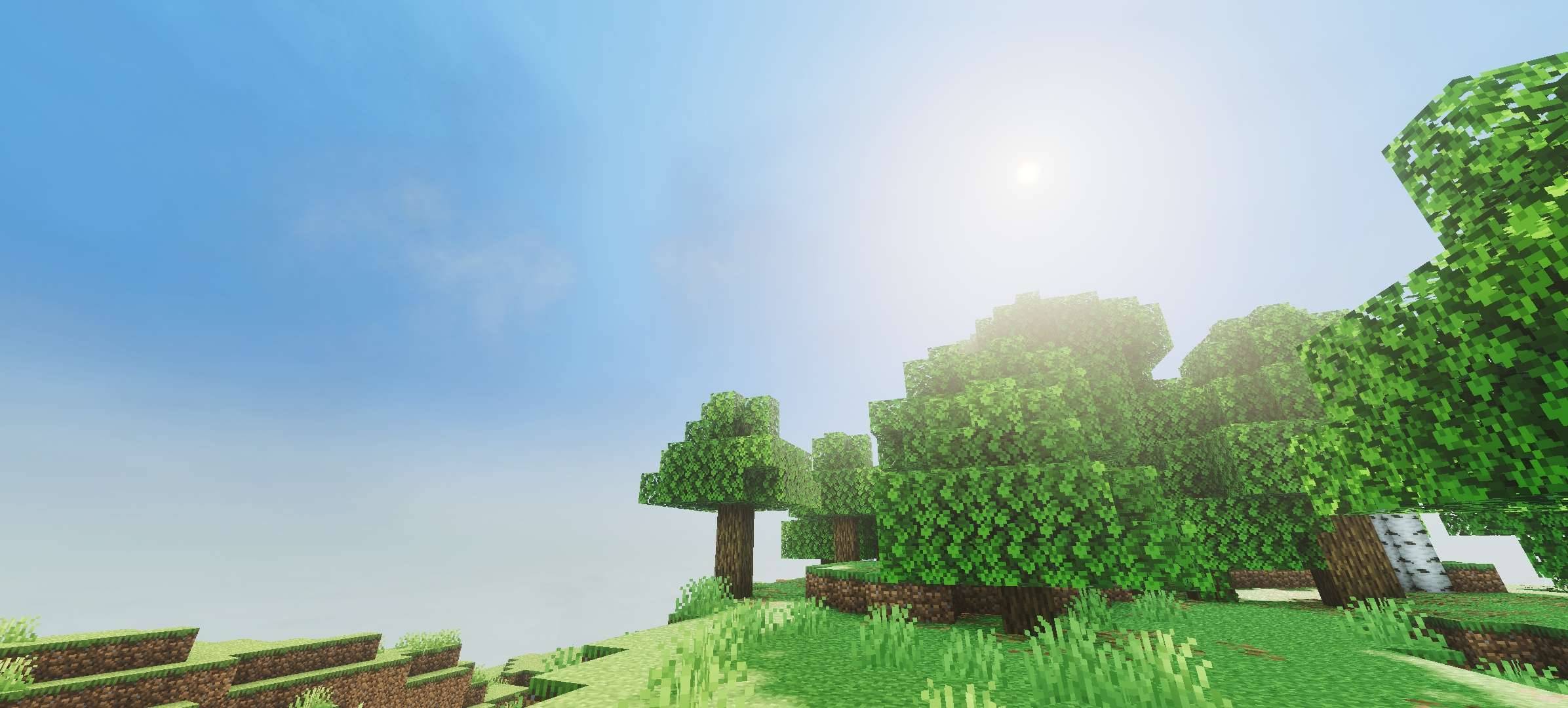
Forests can become more atmospheric and dramatic, making exploration and screenshots more interesting.
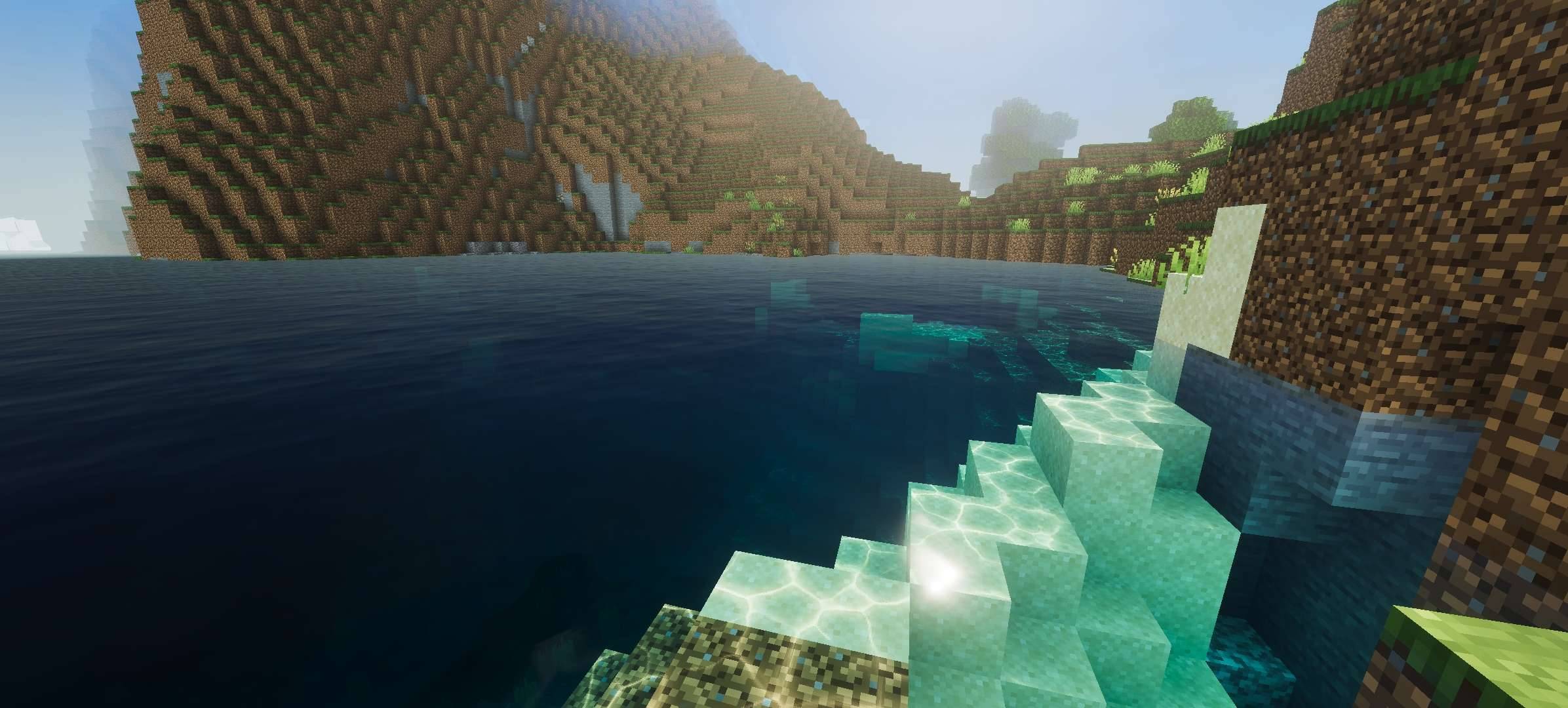
🌊 WATER & OCEANS
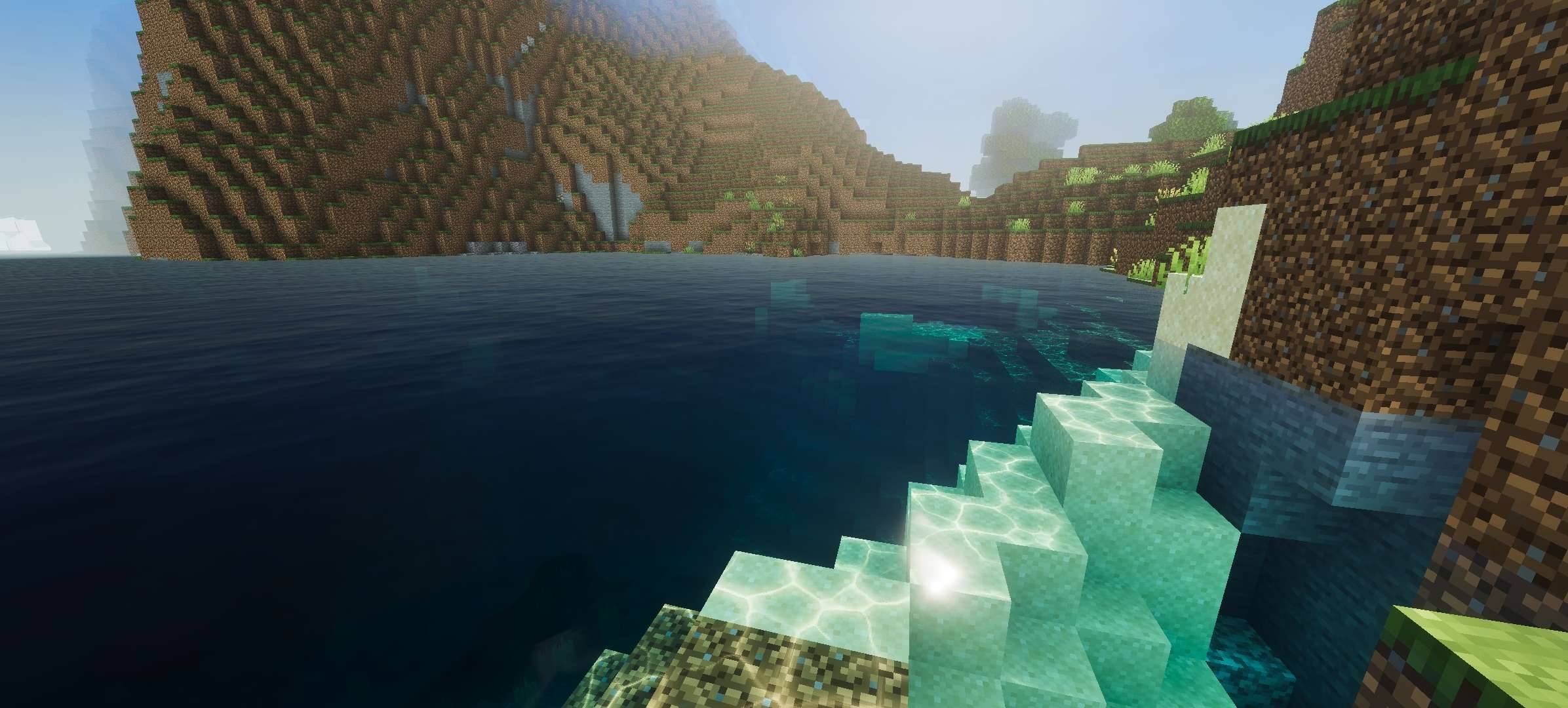
Large oceans and rivers can create beautiful cinematic compositions, especially when combined with high render distance and a carefully selected viewpoint.
💎 06 — PBR & MATERIAL EXPERIENCE
Blind Moon is designed with modern Minecraft visual presentation in mind.
Where supported by the Minecraft graphics environment and compatible resource content, material-based visual effects can contribute to:
- 💎 Surface depth
- 🪨 Block detail
- 🧱 Building presentation
- ✨ Material definition
- 🎬 Cinematic visuals
For the best result, always make sure your Minecraft version and graphics settings are compatible with the visual features you are using.
⚠️ Visual results can vary depending on Minecraft version, device hardware, graphics mode and other installed resource packs.
⚙️ 07 — VISUAL PROFILES
Blind Moon includes different visual profiles intended to provide flexibility for different devices and preferences.
🟢 LOW PROFILE
Recommended for users who want a lighter visual experience.
Useful when:
- 📱 Playing on mobile
- ⚡ Prioritizing smoother gameplay
- 🌍 Playing large survival worlds
- 🎮 Using lower graphics settings
🔴 DEFAULT PROFILE
Recommended for users who want the intended Blind Moon visual experience.
Useful for:
- 🎬 Cinematics
- 📸 Screenshots
- 🏠 Building
- 🌌 Exploration
- 🎥 Content creation
💡 If your device can comfortably handle the Default profile, try it first. If performance becomes unstable, switch to the Low profile.
🛡️ 08 — SURVIVAL FRIENDLY
Blind Moon is designed to be usable during normal Minecraft gameplay.
You can use it while:
- ⛏️ Mining
- 🌲 Exploring
- 🏠 Building
- 🌾 Farming
- 🐄 Managing animals
- ⚔️ Fighting mobs
- 🗺️ Travelling
- 🌊 Exploring oceans
- 🏔️ Exploring mountains
You don't need a special world to use Blind Moon.
Simply activate the pack in your world and experience the visual changes.
🎬 09 — CINEMATIC & SCREENSHOT READY
Blind Moon is also designed for Minecraft content creators.
📸 SCREENSHOTS
For screenshots, try:
Render Distance: High where possible
Time: Sunrise / Sunset / Night
Weather: Match the atmosphere
Camera: Use wide landscape views
UI: Hide UI when capturing final images
🎥 VIDEOS
Blind Moon can also be used for:
- YouTube videos
- Shorts
- Reels
- TikTok-style Minecraft content
- Cinematic trailers
- World showcases
- Build showcases
Always check your FPS before recording long videos.
⚡ 10 — PERFORMANCE
Performance depends heavily on your device and Minecraft configuration.
Factors include:
- 📱 Device hardware
- 🧠 RAM
- 🎮 GPU
- ⚙️ CPU
- 📦 Minecraft version
- 🌍 World size
- 👁️ Render distance
- 🎨 Graphics settings
- 📚 Other resource packs
- 💡 Visual features being used
Blind Moon does
not guarantee a specific FPS because every device and world is different.
🚀 PERFORMANCE TIPS
If you experience performance problems:
- Lower render distance.
- Reduce simulation distance.
- Try the Low profile.
- Disable unnecessary resource packs.
- Restart Minecraft.
- Avoid extremely large worlds while testing.
- Close unnecessary background applications.
- Make sure Minecraft is updated to a compatible version.
📱 11 — ANDROID INSTALLATION
Installing Blind Moon on Android is simple.
STEP 1
Download the Blind Moon Shader
.mcpack file.
STEP 2
Open your Android
Files / File Manager.
Find the downloaded
.mcpack.
STEP 3
Tap the
.mcpack file.
Choose
Minecraft when Android asks which application should open the file.
STEP 4
Minecraft should launch and begin importing the pack.
Wait until the import process finishes.
STEP 5
Open:
Play → Edit World → Resource Packs → My Packs
Find:
🌑 Blind Moon Shader
Then press:
Activate
STEP 6
Enter your world and allow Minecraft a moment to load the visual resources.
💡 If the pack does not appear, restart Minecraft and check your resource-pack list again.
💻 12 — WINDOWS INSTALLATION
STEP 1
Download the Blind Moon
.mcpack.
STEP 2
Open your Downloads folder.
STEP 3
Double-click the
.mcpack file.
Minecraft should open automatically.
STEP 4
Wait for the import notification.
STEP 5
Go to:
Play → Edit World → Resource Packs → My Packs
Select:
🌑 Blind Moon Shader
Press:
Activate
STEP 6
Enter your world and check the visual result.
🍎 13 — iOS / iPadOS INSTALLATION
On iPhone or iPad:
- Download the
.mcpack.
- Open the downloaded file.
- Select Open in Minecraft.
- Minecraft will begin importing the pack.
- Wait for the import to finish.
- Open your world settings.
- Go to Resource Packs.
- Find Blind Moon Shader.
- Activate it.
If iOS does not automatically open Minecraft, use the device's share/open-with option and select Minecraft.
🎮 14 — CONSOLE INFORMATION
Xbox and PlayStation installation can work differently from Windows and Android.
Console versions may not support directly copying
.mcpack files in the same way as mobile or Windows.
Use Minecraft-supported installation and resource-pack methods available for your platform.
⚠️ Do not assume that manually placing a .mcpack file into console storage will work.
🌑 15 — APPLYING BLIND MOON
After importing:
World Settings → Resource Packs → My Packs → Blind Moon Shader → Activate
For testing, create a temporary world first.
This makes it easier to compare:
Vanilla Minecraft VS Blind Moon Shader
Try the shader during:
☀️ Day
🌅 Sunset
🌙 Night
🌧️ Rain
🌲 Forest exploration
🏔️ Mountains
🌊 Oceans
🏠 Your main base
⚙️ 16 — RECOMMENDED SETTINGS
For a balanced experience:
⚡ BALANCED PROFILE
Render Distance: Medium / High
Simulation Distance: Medium
Graphics: Recommended
Resource Packs: Blind Moon + compatible packs
Profile: Default
📱 MOBILE PROFILE
Use:
- Lower Render Distance
- Lower Simulation Distance
- Low Profile
- Fewer additional resource packs
🎬 CINEMATIC PROFILE
Use:
- Higher Render Distance
- Default Profile
- Clear weather
- Sunset or night
- Large landscapes
- Minimal UI
🚨 17 — IMPORTANT WARNING
🚨 PLEASE READ BEFORE USING
🔴 Compatibility
Always use a Minecraft Bedrock version compatible with the release.
🔴 World Safety
Create a backup of important worlds before testing new visual/resource packs.
🔴 Resource Pack Conflicts
Other resource packs may override or conflict with Blind Moon's assets.
🟡 Performance
Performance can vary significantly depending on your hardware and settings.
🔴 File Safety
Do not randomly delete, rename or modify internal files unless you know exactly what you are changing.
🔴 Visual Differences
Some effects may look different depending on Minecraft version, graphics mode, device and compatible resource packs.
🛠️ 18 — TROUBLESHOOTING
❌ PACK DOES NOT APPEAR
Try:
- Restart Minecraft.
- Re-import the
.mcpack.
- Check Resource Packs → My Packs.
- Confirm the import completed.
- Make sure you downloaded the correct file.
❌ NO VISUAL CHANGE
Check:
- Is Blind Moon activated?
- Is another resource pack overriding it?
- Is your Minecraft version compatible?
- Are the required graphics features available?
❌ FPS DROPS
Try:
- Low profile
- Lower render distance
- Lower simulation distance
- Remove unnecessary packs
- Restart Minecraft
❌ IMPORT FAILED
Make sure the file is a valid
.mcpack and was completely downloaded.
If the problem continues, contact support with your:
Minecraft Version + Device + Screenshot + Problem Description
🔗 19 — RESOURCE PACK COMPATIBILITY
Blind Moon may be used alongside other resource packs, but load order and asset conflicts can affect the final appearance.
If you use multiple packs:
- Activate Blind Moon.
- Test the world.
- Add other packs one by one.
- Check whether the appearance changes unexpectedly.
If a specific texture or visual element disappears, another resource pack may be overriding the same asset.
🎥 20 — CONTENT CREATOR USAGE
Content creators are welcome to showcase Blind Moon in Minecraft content where permitted by the project's license.
You can use it for:
- YouTube videos
- Shorts
- Screenshots
- Showcase videos
- Build tours
- Minecraft cinematics
- Social media content
❤️ CREDIT IS APPRECIATED
When showcasing Blind Moon, please credit:
Blind Moon Shader — by PrabhatPie
You can also link viewers to the official project page and the PrabhatPie Shop.
📜 21 — LICENSE
Blind Moon Shader and its original assets are the property of
PrabhatPie, unless otherwise stated.
Downloading or using the project does
not transfer ownership of the original files or assets.
❌ NOT ALLOWED WITHOUT PERMISSION
- Reuploading the complete pack
- Redistributing modified copies
- Claiming ownership
- Selling unauthorized copies
- Removing creator credits
- Rebranding the complete project
- Uploading the files to another download platform
- Including the pack in another project without permission
If you want to use Blind Moon in a project that requires redistribution, contact
PrabhatPie first.
🚫 22 — ANTI-REUPLOAD NOTICE
🚫 UNAUTHORIZED REDISTRIBUTION IS NOT PERMITTED
Please do not mirror, repackage, rename, modify and redistribute Blind Moon Shader as your own project.
Do not upload unauthorized copies to websites, file-hosting services, social media posts or other distribution platforms.
If you discover an unauthorized reupload, please report it through the appropriate platform or contact PrabhatPie.
🔒 23 — CONTENT PROTECTION
Blind Moon is distributed as a Minecraft resource/shader project, which means files must ultimately be available to Minecraft in order for the project to work.
No resource-pack format can make digital files technically impossible to copy.
However, please respect the creator's:
© Copyright • Branding • Credits • License
Do not remove creator information or redistribute the original project without permission.
🔄 24 — UPDATES
Blind Moon may receive updates to improve:
- 🌑 Visual presentation
- ✨ Atmosphere
- ⚙️ Compatibility
- 🐛 Bug fixes
- 📱 Device support
- 🎨 Visual effects
- 🚀 Performance
- 🛠️ Stability
Always check the latest release information before updating.
💡 Keep backups of important worlds before testing major Minecraft or resource-pack changes.
🐛 25 — BUG REPORTS
Found a problem?
Please provide as much information as possible.
INCLUDE:
Minecraft Version:
Device:
Graphics Mode:
Blind Moon Version:
Other Resource Packs:
Problem:
Steps to Reproduce:
Screenshot / Video:
This makes it much easier to investigate the issue.
💬 26 — SUPPORT
Need help with installation, compatibility or troubleshooting?
Join the PrabhatPie community and ask for support.

💬 JOIN THE PRABHATPIE COMMUNITY
Get support • See updates • Share screenshots • Discover new projects
Discord: discord.gg/evu6dernXk
👑 27 — CREDITS
🌑 BLIND MOON SHADER
👑 Creator & Developer: