No Music
Music will not play automatically.
Default Music
Music plays more frequently but not continuously.
Default Music+ (Constant Music)
Music plays continuously.
Old Music
Plays only the classic tracks composed by C418.
New Music
Plays only the tracks introduced from the Aquatic Update onward. *needs work
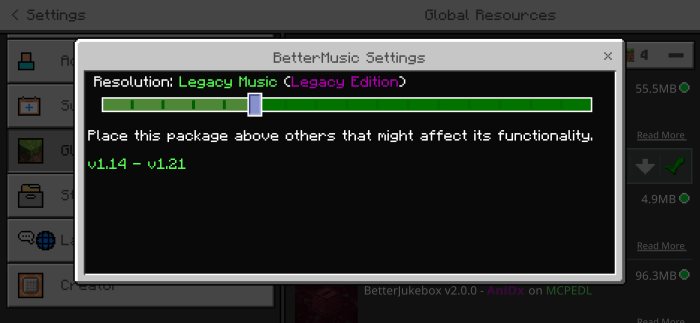
Legacy Music (Legacy Edition)
Replicates the music experience of the Legacy Edition by 4J Studios.
Legacy Music+ (Legacy Edition, Additional Music)
Features Legacy Edition music by 4J Studios with added unused tracks from Volume Alpha and Volume Beta.
Legacy Music+ (Legacy Edition, Christmas Music)
Plays festive tracks used in the Legacy Edition’s Festive Mash-up Pack alongside regular Legacy Edition music.
Menu Music Only
Plays music that is exclusive to the main menu.
Creative Mode Music Only (Excludes Menu Music)
Plays only music used in Creative Mode, with menu tracks playing regardless.
Survival Mode Music Only (Classic Music, Excludes Menu Music)
Plays only music used in Survival Mode, with menu tracks playing regardless.
Nether Dimension Music Only (Excludes Menu Music)
Plays only music used in the Nether dimension, with menu tracks playing regardless.
Custom Music (Tracks 1-100)
Plays up to 100 custom tracks located in sounds/custom/generic.
Custom Music (Tracks 1-50)
Plays the first 50 custom tracks located in sounds/custom/generic.
Custom Music (Tracks 51-100)
Plays the last 50 custom tracks located in sounds/custom/generic.
Custom Music+ (Based on Dimension/Gamemode)
Plays custom music tailored to the player’s dimension or gamemode, with up to 10 tracks per specific dimension or gamemode.
Custom Music++ (Based on Biome/Dimension/Gamemode)
Plays custom music tailored to the player’s biome, dimension, or gamemode, with up to 10 tracks per specific biome, dimension, or gamemode.
Custom Music (Generic)
Custom Music+
Music is organized based on dimension and game mode, with the following directories:
- custom/menu
- custom/game/creative
- custom/game
- custom/game/nether
- custom/game/end
Custom Music++
This level includes additional subdirectories (excluding the main overworld directory but adding specific biomes within it):
- custom/menu
- custom/game/creative
- custom/game
- custom/game/water
Overworld Biomes:
- custom/game/overworld/desert
- custom/game/overworld/forest
- custom/game/overworld/flower_forest
- custom/game/overworld/birch_forest
- custom/game/overworld/taiga
- custom/game/overworld/roofed_forest
- custom/game/overworld/jungle
- custom/game/overworld/bamboo_jungle
- custom/game/overworld/mesa
- custom/game/overworld/swamp
- custom/game/overworld/mangrove_swamp
- custom/game/overworld/meadow
- custom/game/overworld/grove
- custom/game/overworld/cherry_grove
- custom/game/overworld/snowy_slopes
- custom/game/overworld/stony_peaks
- custom/game/overworld/jagged_peaks
- custom/game/overworld/frozen_peaks
- custom/game/overworld/dripstone_caves
- custom/game/overworld/lush_caves
- custom/game/overworld/deep_dark
- custom/game/overworld/sulfur_caves
Nether Biomes:
- custom/game/nether/nether_wastes
- custom/game/nether/soulsand_valley
- custom/game/nether/basalt_deltas
- custom/game/nether/crimson_forest
- custom/game/nether/warped_forest
End Biomes:
- custom/game/end
- custom/game/end/endboss
- custom/game/end/credits
Music Usage and Track Limits
Music files can be placed in any of the directories listed above, depending on the selected pack option:
Custom Music (Generic):
Up to 100 tracks (named custom1.ogg to custom100.ogg or custom1.wav to custom100.wav).
Custom Music+ and Custom Music++:
Up to 10 tracks per directory (named custom1.ogg to custom10.ogg or custom1.wav to custom10.wav).
File Format Requirements
All music files must be in one of the following formats:
Note: Converting to PCM (.wav) is not recommended. Additionally, if the original audio file is in a lossy format (such as MP3), converting it to PCM (.wav) will not improve the quality and will significantly increase the file size. It's best to use Vorbis (.ogg).
Files in other formats will not be playable in the game. For file conversion, you can use:
Custom Music (Generic)
- Path: custom/generic/records
Custom Music (Multitrack)
This level includes additional subdirectories (excluding the main multitrack directory but adding specific records within it):
Records:
- custom/multitrack/records/record_13
- custom/multitrack/records/record_cat
- custom/multitrack/records/record_chirp
- custom/multitrack/records/record_wait
- custom/multitrack/records/record_mellohi
- custom/multitrack/records/record_stal
- custom/multitrack/records/record_strad
- custom/multitrack/records/record_11
- custom/multitrack/records/record_ward
- custom/multitrack/records/record_mall
- custom/multitrack/records/record_blocks
- custom/multitrack/records/record_far
- custom/multitrack/records/record_pigstep
- custom/multitrack/records/record_otherside
- custom/multitrack/records/record_5
- custom/multitrack/records/record_relic
- custom/multitrack/records/record_creator
- custom/multitrack/records/record_creator_music_box
- custom/multitrack/records/record_precipice
- custom/multitrack/records/record_tears
- custom/multitrack/records/record_lava_chicken
- custom/multitrack/records/record_bounce
Music Usage and Track Limits
Music files can be placed in any of the directories listed above, depending on the selected pack option:
Custom Music (Generic):
Up to 22 tracks (named custom1.ogg to custom21.ogg or custom1.wav to custom21.wav).
Custom Music (Multitrack):
Up to 10 tracks per directory (named custom1.ogg to custom10.ogg or custom1.wav to custom10.wav).
File Format Requirements
All music files must be in one of the following formats:
Note: Converting to PCM (.wav) is not recommended. Additionally, if the original audio file is in a lossy format (such as MP3), converting it to PCM (.wav) will not improve the quality and will significantly increase the file size. It's best to use Vorbis (.ogg).
Files in other formats will not be playable in the game. For file conversion, you can use:
If you have any issues or feedback, feel free to leave a comment on this submission or message me via Discord: @anidx.