Alya Ui | Anime Girl Animated Menu

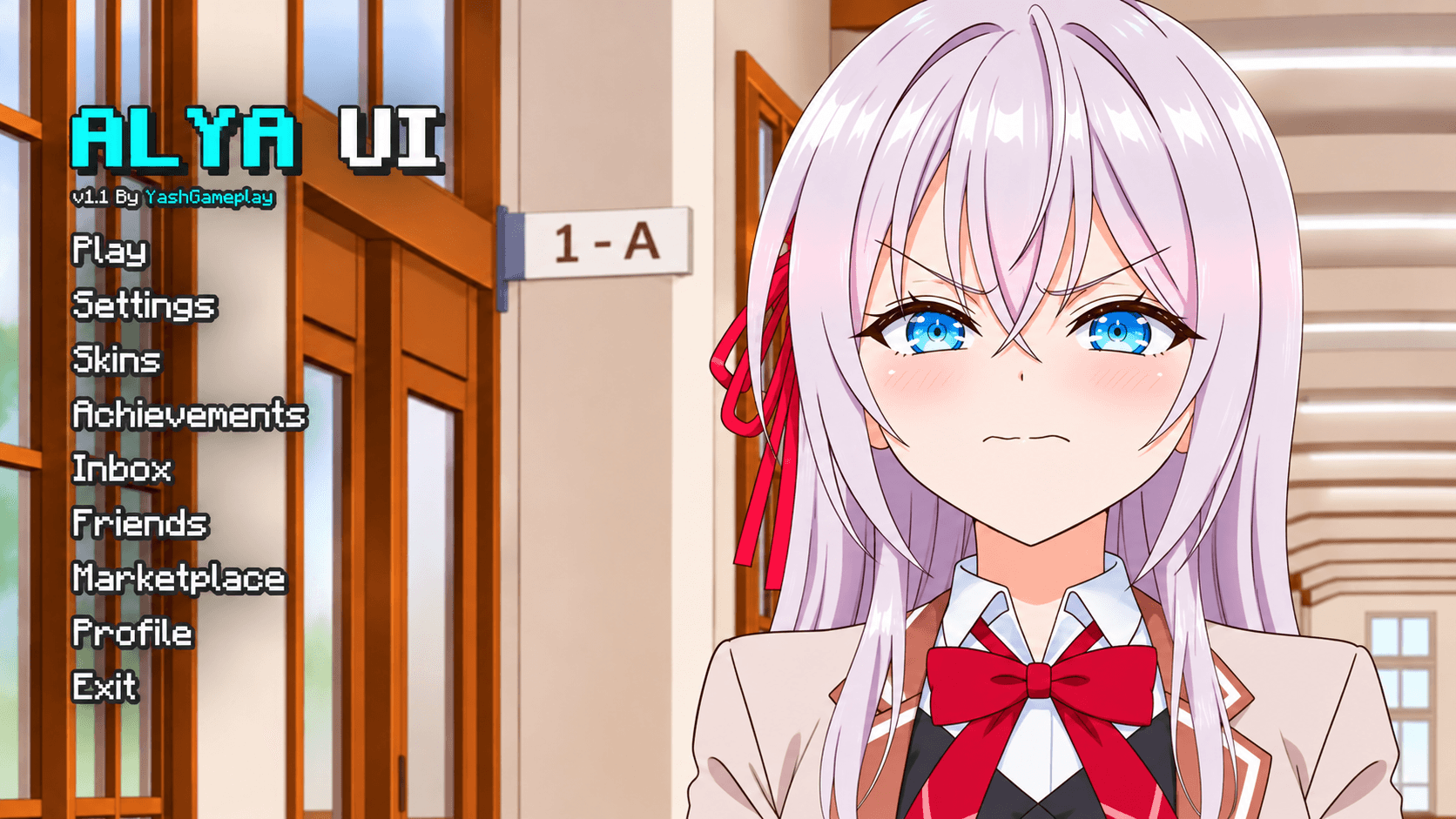
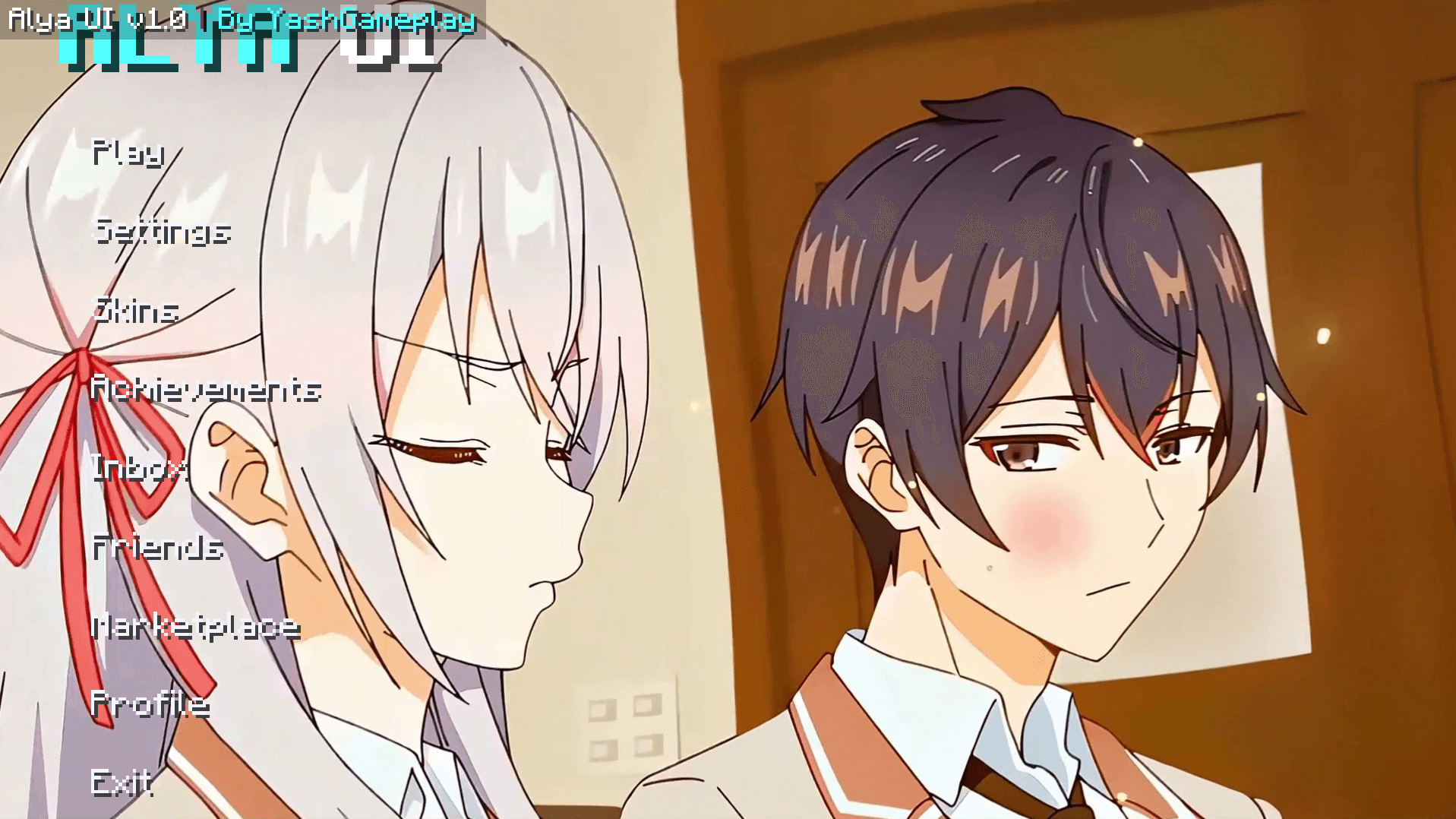
Transform your Minecraft Bedrock main menu with an ultra-smooth 120-frame animated Alya (Roshidere) Start Screen UI! Includes 1080p Ultra & Zero-Lag Static subpacks with custom fonts.
Alya_UI.png

Alya_UI.png

Screenshot 2026-11-17 191609.png

Screenshot 2026-11-17 191609.png

Description

❄️ Alya Animated UI — Minecraft Bedrock Edition

Step into the world of Alya Sometimes Hides Her Feelings in Russian (Roshidere) directly from your Minecraft Bedrock main menu!

Alya UI completely transforms your boring vanilla start screen into a breathtaking, modern, anime-inspired dashboard featuring high-definition visuals, smooth animations, and a sleek custom typography overhaul.


✨ Features at a Glance

  • 🎬 120-Frame Seamless Animation: Handcrafted 20 FPS video loop with smooth crossfade transitions—zero harsh cuts or stuttering.
  • ⚙️ Dual Subpack Engine (Gear Icon):
    • 🌟 1080p Ultra Mode: Maximum visual fidelity for Windows 10/11 & high-end mobile devices.
    • ⚡ Static Mode: Clean, freeze-free static wallpaper with zero battery drain & 0% FPS drop for budget/low-end phones.
  • 🔤 Clean Custom Typography: Overhauled UI font using modern Nunito-Bold for clean, crystal-clear readability.
  • 🖱️ Full Controller, Touch & Mouse Support: Fully native button bindings (Play, Settings, Dressing Room, Achievements, Marketplace) with instant response.
  • 📱 Cross-Platform Compatibility: Runs flawlessly on MCPE (Android / iOS) and Minecraft Bedrock Windows 10/11.

🎛️ How to Switch Subpacks (Ultra vs Static)

To toggle between 1080p Ultra Animation and Zero-Lag Static Mode:

  1. Go to Settings > Global Resources (or Resource Packs in your world).
  2. Click on Alya UI.
  3. Tap the Gear (⚙️) icon below the pack.
  4. Drag the slider:
    • Right: 1080p Ultra Quality (Animated)
    • Left: Static Wallpaper (Performance/Low-End)
  5. Restart Minecraft to apply changes smoothly!

📥 Installation Instructions

  1. Download the .mcpack file below.
  2. Tap/Double-click the downloaded file — Minecraft Bedrock will open and import it automatically.
  3. In Minecraft, navigate to Settings > Global Resources > My Packs.
  4. Activate Alya UI and move it to the top of your active packs list.
  5. Enjoy your stunning new main menu!

⚠️ Important Notes

  • Bedrock Version Support: Works on Minecraft Bedrock 1.20, 1.21+, and all upcoming versions.
  • If you encounter any UI overlapping with other mods, ensure Alya UI is placed at the very top of your Active Resource Packs hierarchy.

❤️ Created with passion by YashGameplay

Support my work, leave a rating, and follow my CurseForge profile for more custom Bedrock UI packs, skies, and addons!

Alya Ui | Anime Girl Animated Menu Team

profile avatar
  • 22
    Followers
  • 12
    Projects
  • 220.1K
    Downloads
Donate

More from YashGameplayView all

  • Furina Sky | Genshin Impact project image

    Furina Sky | Genshin Impact

    Transform Minecraft Bedrock & MCPE with Furina Sky, a Genshin Impact-inspired anime sky texture pack featuring beautiful blue skies, detailed Furina artwork, soft cloud scenery, and a vibrant Hydro-themed atmosphere for Minecraft 1.26+.

    • 486
    • November 16, 2026
  • Night Vision | FullBright project image

    Night Vision | FullBright

    Experience Night Vision in Minecraft Bedrock & MCPE with this FullBright-like addon! Enjoy clearer caves, brighter nighttime exploration, and improved mining visibility. Includes Resource Pack (RP) and Behavior Pack (BP); both are required.

    • 813
    • November 12, 2026
  • MAX FPS Boost project image

    MAX FPS Boost

    Boost Minecraft Bedrock performance with a lightweight 77 KB FPS optimization pack featuring 78 biome fog profiles, 8 particle toggles, Balanced and Ultra modes, reduced visual effects, and aggressive low-end device optimization.

    • 37.2K
    • November 4, 2026
  • Xray Vision | Full Bright project image

    Xray Vision | Full Bright

    X-Ray Vision is a standalone Minecraft Bedrock mining pack with 3 modes for Overworld and Nether mining. Reveal hidden ores, choose whether dirt and grass stay visible, and customize visibility for faster cave exploration and resource hunting.

    • 24.6K
    • November 4, 2026
  • Furina Sky | Genshin Impact project image

    Furina Sky | Genshin Impact

    Transform Minecraft Bedrock & MCPE with Furina Sky, a Genshin Impact-inspired anime sky texture pack featuring beautiful blue skies, detailed Furina artwork, soft cloud scenery, and a vibrant Hydro-themed atmosphere for Minecraft 1.26+.

    • 486
    • November 16, 2026
  • Night Vision | FullBright project image

    Night Vision | FullBright

    Experience Night Vision in Minecraft Bedrock & MCPE with this FullBright-like addon! Enjoy clearer caves, brighter nighttime exploration, and improved mining visibility. Includes Resource Pack (RP) and Behavior Pack (BP); both are required.

    • 813
    • November 12, 2026
  • MAX FPS Boost project image

    MAX FPS Boost

    Boost Minecraft Bedrock performance with a lightweight 77 KB FPS optimization pack featuring 78 biome fog profiles, 8 particle toggles, Balanced and Ultra modes, reduced visual effects, and aggressive low-end device optimization.

    • 37.2K
    • November 4, 2026
  • Xray Vision | Full Bright project image

    Xray Vision | Full Bright

    X-Ray Vision is a standalone Minecraft Bedrock mining pack with 3 modes for Overworld and Nether mining. Reveal hidden ores, choose whether dirt and grass stay visible, and customize visibility for faster cave exploration and resource hunting.

    • 24.6K
    • November 4, 2026