Classic '25 (Muss Dev)
- By
The first Skin Pack created by Muss Dev. This pack includes variations of "dreamch" and "Nick'o TV" skins.
This Skin Pack gives you access to original skins by “Muss Dev” created in collaboration with “dreamchツ” and “Nick’o TV”.
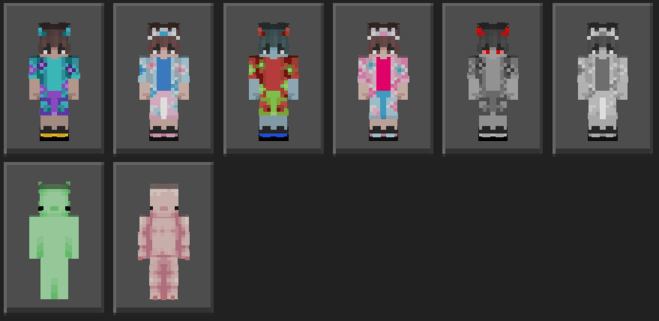
Description of all Skins:
- dreamchツ (wavy) - Eternal summer, crashing waves and exotic flavours... Dive into the never-ending beach season together with dreamch! [skin creator - dreamchツ, idea - dreamchツ, prod. by Muss]
- Nick'o TV (Wicked 2) - Want to be part of a musical? Catch the Sequel! This Nick'o not only knows how to use magic and sing beautifully, but he’s also a fashion guru! [skin creator - dreamchツ, idea - Nick'o TV (inspired by blue Galinda from the “Wicked 2” movie), prod. by dreamchツ]
- dreamchツ ghost - Actually, it's not a dead dreamch. This costume was made to prank Nick'o. If the prank succeeds, we'll soon see Nick'o ghost (a real GHOST this time)... [skin creator - dreamchツ, idea - Nick'o TV, prod. by Muss]
- Nick'o TV (Wicked) - Do you want to be part of a musical? Excellent! This Nick'o can sing and cast spells well. [skin creator - dreamchツ, idea - Nick'o TV (inspired by the pink Galinda from the “Wicked” movie), prod. by dreamchツ]
- dreamchツ noir - Sometimes your eyes get really tired from all the colours, and you just want to spend a little time in a Black & White scene... [skin creator - dreamch, idea - dreamch, prod. by Muss]
- Nick'o TV (Old TV Show Wicked) - Old musical, Black'n'White vibe, but with more vibrant feelings... [skin creator - dreamchツ, idea - Nick'o TV (inspired by Galinda from the “Wicked” movies), prod. by dreamchツ]
- axo (Wild Bratty Axolotl) - This skin was inspired by a remodel of the Wild Axolotl by “dreamchツ". This remodel can be found in the “Project: Supernova Reveries” Resource Pack for Minecraft Java Edition by “dreamchツ” (Produced and Published by Muss Dev). [skin creator - dreamchツ, idea - dreamchツ, prod. by Muss]
- Axolotl - Everyone loves axolotls. They're so cute!!! Why not become one of them? [skin creator - Nick'o TV, idea - Nick'o TV, prod. by dreamchツ]
How to install? - Download the file, then click on it (if you are asked which app to use to open it, select Minecraft). If you’ve done everything correctly, Minecraft will open and the skins will start installing (you can find these skins in the editor).
Classic '25 (Muss Dev) Team