Server Admin Hub: Menus, Economy & Tools
Run your whole Bedrock server from one clean purple menu.
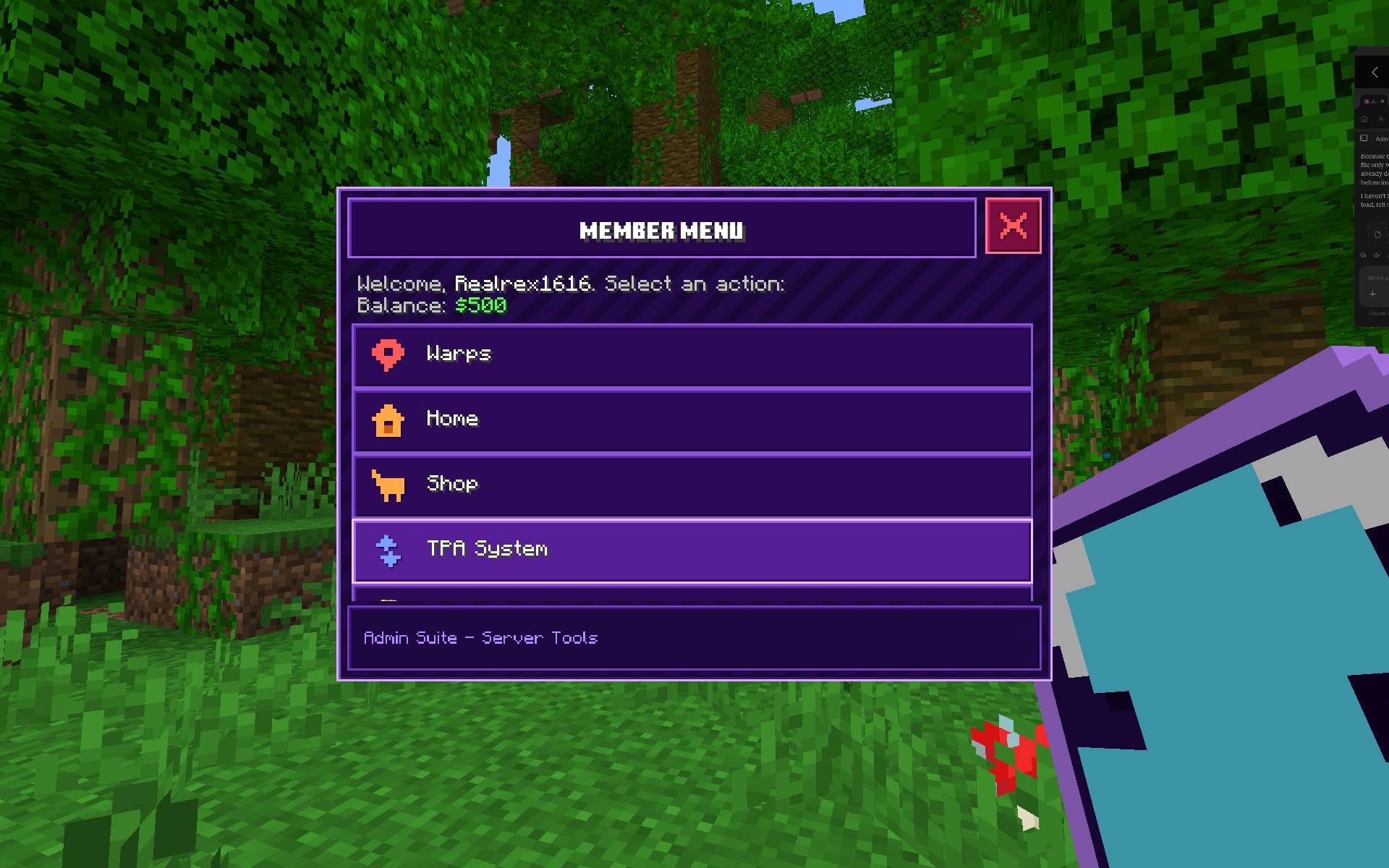
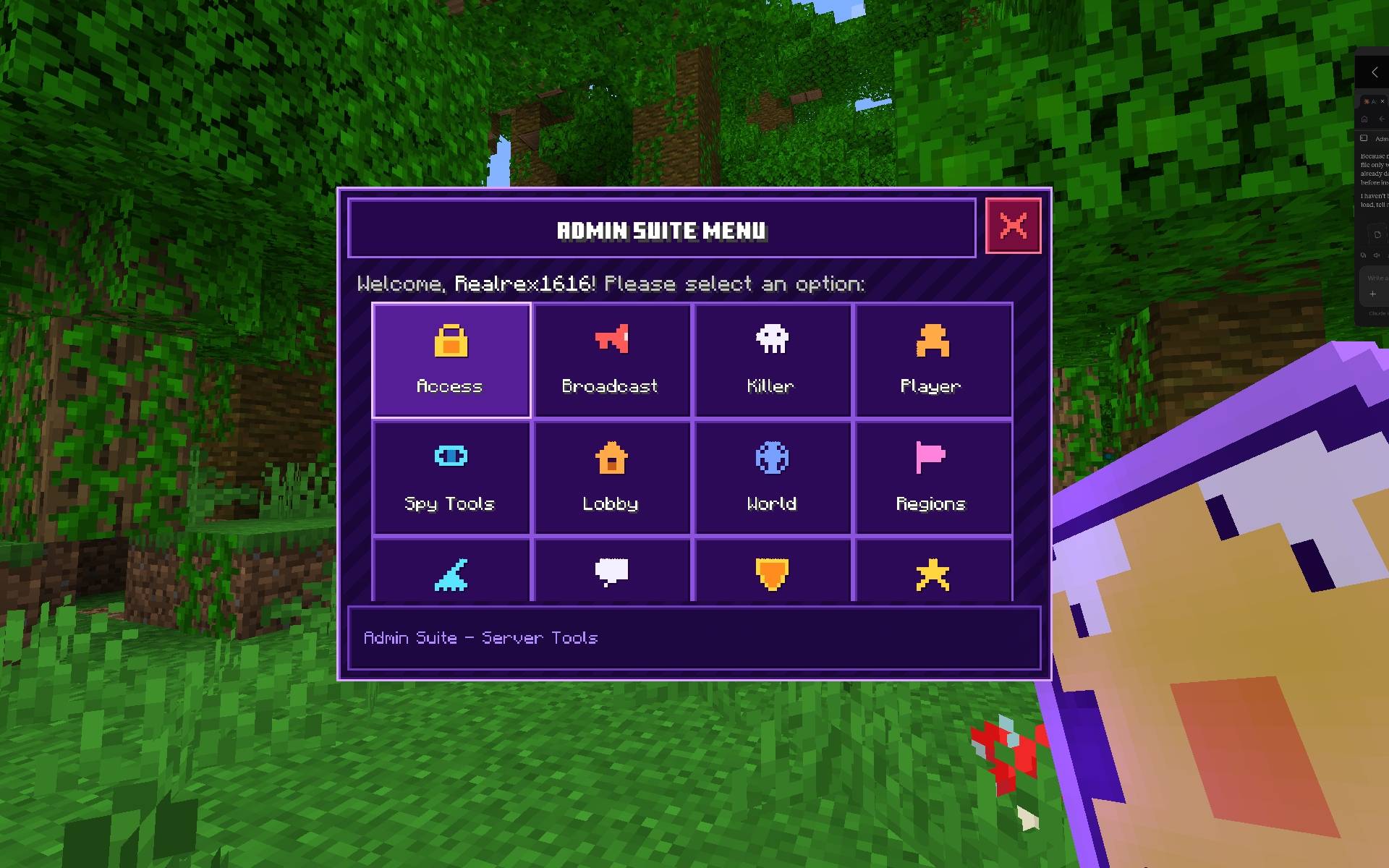
🛠️ An all-in-one server toolkit for Minecraft Bedrock. Manage players, set up a lobby and warps, run a shop and economy, let players claim land and make clans, and place NPCs that open menus when you tap them. Staff get a powerful Admin Menu with roles and permissions. Players get a friendly Member Menu. Everything is built on a custom purple GUI with icons, a sidebar HUD and nameplates. 🛠️
No commands needed to play. You get a Member Menu item when you join. Tap it, pick what you want and go. 🧭
👉 Join the Discord community for updates, bug reports and sneak peeks!
Features
- Custom purple GUI with an icon grid, list menus and a bottom button bar. Needs the included Resource Pack
- Admin Menu with 19 tools, shown only to staff who have the permission for each one
- Roles and permissions: create your own roles and toggle 21 permissions for each
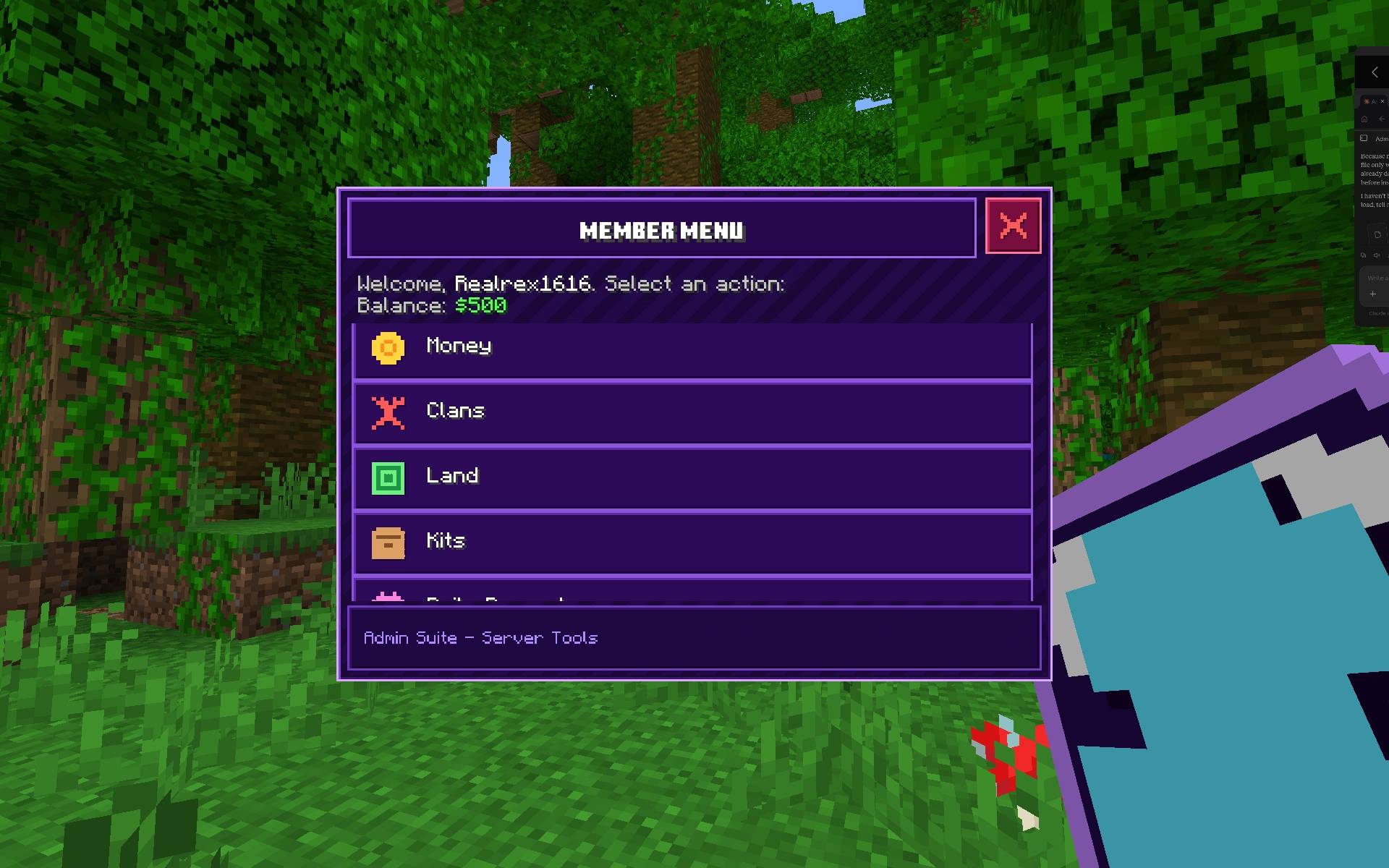
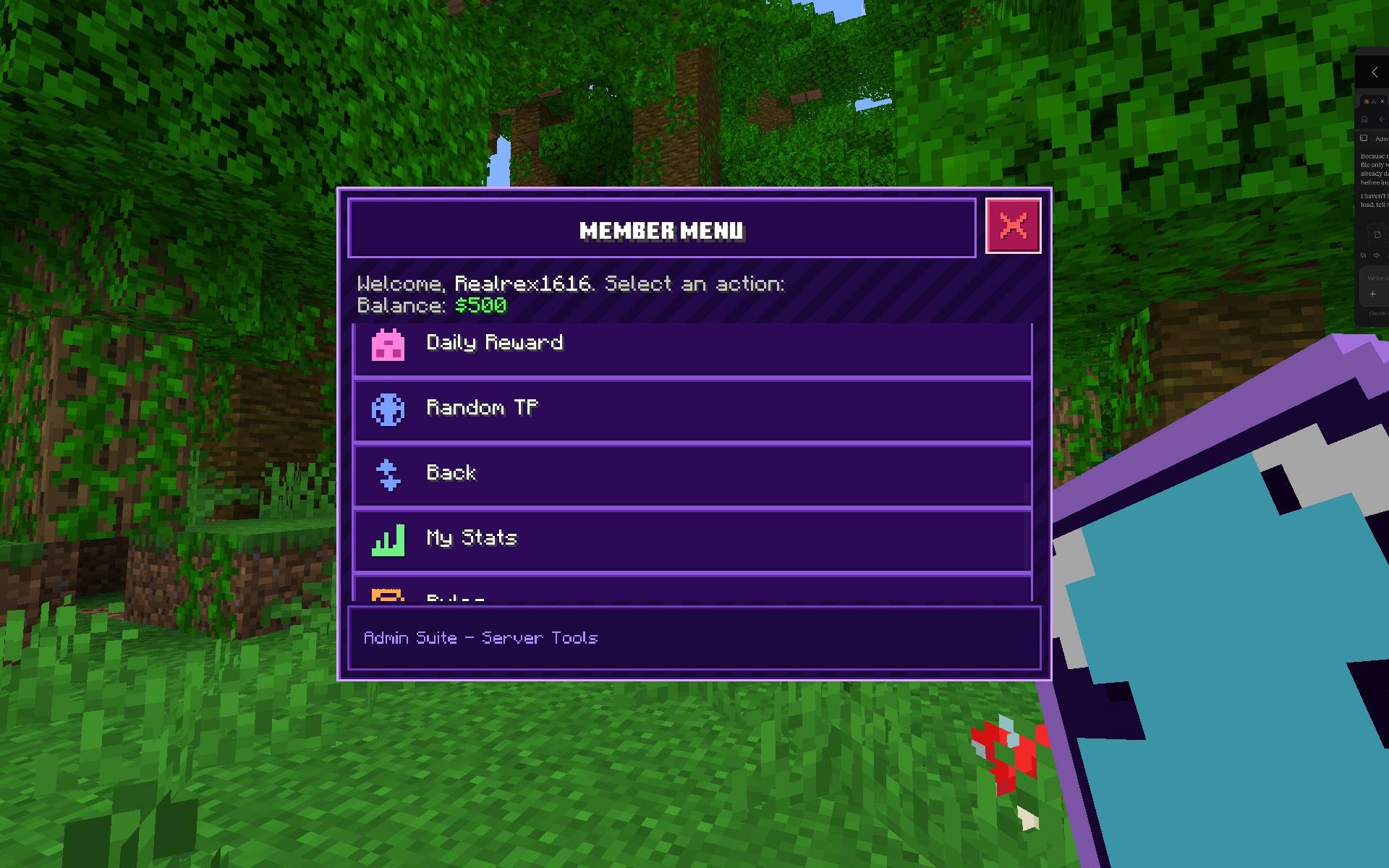
- Member Menu: warps, homes, shop, TPA, money, clans, land, kits, daily reward, random teleport and more
- Economy: wallet, bank with daily interest, player payments, leaderboards and a scoreboard objective called
money
- Shop: 8 ready-made categories, buy and sell, item search, rank shop, top merchants and an in-game shop editor
- Clans: tags, invites, clan bank, clan home and friendly fire toggle
- Land claims: claim 16x16 chunks, trust friends and protect your builds
- Regions with flags for breaking, placing, interacting, PvP and explosions
- Lobby protection with no PvP, no damage, no hunger, no building and optional no mobs
- NPC system: 12 NPC types such as Marketplace, Warps, Starter Kit, Daily Reward and Report Player
- Floating text holograms you create and edit in the menu
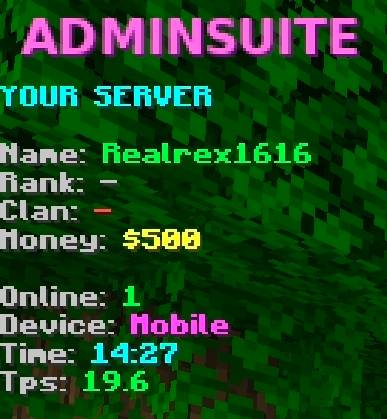
- Sidebar HUD with your name, rank, clan, money, online players, device, time and TPS
- Nameplates with rank, clan tag and health, plus mob health when you hit them
- Safe teleports: delay, cooldown, cancel on move and a combat tag
- Chat ranks, mute and chat commands (
!menu, !admin)
- Staff tools: kick, ban (timed or permanent), mute, freeze, vanish, inventory view, silent teleport and a player locator
- Clear Lag and an auto announcer you can run on a timer
- Reports: players report others, staff review and resolve them
- Everything saves with the world and every value can be changed in the Settings menu
🚀 Getting started
- Download the
.mcaddon file and open it with Minecraft Bedrock.
- Edit your world and activate both packs: the Behavior Pack and the Resource Pack.
- Turn on Beta APIs and cheats in the world settings.
- Join the world. If you are an operator you are an Owner automatically. For anyone else run
/tag PlayerName add as_owner.
- Get your items:
/give @s asuite:admin and /give @s asuite:member.
- Open the Admin Menu, go to Lobby and tap Set Lobby Here.
- Add some warps in Warp Editor, make a kit named
starter in Kit Editor and place NPCs in NPCs.
🧭 Opening the menus
- Member Menu item: given to every player when they join. Use it (right-click or tap)
- Admin Suite item: use it to open the Admin Menu (staff only)
- Staff can also sneak and use the Member Menu item to open the Admin Menu
/scriptevent as:menu opens the Member Menu/scriptevent as:admin opens the Admin Menu/scriptevent as:shop opens the Shop- Type
!menu or !admin in chat
🛡️ Admin Menu
| Button |
What it does |
| Access |
Kick players, ban players (timed or permanent) and manage the ban list |
| Broadcast |
Send a message as chat, title, action bar or both, with colors and sound |
| Killer |
Remove hostile mobs, passive mobs, items, XP orbs, arrows or a custom entity type |
| Player |
Teleport, bring, heal, game mode, inventory, give items, money, roles, ranks, mute, freeze, kick and ban |
| Spy Tools |
Vanish, player locator, silent teleport and inventory viewer |
| Lobby |
Set the lobby spawn and choose what is protected around it |
| World |
Time, weather, difficulty, 10 game rules and world spawn |
| Regions |
Create protected areas with the Region Wand and edit their flags |
| Clear Lag |
Clear items and XP orbs now or on a timer |
| Floating Text |
Add, edit, move and delete holograms |
| Rank |
Create colored ranks and give them to players |
| Permissions |
Create roles, edit permissions and assign roles |
| Economy |
Give, take or set money, see top balances and run giveaways |
| Shop Editor |
Add items, change prices and manage categories |
| Warp Editor |
Create warps with a cost and an icon |
| Kit Editor |
Make kits from your inventory with cooldowns, prices and one-time kits |
| NPCs |
Place, rename, move and remove NPCs |
| Reports |
Read and resolve player reports |
| Settings |
General, economy, teleport, land, rules text and announcer settings |
🧑 Member Menu
| Button |
What it does |
| Warps |
Teleport to server warps |
| Home |
Set, move, delete and teleport to your homes |
| Shop |
Buy and sell items, search, buy ranks and see top merchants |
| TPA System |
Send and answer teleport requests |
| Money |
Pay players, use the bank and see leaderboards |
| Clans |
Create or join a clan and manage it |
| Land |
Claim, unclaim and trust players on your chunks |
| Kits |
Claim kits |
| Daily Reward |
Claim a reward that grows with your daily streak |
| Random TP |
Teleport to a random safe spot in the overworld |
| Back |
Return to your last location or your death point |
| My Stats |
Money, kills, deaths, K/D, playtime and streak |
| Rules |
Read the server rules |
| Reports |
Report a player to the staff |
🔑 Roles and permissions
Four roles are ready to use: Owner, Admin, Moderator and Member. Operators are always Owners. Make your own in Admin Menu → Permissions → Create Role and switch on only what that role needs. Each role can also give bonus homes.
To let someone ignore the protection systems, give their role the Bypass Protection permission.
🧍 NPCs
Go to Admin Menu → NPCs → Place NPC, pick a type and a label. Players tap the NPC to use it.
- Marketplace, Warps, Server Rules, Starter Kit, Daily Reward, Report Player, Bank, Clans, Member Menu, Random TP, Land Office and Kits
- The Starter Kit NPC gives the kit named
starter. If a kit with that name exists, new players get it automatically on their first join
- To edit or remove an NPC, sneak and tap it while holding the NPC Placer (
/give @s asuite:npc_wand)
🗺️ Regions
Get the Region Wand from Admin Menu → Regions (or /give @s asuite:claim_wand). Left-click a block for corner 1 and use the wand while aiming at a block for corner 2. Then tap Create Region and choose what is allowed inside.
Tips
- Set the lobby first. New players are sent there on their first join.
- Make a kit called
starter so every new player gets something to begin with.
- Use Clear Lag on a timer (for example every 10 minutes) on busy servers.
- Give moderators a custom role with only Access, Player, Spy Tools and Reports turned on.
- Check the Settings menu. Prices, cooldowns, delays and limits can all be changed there.
FAQ
Do I need the Resource Pack?
Yes. The Resource Pack is what makes the purple menus, icons and sidebar. Activate both packs.
Do I need Beta APIs?
Yes. Mute, chat ranks and the chat commands use chat features that need the Beta APIs toggle.
Does it work on mobile and console?
It works anywhere Bedrock supports add-ons with scripting.
Does it work in multiplayer?
Yes. It is made for servers and Realms. Every player has their own money, homes, kits, clan and settings.
I cannot open the Admin Menu.
Operators have access automatically. For others, give them a role with the Admin Menu Access permission, or run /tag PlayerName add as_owner.
Why can I not kick myself?
Minecraft does not allow the world host to be kicked by command. Test kicking with a second player.
How do I stop a player from breaking things somewhere?
Make a Region over the area, or use the lobby protection. Players can also claim their own land with Land.
Can I change the shop prices and items?
Yes. Use Admin Menu → Shop Editor. Changes save right away.
Does it work with other add-ons?
Yes. The only custom entities are the NPC and the floating text. It also writes balances to a scoreboard objective called money.
Community 💬
Got a bug to report, an idea for a new tool or a screenshot of your server setup? Come hang out!
👉 Join the Discord server
Leaving a comment or a rating on this page also helps a lot. Thank you for the support! ❤️
Notes
- Requires Minecraft Bedrock 1.21.100 or newer with Beta APIs turned on.
- Player-versus-player protection restores health right after a hit, so players may still see a short hit effect.
- Back up your world before adding or removing the add-on on an important server.
- The sidebar uses the title text on the screen, so another add-on that also shows titles may overlap with it. Players can turn the sidebar off in their settings.
Open the menu. Run your server. Keep it fun. 🛠️🧭