
This is a Minecraft Bedrock addon for quickly mining ore veins and cutting the entire trees down. With this addon enabled, when a player mines a block, all the surrounding blocks with the same type break, which in turn causes other blocks surrounding them with the same type to break in a chain reaction.
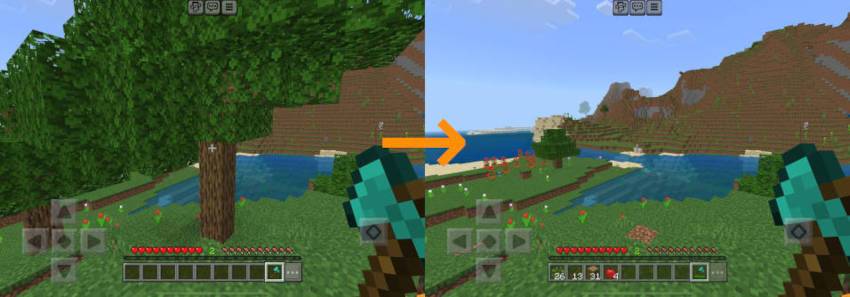
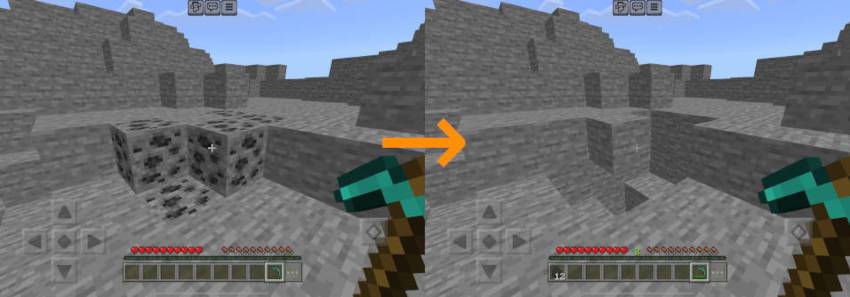
There are already plenty of similar addons out there, and this is yet another one joining the party. Why do we need more? What makes it different from others?
- It respects tool enchantments. Mining ores with Fortune pickaxes yields more. Unbreaking tools last longer. XP-producing blocks like Coal ores repair your Mending tools. Silk Touch may produce different kind of items depending on the block type.
- It consumes durability of your tools correctly. Most vein-mining addons let you mine the entire vein with consuming durability worth only one use of your tool. This addon consumes durability worth one use per block you mine, making it less overpowered.
- It decays leaves fast. Cutting logs with an axe also breaks leaves immediately, with no additional consumption of tool durability.
- It collects items and XP orbs for you. Items produced by mining blocks are directly placed in your inventory. The same goes for XP orbs, unless you have damaged Mending tools and armors.
- It is customizable. It comes with a configuration UI to let you customize the behavior of the addon, such as when to enable quick-mining, what kind of blocks should be quick-mined, and more.
- It can coexist with other addons. Modifying
player.jsonis one of the greatest ways to make an addon incompatible with others. This addon doesn't do things like that. Custom tools added by other addons should also work as long as they have vanilla-compatible item tags.
Installation
- Enable the behavior pack on your world. This automatically enables its resource pack counterpart. Enabling it globally is not recommended.
- And it's done. You don't need to turn any experimental options on.
Usage
Quick-mining happens when you mine blocks with a suitable tool while sneaking, such as cutting logs with an axe and mining ores with a pickaxe. You must use a correct tool for your task, that is, cutting trees with bare hand will not trigger quick-mining.
Special cases
- Trees:
- Cutting Logs or Wood also breaks non-player-placed leaves surrounding them. This is a fast simulation of decaying so your axe don't lose durability for this, and its enchantments don't apply. If you want to gather leaf blocks, break them with shears or a Silk Touch hoe.
- There are 4 separate options for enabling quick-mining Logs, Stripped Logs, Wood, and Stripped Wood. These options work in a combining manner. For example, suppose you have enabled options for Logs and Stripped Logs, mining Logs also mines nearby Stripped Logs and vice versa, as long as they share the same wood type (such as Oak).
- Mangrove trees: Cutting mangrove logs or roots cuts the entire tree down, including moss carpets touching them and propagules hanging from leaves.
- Azalea leaves: Breaking azalea leaves (flowering or not) also breaks the other variant.
- Huge Mushrooms: Mining mushroom blocks (red or brown) also mines mushroom stems and vice versa.
- Huge Nether Fungi: Mining nether wart blocks (warped or not) also mines surrounding shroomlights and vice versa.
Customization
Type /qmine-prefs on the chat screen. A customization UI will show up. These are per-player settings and do not affect any other players.
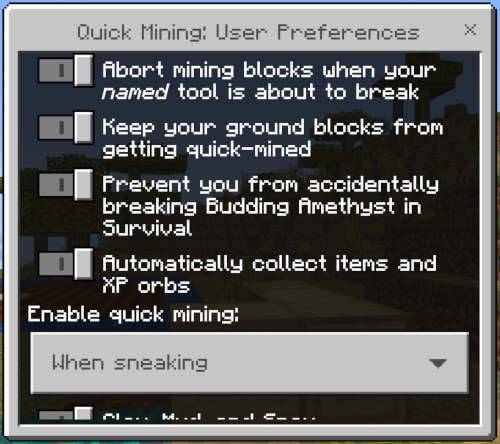
Protection settings:
- Abort mining blocks when your named tool is about to break: With this option enabled, quick-mining will abort or will not trigger when the durability of your tool is depleting. This only applies to named tools.
- Keep your ground blocks from getting quick-mined: This option protects blocks underneath the player from being quick-mined. Note it's not perfect. The addon does not take account of the type of block you are standing on, so you can still accidentally fall down if you are on a gravity-affected block such as sand, or one that requires supporting blocks like redstone repeater.
- Prevent you from accidentally breaking Budding Amethyst in Survival: Budding Amethyst is not eligible for quick-mining in the first place, but this option also prevents you from accidentally mining them with or without any tools. This doesn't mean a perfect protection. You can still break them with TNT, and Creepers don't care the option at all. This option is disabled by default.
Loots settings:
- Automatically collect items and XP orbs: Items produced by mining blocks are directly placed in your inventory as long as they fit. Overflowed items will be spawned as item entities at the same location as the player. Experience orbs go directly into any Mending equipment until they are fully repaired, and excess XP will go into the player.
Quick-mining mode:
- When sneaking: Enable quick-mining only when the player is sneaking.
- When not sneaking: Enable quick-mining only when the player is not sneaking.
- Always: Always trigger quick-mining.
- Never: Never trigger quick-mining.
Block coverage:
- Bones: Enable quick-mining for Bone blocks. They require pickaxes to quick-mine. This option is disabled by default.
- Bookshelves: Enable quick-mining for Bookshelves. This currently does not allow Chiseled Bookshelf to be quick-mined due to a technical issue.
- Clay, Mud, and Snow: Enable quick-mining for Clay, Mud, Snow Block, and Snow. These require shovels to quick-mine.
- Corals: Enable quick-mining for Coral, Dead Coral, Coral Fans, Dead Coral Fans, Coral Blocks, and Dead Coral Blocks. These require pickaxes with Silk Touch, except for Coral Blocks that can also be quick-mined with a non-silk-touch pickaxe (although doing so kills the corals). Mining non-block corals or fans do not consume tool durability. Mining Coral Blocks also mines non-block Corals, Coral Fans, and Sea Pickles attached to them with no tool durability nor hunger bar consumption, but non-block Corals and Fans are destroyed in this case because that's what happens in vanilla Minecraft.
- Amethyst Buds and Clusters: Enable quick-mining for Amethyst Buds of any size, as well as Amethyst Clusters. These require pickaxes with Silk Touch.
- Dirt, Grass Block, and their variants: Enable quick-mining for Dirt, Coarse Dirt, Dirt Path, Farmland, Grass Block, Mycelium, Podzol, and Rooted Dirt. Moisture level of Farmland is ignored. This option is disabled by default.
- Glowstone and Sea Lantern: Enable quick-mining for Glowstone and Sea Lantern. These require pickaxes.
- Ice, Packed Ice, and Blue Ice: Enable quick-mining for Ice, Packed Ice, and Blue Ice. Ice requires pickaxes to quick-mine, and the latter two additionally requires Silk Touch. Breaking ice with a non-silk-touch tool will turn it into Water if certain conditions are met.
- Leaves: Enable quick-mining for Leaves. They require either Shears or hoes.
- Logs and Nether Fungus Stems: Enable quick-mining for non-stripped Logs, including the Nether fungus variants and Mangrove Roots. These require axes to quick-mine. Creaking Heart does not count as a wood-like block, and is not eligible for quick-mining.
- Mineral Blocks: Enable quick-mining for Mineral Blocks, except for Block of Amethyst and Block of Raw Metals. It ignores variance in oxidization levels and waxing of Block of Copper. These require pickaxes of varying tiers. This option is disabled by default.
- Moss Blocks and Carpets: Enable quick-mining for Moss Block, Moss Carpet, Pale Moss Block, and Pale Moss Carpet. These require hoes. This option is disabled by default.
- Mushroom Blocks and Stems: Enable quick-mining for Huge Mushrooms. They require axes to quick-mine.
- Netherrack, Crimson and Warped Nylium: Enable quick-mining for Netherrack and Nylium. This option is disabled by default.
- Obsidian and Crying Obsidian: Enable quick-mining for Obsidian and Crying Obsidian. These require pickaxes of at least diamond-tier.
- Ores: Enable quick-mining for Ore blocks as well as Ancient Debris, Block of Raw Iron, and any other blocks of raw metal. They require pickaxes of varying tiers. Note that Gilded Blackstone does not count as ore and is not eligible for quick-mining.
- Plants and Crops: Enable quick-mining for several plants and crops. Mining crops with a hoe does not consume its durability.
- Cocoa pods, Melon, and Pumpkin require axes to quick-mine.
- Nether Wart requires hoes to quick-mine, not sure if it's a plant though.
- Grass and Fern require either hoes or shears.
- Beetroot, Carrot, Potato, and Wheat require hoes.
- Glow Lichen and Vines require shears. Note that Sculk Vein does not count as a plant, while Glow Lichen counts although lichens are technically not plants.
- Sea Pickle requires shears to quick-mine, and does not consume tool durability. It counts as a plant although it's in fact not.
- Bush, Firefly Bush, Short Dry Grass, Tall Dry Grass, and Leaf Litter require shears, and they don't consume durability.
- Hay bales require hoes, and they do consume durability.
- Abundant rocks such as Stone and Cobblestone: Enable quick-mining for Stone, Cobblestone, Mossy Cobblestone, Deepslate, Cobbled Deepslate, and End Stone. This option is disabled by default.
- Non-stone Common Rocks such as Andesite, Basalt, and Tuff: Enable quick-mining for Andesite, Basalt, Diorite, Granite, and Tuff. These require pickaxes to quick-mine. This option is disabled by default.
- Uncommon Rocks such as Blackstone, Calcite, and Magma Block: Enable quick-mining for Blackstone, Block of Amethyst, Calcite, Dripstone Block, and Magma Block. These require pickaxes to quick-mine. This option is disabled by default.
- Gravel, Sand, and Red Sand: Enable quick-mining for Gravel, Sand, and Red Sand. These require shovels to quick-mine. This option is disabled by default.
- Sculk Block, Catalyst, Sensor, Shrieker, and Vein: Enable quick-mining for Sculk, Sculk Catalyst, Sculk Sensor, Sculk Shrieker, and Sculk Vein. These require hoes to quick-mine.
- Soul Sand and Soul Soil: Enable quick-mining for Soul Sand and Soul Soil. These require shovels to quick-mine.
- Stripped Logs and Stripped Nether Fungus Stems: Enable quick-mining for Stripped Logs including the Nether fungus variants. These require axes to quick-mine. This option is disabled by default.
- Stripped Wood and Stripped Hyphae: Enable quick-mining for Stripped Wood including the Nether fungus variants. These require axes to quick-mine. This option is disabled by default.
- Terracotta: Enable quick-mining for Terracotta, colored or not, but not including glazed one. These require pickaxes to quick-mine. This option is disabled by default.
- Crimson and Warped Wart Blocks, and Shroomlight: Enable quick-mining for Nether Wart Block, Warped Wart Block, and Shroomlight. These require hoes to quick-mine.
- Wood and Hyphae: Enable quick-mining for Wood including the Nether fungus variants. These require axes to quick-mine. This option is disabled by default.
For server admins
Players with operator privileges can also change worldwide settings by typing /qmine-admin on the chat screen.
- Consume hunger bar proportionally to the number of blocks mined: Turning this option on makes quick-mining consume the hunger bar the same way as mining blocks in the regular way. And when the hunger bar of the player drops below 3 points (1.5 ham shanks), they lose their ability to perform quick-mining. Turning it off may slightly improve performance of the addon but makes it OP so it's not recommended.
- Time budget for quick-mining in milliseconds per tick: Setting this to higher values may speed up the process of quick-mining, but can cause severe server lags. MCBE addons are single-threaded, that is, addon scripts run on the same thread that ticks the server. This means addons cannot spend too much time in each game tick, so this addon measures the time it's taking and reschedules its remaining work for the next tick if it's going to take longer than this value. It is not recommended to change this value unless you know what you are doing.
- Maximum horizontal distance for blocks to quick-mine, Maximum vertical distance for blocks to quick-mine: The range of blocks to be quick-mined is limited by these values. Setting them to higher values would allow players to cause a massive destruction.
Known issues
- This addon shows a welcome message when you join a world where the addon is installed. But the message is sometimes not shown as of Minecraft Bedrock 1.21.60. This is because the game spawns players long before it starts rendering the world for them, and addons can't know the real readiness. If this happens to you, you can still see the message by opening the chat screen.
- Tall variants of Grass and Fern cannot be quick-mined due to the way how they are implemented in the game. That is, replacing their upper half with
minecraft:aircauses their lower half to break, and we cannot collect loots from their lower halves. The same goes for tall flowers. - Snowlogged plants cannot be quick-mined, neither with hoes nor shovels. This is because snowlogged blocks seem to be internally represented in a very ad-hoc way, that is, they are represented as snow layers with a block state indicating that they are covering something, but the thing they cover is not accessible from the scripting API. Addons can therefore not uncover them nor harvest covered plants.
- Chiseled Bookshelf cannot be quick-mined. It is supposed to be a container but it doesn't have a block component
minecraft:inventoryand thus we cannot retrieve books inside it using the scripting API. - Using the /reload command makes the addon temporarily non-working until the server is restarted. This is because addons aren't notified when they are about to be reloaded so they cannot save their internal state to survive reloading.
/reload allworks fine though. - Custom ores or wood added by add-ons aren't quick-mined. This is because:
- There are no standard block tags for ore blocks representing the required tool tier,
- Loot tables are not accessible from the scripting API, and
- The API doesn't provide any means to simulate what would be dropped when a block is mined.
In short, these are issues that we can do absolutely nothing about. Ask Mojang to improve the API if you want these to be fixed.
Terms of use
This addon is licensed under CC0 "No Rights Reserved". This means anyone can use, reuse, or redistribute it, with or without modifications, all without asking permission.
Links
- Homepage: https://github.com/depressed-pho/quick-mining
- Past releases: https://github.com/depressed-pho/quick-mining/releases
- Issue tracker: https://github.com/depressed-pho/quick-mining/issues
Quick Mining Addon Team
