Kaidaz18's World Logger
- By
RECOMENDED FOR SERVER OWNERS! This addon Logs player actions, items, and anything the player interacts with for server owners to see! This is kind of the same addon as the Ledger mod for Java but this one is for Bedrock Edition!
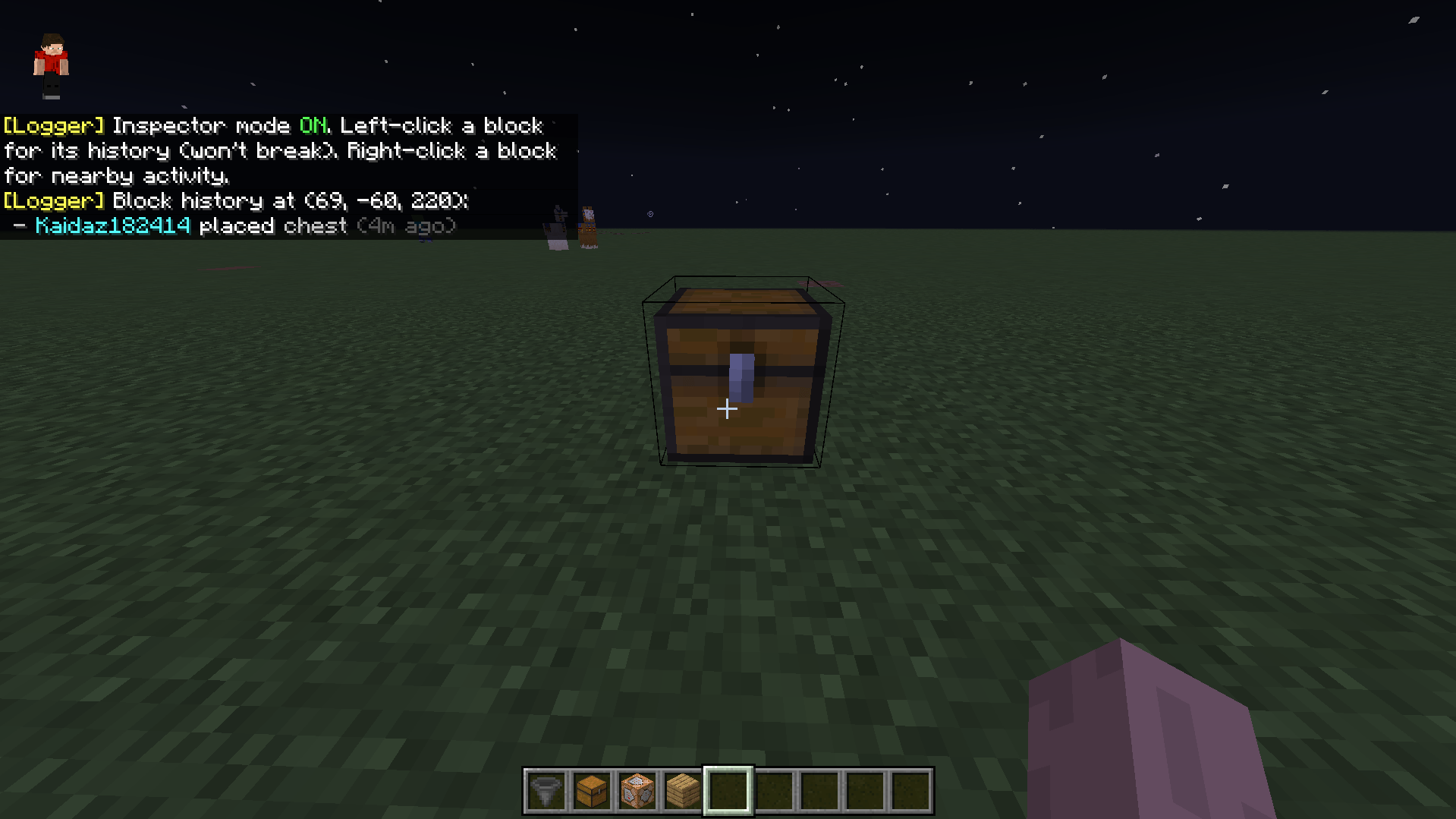
Inspect Blocks which have been interacted with
Description
Kaidaz18's World Logger
Find out who griefed, stole or cheated, and undo it.
World Logger records what happens in your Bedrock world: blocks broken and placed, chests opened, items taken, TNT lit, mobs killed, chat and more. Look up any block's history, search everything a player did, and roll back griefing in seconds. It's similar to CoreProtect on Java, built for Bedrock.
REQUIREMENTS
Minecraft Bedrock 26.50
Experimental Features: Beta APIs must be turned ON for the world. The add-on won't load without it.
New world: turn on Beta APIs under Experiments when creating it.
Existing world: Edit World, then Experiments, then Beta APIs. Back up your world first, because experiments can't be turned off again.
Dedicated server: enable Beta APIs on the world before uploading it to the server.
Behaviour pack only. No resource pack needed.
You need to be an operator once, to give yourself access (see Getting Started).
Add-ons that use Beta APIs are tied to a specific Minecraft version. When Minecraft updates, the add-on may stop loading until it's updated too.
GETTING STARTED
1. Apply the pack to your world with Beta APIs on.
2. Give yourself access: /tag YourName add logger
3. Run /logger:help for every command, or /logger:ui for the menu.
4. Grab the inspector: /logger:wand
Only players with the logger tag can use the add-on. Untagged players can't search, inspect or roll anything back, operators included.
WHAT IT LOGS
Blocks: breaks, places (including what was replaced), doors, levers and buttons
Grief tools: lava, water and powder snow buckets, flint and steel, fire charges
TNT and explosions: who lit or placed the TNT, and every block it destroyed
Containers: items put into and taken from chests, barrels, shulker boxes, furnaces, hoppers and more
Signs: what was written, and by whom
Items: drops and pickups
Players and mobs: deaths, player kills, named mob deaths, joins and leaves
Chat
You can switch any type of logging off in Settings.
TOOLS
Inspector and Logger Wand
Hit a block with the wand to see its full history. Use it on a block to see everything that happened within 3 blocks. Use it in the air to open the menu. While inspecting, blocks won't break and chests won't open.
Search
Example: /logger:search "user:Steve action:container-withdraw item:diamond time:1d"
Filter by player, action, block or item, dimension, radius and time. Use ! to exclude something. Searchable chat history is included too.
Rollback from the log
Example: /logger:rollback "user:Steve time:2h range:30 #preview"
Puts back blocks they broke, including chest contents, sign text and block rotation.
Removes blocks, lava and fire they placed, and repairs their TNT damage.
Add #items to return stolen items to chests, and #mobs to respawn mobs they killed.
Add #preview to see particles first, then confirm with /logger:apply or cancel with /logger:cancel.
/logger:undo reverses your last rollback, and /logger:restore redoes a rollback.
Blocks someone else has changed since are skipped, so innocent players' builds aren't overwritten.
Area snapshots
Save a whole area (up to 64 x 384 x 64) and restore it to any saved point in time, on a timer if you like. This covers things the log can't see, like piston movement and spreading fire.
SERVER-FRIENDLY
Staff roles: tagged players are Admins by default. Lower someone to Helper (inspect and search) or Moderator (inspect, search and rollbacks).
Lag alerts: the add-on measures how much server time each of its features uses. Admins get a warning naming the feature if it starts to lag the server, or if TPS drops.
Switch features off: turn off any feature that's lagging your server, from the menu or with /logger:feature <name> off.
Storage manager: a live meter shows how much space the log uses and how much is left. You can see what's taking up space (by type or player), delete specific types, players or old entries, set a storage limit, and choose whether to delete the oldest entries or stop logging when it's full. Auto-purge can delete entries after a number of days you choose.
LIMITATIONS
Bedrock doesn't let add-ons see some changes, so these can't be logged or rolled back from the log:
pistons, fire spreading, leaf decay, crop and tree growth, flowing liquids
blocks that pop off as a side effect (for example a torch falling when the block under it breaks)
commands run by other players
Use area snapshots to protect builds against these.
Restored chest items keep their type and amount, but not enchantments or custom names.
/logger:undo history is cleared when the server restarts. /logger:restore still works after that.
FEEDBACK
Found a bug or have an idea? Leave a comment. Please include your Minecraft version and what you were doing when it happened.
Made by Kaidaz18
Kaidaz18's World Logger Team