Device Viewer
View other players devices through Cyan Studios brand new scripting addon! Device Viewer is fully made by the Cyan Studios Developers. Join our discord!
With the Player Device Display addon by Cyan Studios, identifying a player's platform has never been easier! Whether they're on Desktop, Mobile, or Console, this addon ensures their device type is displayed in both their name tag and chat messages. Whenever a player sends a message, an icon representing their platform appears beside their name, making communication more transparent and engaging. Server owners can use this feature to balance gameplay, prevent unfair advantages, or simply add a unique touch to their community. This addon is perfect for improving interaction, tracking player platforms, and enhancing the overall multiplayer experience!
Required Experimental:
Beta Api's
 </figure>
<figure class="image">
</figure>
<figure class="image"> </figure>
<figure class="image">
</figure>
<figure class="image"> </figure>
<figure class="image">
</figure>
<figure class="image"> </figure>
<figure class="image">
</figure>
<figure class="image"> </figure>
<figure class="image">
 </figure>
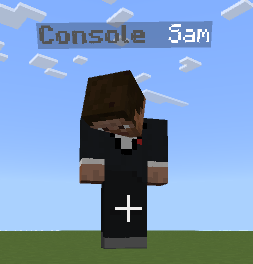
It even shows up under players names!
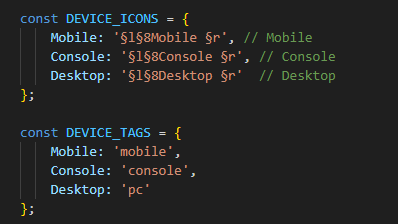
Dont like the colors? You can go into the code and change the color!
 </figure>
Here at Cyan Studios made it super easy to understand! for Device Tags it will be the tag given to the player depending on which device they are on which in the `` you can put the tag you want for each device! With Device Icons you can put glyphs, Custom Colors and much much more!
Tutorial by <mark class="pen-red">HiveLanky</mark> [Co Owner]
Device Viewer Team