Basic Auto Harvest (Achievement Friendly)

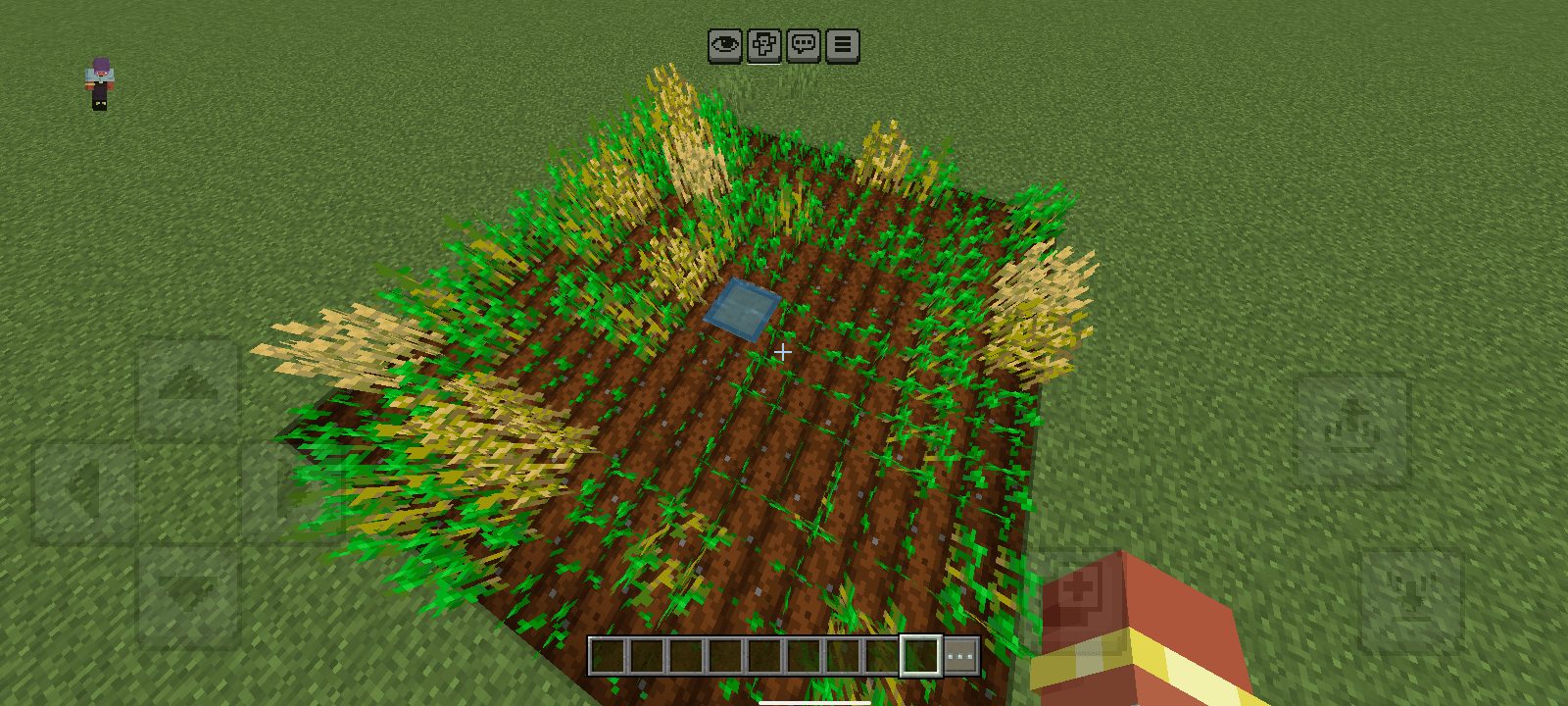
Farming automation system that automatically detects and harvests fully grown crops within a 4-block radius, sending the yields directly into storage.
Screenshot_20260805-072803.png
Screenshot_20260805-072803.png

Screenshot_20260805-072851.png

Screenshot_20260805-072851.png

Description

Basic Auto Harvest is a practical solution for players looking to save time while farming in Minecraft. The addon intelligently monitors the growth stages of crops planted on nearby farmland. As soon as a crop reaches full maturity, the system instantly harvests it and transfers all dropped items directly into the chest, no manual gathering required.


Key Features


  • Fully grown crops are harvested automatically without any manual player interaction.
  • Items are sent straight into the chest rather than dropping on the ground, preventing despawns and lag.
  • Matches standard Minecraft hydration logic (4 blocks in every direction from the water source).
  • The chest is submerged in water (waterlogged), leaving every surrounding block available for crops.

Supported Crops (for now)

  • Wheat
  • Carrots
  • Potatoes
  • Beetroot
  • Pitcher Plant
  • Torchflower
  • Sweet Berry

How to Setup

  1. Dig 1 block down into the ground.
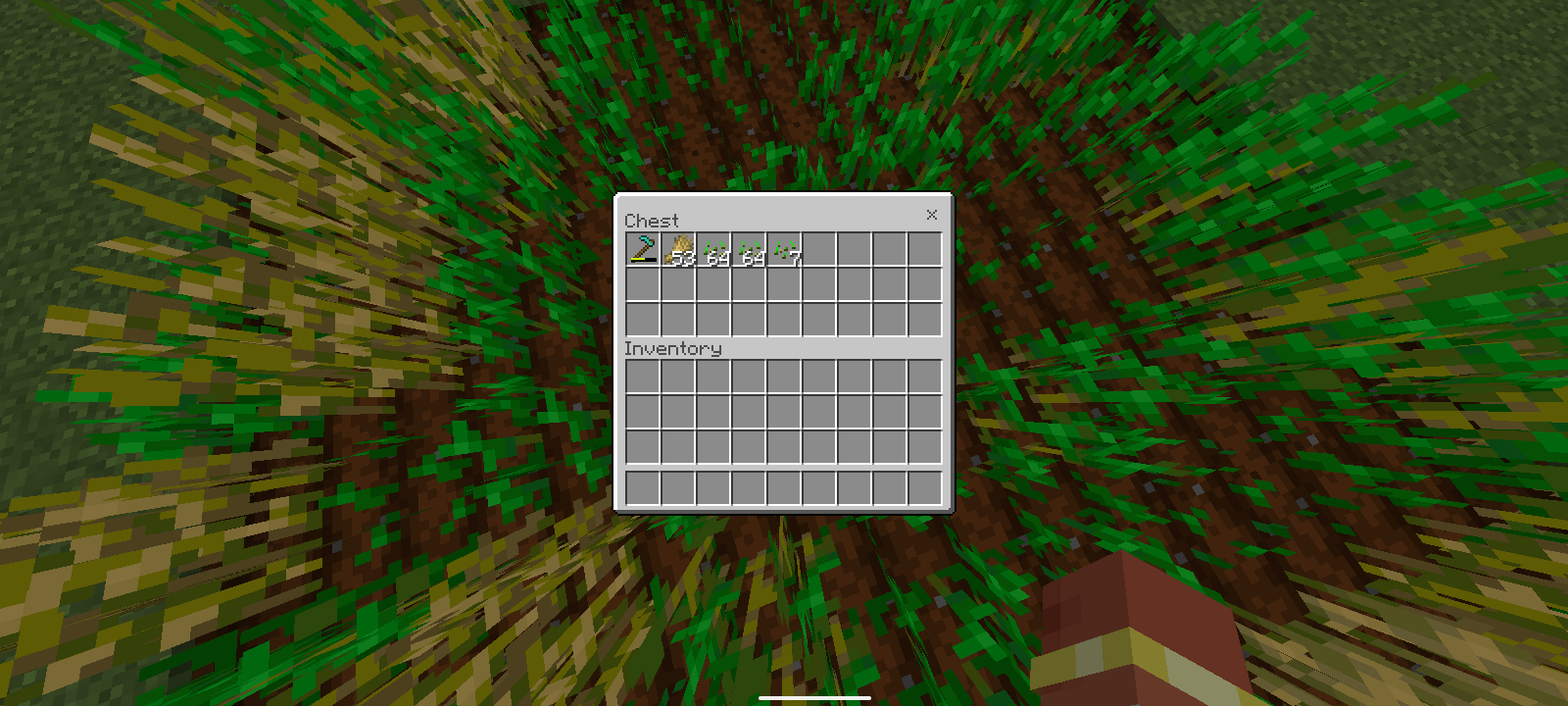
  2. Fill the hole with water and place a chest directly inside the water to create a waterlogged chest.
  3. Hoe the ground surrounding the chest up to 4 blocks outward in all directions (forming a 9x9 farm layout with the chest at the center).
  4. Insert 1 Hoe of any tier into the first slot of the chest.
  5. Stand directly on top of the chest and type /autoharvest in the command chat.


Note:

The durability of the hoe will decrease as crops are cut. If the hoe is damaged, the system will stop. Insert a new hoe to restart the system.

Basic Auto Harvest (Achievement Friendly) Team

profile avatar
  • 1
    Followers
  • 10
    Projects
  • 6.7K
    Downloads

More from Darkness9373View all

  • Chat Rank Plus project image

    Chat Rank Plus

    Adds customizable rank tags to player chat messages and nametags. Server administrators can easily configure each player's rank tag to create a cleaner and more organized multiplayer experience.

    • 123
    • September 23, 2026
  • Keep Inventory project image

    Keep Inventory

    Keep Inventory allows you to toggle the Keep Inventory gamerule on and off using simple custom commands, all without turning on vanilla cheats or disabling world achievements.

    • 919
    • September 14, 2026
  • Grave Keeper project image

    Grave Keeper

    Never lose your items again. Grave Keeper creates a smart gravestone system with tracking, protection, and auto cleanup.

    • 3.6K
    • September 10, 2026
  • Darkness's Debug Screen project image

    Darkness's Debug Screen

    Bring the iconic Java Edition debug screen experience straight to Minecraft Bedrock

    • 518
    • September 9, 2026
  • Chat Rank Plus project image

    Chat Rank Plus

    Adds customizable rank tags to player chat messages and nametags. Server administrators can easily configure each player's rank tag to create a cleaner and more organized multiplayer experience.

    • 123
    • September 23, 2026
  • Keep Inventory project image

    Keep Inventory

    Keep Inventory allows you to toggle the Keep Inventory gamerule on and off using simple custom commands, all without turning on vanilla cheats or disabling world achievements.

    • 919
    • September 14, 2026
  • Grave Keeper project image

    Grave Keeper

    Never lose your items again. Grave Keeper creates a smart gravestone system with tracking, protection, and auto cleanup.

    • 3.6K
    • September 10, 2026
  • Darkness's Debug Screen project image

    Darkness's Debug Screen

    Bring the iconic Java Edition debug screen experience straight to Minecraft Bedrock

    • 518
    • September 9, 2026