

![Modern House | Survival [Achievements Enabled] logo](https://media.forgecdn.net/avatars/thumbnails/2029/741/64/64/639242511067956595.png)
Modern House | Survival [Achievements Enabled]
- By

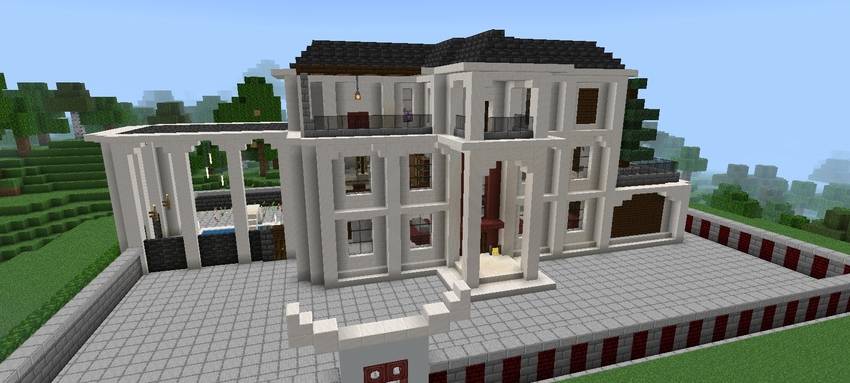
A beautiful Minimalist Modern Mansion! Fully survival ready, multi-story with balconies. Complete achievements for MCPE.
Modern House | Survival [Achievements Enabled]
Welcome to Your Ultimate Survival Base
Ditch the dirt hut and start your Minecraft adventure in complete luxury! This world features a stunning, meticulously crafted Modern Mansion designed specifically for Survival Mode. Perfect for both new players and seasoned veterans looking for an elevated start, this clean, minimalist, multi-story house combines functional design with unparalleled aesthetics.
Crucially, this is not a schematic; it is a complete world save where achievements are fully enabled. You can enjoy the survival experience with a high-end starter base while still progressing through all your game goals.
Key Features:
- Beautiful Modern Design: The entire property boasts a clean and minimalist aesthetic, using refined blocks like polished quartz, dark stone, and extensive glass for a contemporary feel.
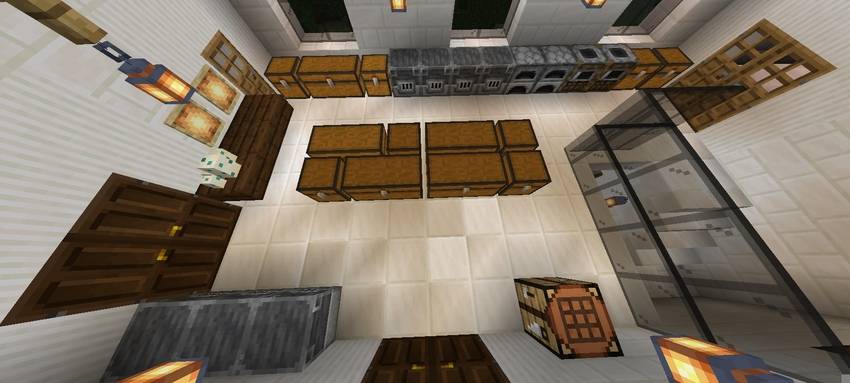
- Survival-Ready and Functional: The house is built with multiple floors to accommodate all your survival needs, offering generous space for crafting, storage, sleeping, and more.
- Achievements Enabled: This world has not been used with creative mode or cheats. You can earn all your achievement points without limitations.
- Detailed Multi-Story Layout: Explore multiple levels, including extensive balconies with custom railings, giving you fantastic views of the natural landscape.
- Expansive Front Courtyard: The ground is paved with unique textured stone, and the facade features distinct white architectural arches and a textured outer perimeter wall.
- Unique Side Pavilion Area: A massive open archway on the side leads to a covered pavilion area, ideal for customization as a swimming pool, outdoor workshop, or relaxation spot.
- Biome Setting: Set in a pristine plains and forest biome, with natural hills and trees right at your doorstep for easy access to resources.
World Details & Installation
- World Version: (USER: PLEASE INSERT YOUR MINECRAFT BEDROCK VERSION, e.g., 1.20+)
- World Type: Survival Mode
- Base Game Version: MCPE / Bedrock Edition
- World Seed: [Optional: (USER: Leave blank or add your seed)]
- Texture Pack: Designed with Default (Vanilla) Textures. No additional resources needed.
Installation Instructions (Mobile):
- Download the
.mcworldfile from this project page. - Navigate to the downloaded file on your device using a file explorer.
- Tap the
.mcworldfile. Your device should prompt you to open the file with Minecraft. - Minecraft will launch and automatically import the world.
- Select the world from your list and start your new life!
Installation Instructions (Manual):
- Download the
.mcworldfile. - Connect your device to your computer and locate the
minecraftWorldsfolder within the Minecraft app directory. - Place the
.mcworldfile inside this folder. - Start Minecraft on your device, and the world should be in your list.
The Modern House | Survival [Achievements Enabled] Team


Owner

![Survival Starter House [Achievements Enabled] project image](https://media.forgecdn.net/avatars/thumbnails/2028/583/256/256/639242067916303421.png)
![Ultimate Modern Starter Base | HardCore Survival [Achievements Enabled] project image](https://media.forgecdn.net/avatars/thumbnails/2027/940/256/256/639241789782154729.png)
![Hardcore Survival Starter House [Achievements Enabled] project image](https://media.forgecdn.net/avatars/thumbnails/2024/383/256/256/639240198316780072.png)