Wool Printer
- By
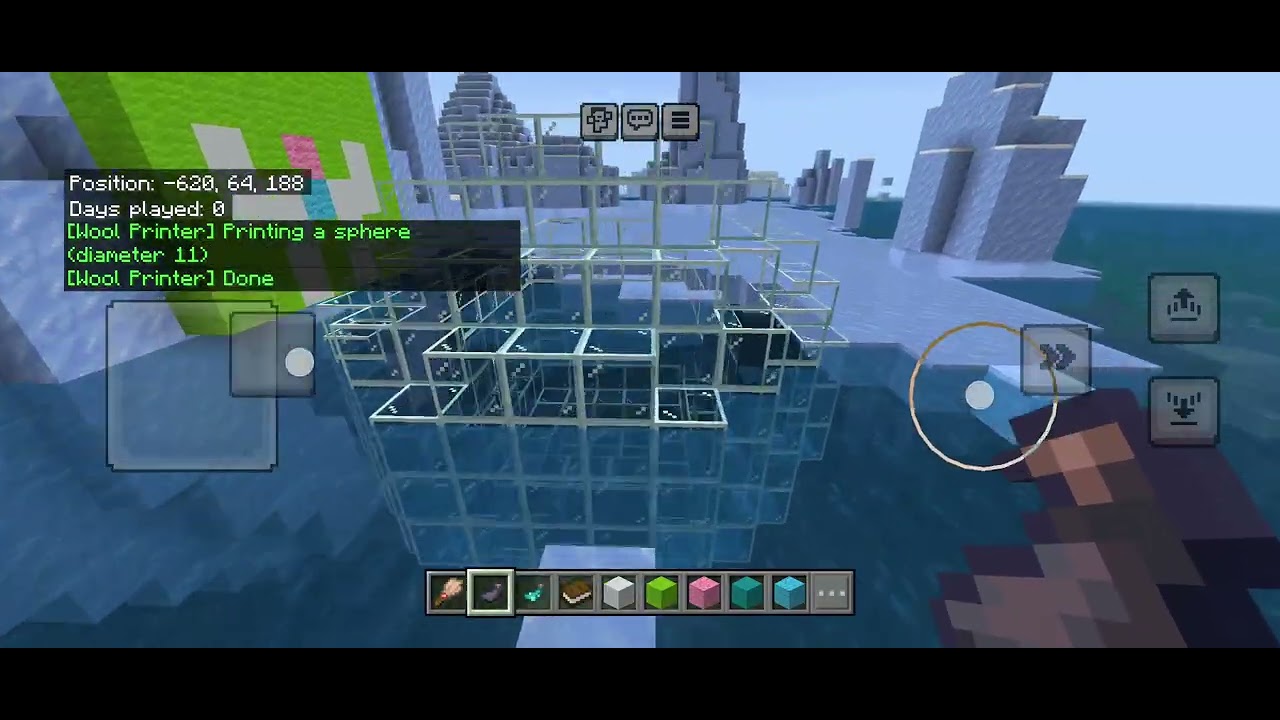
Wool Printer is a script-only add-on for Minecraft: Bedrock Edition. Draw a cross-section with wool and concrete, tap the core with an ink sac, and the pattern is printed as real blocks — no commands, no structure files, no custom blocks.
Description
Wool Printer
Draw it in wool. Print it in blocks.
Wool Printer is a script-only add-on for Minecraft: Bedrock Edition. Draw a cross-section with wool and concrete, tap the core with an ink sac, and the pattern is printed as real blocks — no commands, no structure files, no custom blocks.
Features
- Extrusion mode — print a flat wool pattern into a long 3D shape. The core's color sets the length: 30 / 50 / 100 blocks
- Sphere mode — turn a square template into a hollow sphere or dome, generated mathematically (no size list, any odd diameter up to 25)
- In-game palette — use a Book on any wool/concrete block to see the full color → block list in chat
- Undo — use a Brush on any block to undo your last print
- Bilingual — all messages in English / Japanese (switches with your game language)
How to Use
1. Build a template
Make a flat pattern out of wool and/or concrete blocks, with one core wool block in it. The core must be Pink, Magenta, or Red wool.
Template rules:
- Max size 25 × 25 (the scan reaches up to 12 blocks from the core in each direction)
- The pattern must be connected along both lines that cross at the core — a gap on either line cuts off everything beyond it
2. Print
⚠ Note: Printing overwrites any blocks in its path (no drops). Only the most recent print can be undone.
| Item used on the core | Mode |
|---|---|
| Glow Ink Sac | Extrusion |
| Ink Sac | Sphere |
| Ink Sac while sneaking | Hemisphere (dome) |
- Extrusion prints toward the opposite side of the face you tapped, starting 1 block away from the template. The template stays in place, so you can print again.
- Sphere prints in all directions. The sphere's diameter equals the side of your template square. Spheres are hollow (2-block shell, so they don't leak underwater), and the center cell is filled with the most common block in your template — a glass sphere gets a glass center. The template is removed after a sphere print (Undo brings it back).
- Hemisphere prints only toward the opposite side of the tapped face, with the core as the top of the dome. Stand on the core and use the ink sac downward to cap an underwater base, for example.
In Survival, each print consumes 1 ink sac.
3. Check the palette / Undo
| Action | Effect |
|---|---|
| Book on any wool/concrete | Show the color → block palette in chat |
| Brush on any block | Undo your last print (one print per player) |
Brushing Suspicious Sand / Suspicious Gravel always does vanilla archaeology — the add-on never overrides it.
Core Colors (print length)
| Core (wool) | Length |
|---|---|
| Pink | 30 blocks |
| Magenta | 50 blocks |
| Red | 100 blocks |
Palette
Wool
| Color | Prints as |
|---|---|
| Purple Wool | Pearlescent Froglight |
| Yellow Wool | Ochre Froglight |
| Green Wool | Verdant Froglight |
| Light Blue Wool | Sea Lantern |
| Orange Wool | Waxed Block of Copper |
| Blue Wool | Water |
| Cyan Wool | Blue Ice |
| White Wool | Glass |
| Light Gray Wool | Stone Bricks |
| Gray Wool | Tuff Bricks |
| Black Wool | Deepslate Bricks |
| Brown Wool | Waxed Copper Grate |
| Lime Wool | Air |
| Pink / Magenta / Red Wool (core) | Air (in sphere mode: the template's most common block) |
Concrete
| Color | Prints as |
|---|---|
| White Concrete | Quartz Bricks |
| Light Gray Concrete | Nether Bricks |
| Brown Concrete | Soul Sand |
| Blue Concrete | Prismarine Bricks |
| Black Concrete | Obsidian |
| Lime Concrete | Slime Block |
| Red Concrete | Block of Redstone |
| Orange Concrete | Magma Block |
Colors not listed here print as Air.
Requirements & Installation
- Import the pack and activate both the Behavior Pack and the Resource Pack in your world
- Printing runs over several ticks; long prints use a temporary ticking area to stay loaded
Wool Printer Team