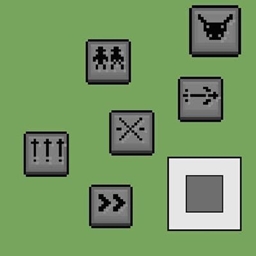
This add-on is made to work with YTAUN Skill Buttons, a set of on-screen skill buttons placed around the jump button. Tap a button and the skill goes off at once, which is perfect on phones and tablets. Install it next to this add-on, hold the scythe, and the buttons appear:
Button
Skill
1
Q – Reaping Slash
2
W – Blade’s Reach
3
E – Shadow Step
4
R – Umbral Trespass
5 (big)
Darkin Awakening
A button dims while its skill is on cooldown.
Q and W aim themselves at the nearest enemy in front of you.
R picks the nearest marked enemy, wherever you are looking.
If you tap a little too early, the tap is kept and the skill fires as soon as it is ready.
Inside R, any button tears you out.
On PC the buttons are hotbar keys 4–8.
⚠️ Some skills still need the original moves, even with Skill Buttons:
Reaping Wheel has no button. Hold the scythe for 5 s to charge it, then jump and attack in the air.
R – Umbral Trespass needs a marked enemy, so hit an enemy with a normal attack first (a Darkin eye appears over it), then tap button 4.
Bursting out of R goes where you look: aim with the camera before you tap.
E – Shadow Step only starts the skill. To sink into the ground, look down and walk. To pass through walls, walk into them.
Reaping Wheel steering follows where you look.
Darkin Awakening works both ways: tap button 5, or sneak + jump as usual.
Skill Buttons is optional. Without it, every skill still works with the normal controls below.
⚔️ Overview
Kayn’s living Darkin scythe from League of Legends, with his full kit: Reaping Slash, Blade’s Reach, Shadow Step and Umbral Trespass. Awaken the scythe and it becomes Rhaast, the bloodthirsty Darkin, or the Shadow Assassin. Each form changes how every skill plays.
3D scythe model in three looks: Kayn, Rhaast and Shadow Assassin.
Hand-drawn pixel-art particles for every skill.
Warning tiles light up on the ground before a blow lands.
Custom attack animations in first and third person.
Each form adds a look to you: Rhaast grows great curved horns. The Shadow Assassin’s arms turn dark violet and burn with blue fire, his torso gets Darkin markings and a tattered shadow cape, and a black-and-blue aura surrounds him.
🎮 Controls (holding the scythe)
Control
Skill
Right-click
Q – Reaping Slash
Sneak + right-click
W – Blade’s Reach
Sprint + attack
E – Shadow Step
Sneak + attack
R – Umbral Trespass
Jump + attack (in the air)
Reaping Wheel
Sneak + jump
Darkin Awakening
On phones, right-click means tap and hold, or the Use button.
📜 Skills
Q – Reaping Slash (4 s cooldown) Dash forward cutting everything you pass, then whirl the scythe around you. Both hits land. Hitting with the whirl takes 1.5 s off the cooldown.
W – Blade’s Reach (6 s cooldown) Draw the scythe back for a moment, then strike a long line in front of you that slows enemies heavily.
E – Shadow Step (8 s cooldown) Run faster and walk straight through walls, or sink into the ground (look down and walk). Entering terrain for the first time heals you.
R – Umbral Trespass (45 s cooldown) Dive into an enemy you have just hit (a Darkin eye marks it). While inside you are untargetable. Press again to tear out of it in the direction you look, ripping through anyone on your way out.
Reaping Wheel (hold the scythe for 5 s to charge) Jump and attack in the air. You roll along the ground for 2 s, windmilling the scythe like a wheel and steering where you look. Hitting a wall bounces you back, and every bounce makes the wheel cut harder. At the end you spring up and cut all around you.
🩸 Darkin Awakening
Sneak + jump (or Skill Button 5). Your scythe awakens at random into one of two forms for 3 minutes, then turns back.
Rhaast – the Darkin
Every skill heals you for part of the damage it deals.
Q whirls twice and deals bonus damage based on max health. Tap Q twice more within 3 s for two more moves:
Hook Vault: hook the nearest enemy ahead, vault over its head and fling it back where you stood.
Devour: a great cleave. A Darkin ribcage snaps shut on every enemy the chain wounded and reaps back part of the damage dealt.
W is wider, knocks enemies up and makes them bleed.
E keeps healing you while you are inside terrain.
R deals a share of the victim’s max health, heals you, and bursts a flesh bloom around it.
Shadow Assassin
Entering combat, or coming out of R, gives you a burst of bonus damage.
Q leaves a living shadow that repeats the whirl. Tap Q twice more within 3 s for two more moves:
Shadow Swap: trade places with your shadow, cutting everything between you.
Converge: you and your shadows dash to one point and tie into a knot that explodes.
W is cast by two living shadows while you keep moving.
E is faster, ignores slows, and leaving terrain sets up an Ambush: your next hit deals more damage and blinds.
R reaches further and leaves you invisible for a moment after you burst out.
Transform your MCPE world with Foxay Shader! Experience breathtaking aurora night skies, vibrant glowing ores, and stunning lighting effects. Download now to upgrade your Minecraft graphics and explore a truly immersive universe!
Pick 1 of 6 classes and grow a 108-node skill web: traits, drawbacks, starter kits and hidden passives. Level to 60 by fighting, mining and crafting. Smooth custom UI made for mobile. No experiments.
Bet an item for a chance to upgrade it into something better! Lucky wheel, custom UI like the Upgrader mod, win odds based on each item's real value. No experiments needed.
Transform your MCPE world with Foxay Shader! Experience breathtaking aurora night skies, vibrant glowing ores, and stunning lighting effects. Download now to upgrade your Minecraft graphics and explore a truly immersive universe!
Pick 1 of 6 classes and grow a 108-node skill web: traits, drawbacks, starter kits and hidden passives. Level to 60 by fighting, mining and crafting. Smooth custom UI made for mobile. No experiments.
Bet an item for a chance to upgrade it into something better! Lucky wheel, custom UI like the Upgrader mod, win odds based on each item's real value. No experiments needed.