Waystones Lite | Fast Travel Network
- By
Build and name magical Waystones to create a shared fast-travel network across your Minecraft Bedrock world and dimensions.

MCPEDL.png

Screen-1.png

Screen-2.png

Screen-3.gif
Description
About
Waystones Lite adds a simple, survival-friendly fast-travel network to Minecraft Bedrock.
Craft Waystones in pairs, place them at important locations, give each one a name, and interact with any stone to travel to another registered destination. The shared network works across long distances and dimensions without commands or experimental toggles.

Features
- Craftable Waystone blocks for fast travel
- Name each destination when placing its Waystone
- Shared network available to every player
- Travel across long distances and between dimensions
- Destination menu shows names, distances, and dimensions
- Safe arrivals that reject blocked or unavailable destinations
- Teleport sounds and particles at departure and arrival
- Persistent network with support for up to 32 Waystones per world
- Breaking a Waystone removes it from the network
- Compatible with Vibrant Visuals
How to use
- Import the
.mcaddonfile into Minecraft Bedrock. - Activate both the Behavior Pack and Resource Pack in your world.
- Craft two Waystones.
- Place the first Waystone and give it a name, such as
Home. - Place and name another Waystone at a different location.
- Interact with either Waystone and choose a destination from the menu.
Crafting
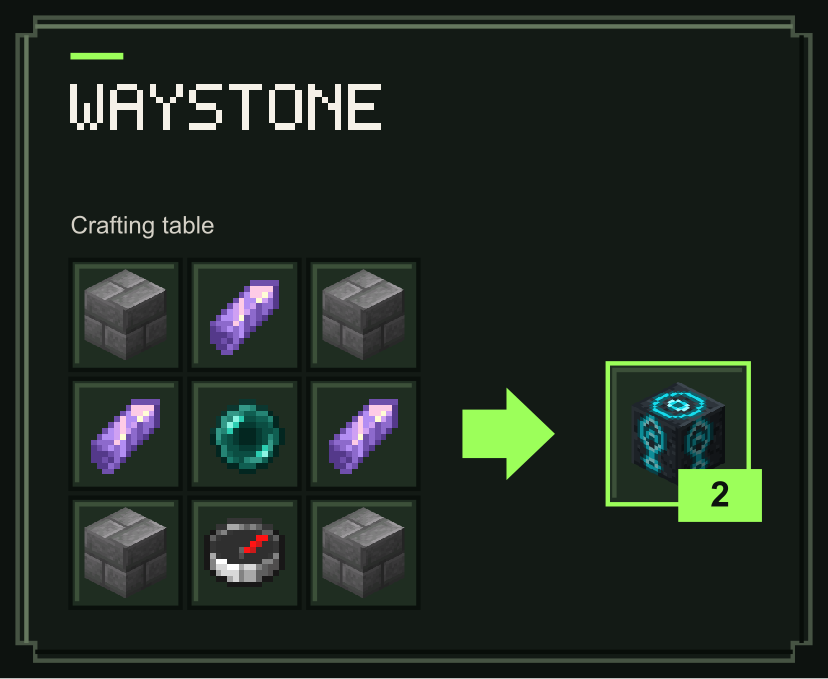
Recipes use the ingredients and quantities shown below.
Waystone
Recall Flask integration
Recall Flask Waystones includes this network together with consumable return potions. Sneak-use a Flask to choose a personal Waystone destination, then drink it to return. If the selected stone is blocked or unavailable, the Flask tries your personal spawn, a manually selected world spawn, and the nearest reachable Waystone in your current dimension. Your selection is kept unless the stone is confirmed destroyed. This integration is optional and comes in the separate Recall Flask Waystones bundle.
Notes
- The Waystone network is shared by all players in the world.
- A world can contain up to 32 registered Waystones.
- The destination needs enough free space for the player to arrive safely.
- Waystones in the Overworld, Nether, and End can share the same network.
Requirements
- Minecraft Bedrock Edition 26.50 or newer
- No experimental toggles required
- No external dependencies required

Waystones Lite | Fast Travel Network Team

Owner