Utilidades
- By
Utility addon with practical items that keep growing with every update. | Addon de utilidades con items prácticos que crecen con cada actualización.
English
Utilidades is a small but very handy addon for Minecraft Bedrock: carry your Ender Chest everywhere, see at night like it's day, and gain extra hearts to survive longer.
Items
| Texture | Item | What it does |
|---|---|---|
 |
Ender Bag | Opens your Ender Chest anywhere. Hold it in your hand and a chest appears in front of you: right-click and you're done. It stays in sync with your normal Ender Chest. |
 |
Night Berry | Food that gives Night Vision for 10 minutes. Stacks up to 16. |
 |
Red Heart | Gives 1 permanent extra heart (up to 50 extra). Kept when you die and when you rejoin. |
 |
Absorption Heart | Gives Absorption V for 5 minutes (+10 temporary hearts). |
Items Explained
- Ender Bag: Hold it in your main hand and an invisible chest appears in front of your face. Right-click it to open your Ender Chest. The contents are synced with your real Ender Chest. If you aim at an interactive block (chests, furnaces, doors, tables, etc.), the chest moves out of the way. Nobody else can open your bag. It does not stack.
- Night Berry: Restores 6 hunger and has high saturation. Gives Night Vision with no particles for 10 minutes.
- Red Heart: Each one adds 1 heart to your max health and heals 1 heart. Maximum of 50 extra hearts; if you already reached it, the item is not consumed. Hearts are kept when you die and when you rejoin the world.
- Absorption Heart: Can always be consumed, even with a full hunger bar.
Crafting
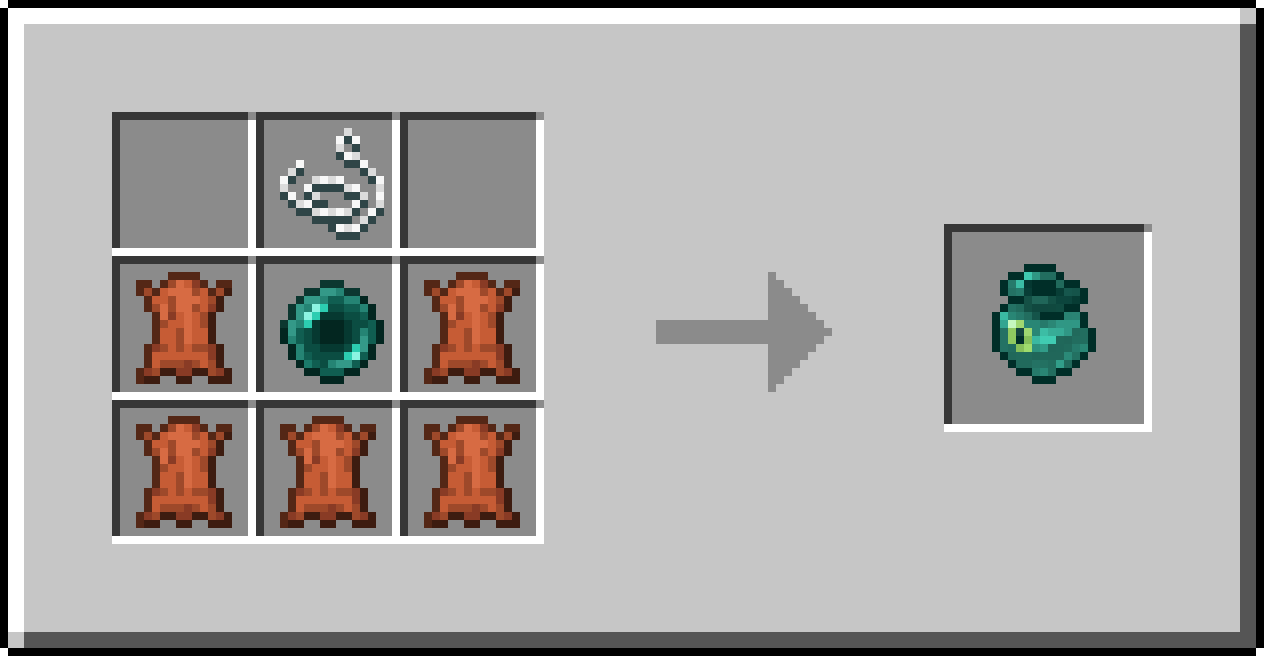
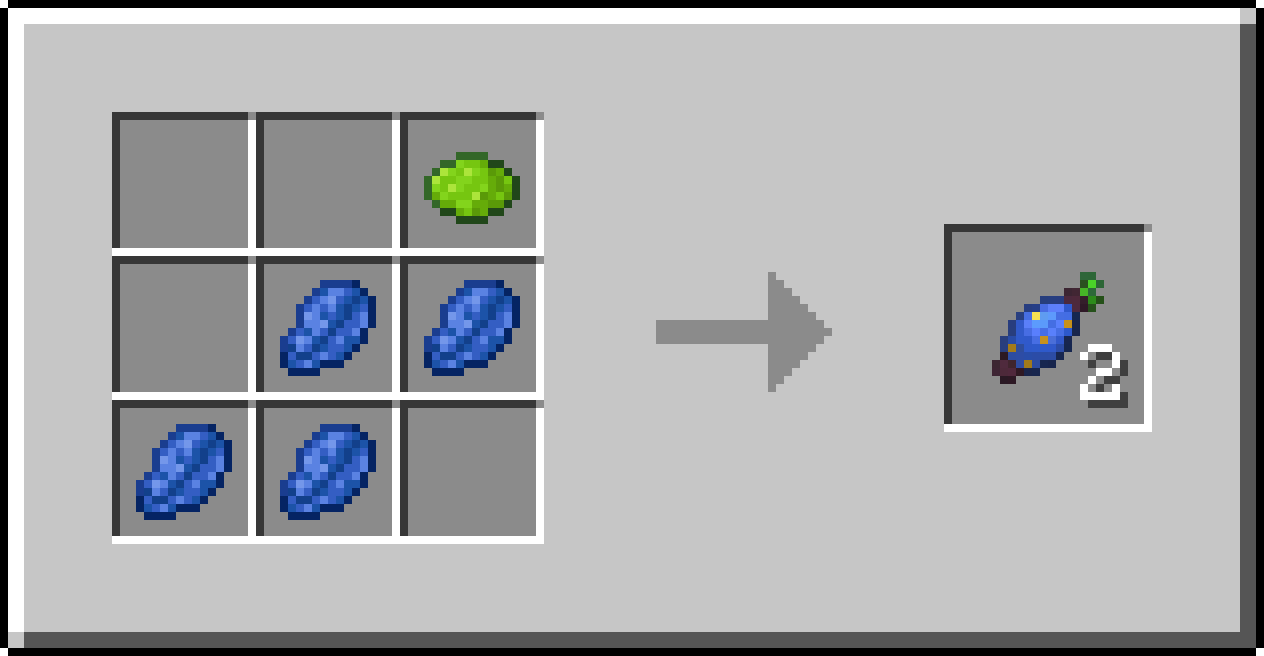
The Ender Bag and the Night Berry recipes always show in the recipe book. The hearts have no recipe: get them from the creative inventory or with commands.
Ender Bag
Night Berry (makes 2)
Commands
Cheats must be enabled.
/scriptevent itiziano:heartsshows how many extra hearts you have./scriptevent itiziano:resetresets your extra hearts to 0.
Got an idea?
The addon is updated often and new items will keep appearing. If you have an idea for an item or feature you'd like to see, leave it in the comments and I'll consider it for future versions.
Español
Utilidades es un addon pequeño pero muy práctico para Minecraft Bedrock: llevá tu Cofre Ender a todos lados, ve de noche como de día y ganá corazones extra para sobrevivir más.
Items
| Textura | Item | Utilidad |
|---|---|---|
|
Bolsa Ender | Abre tu Cofre Ender en cualquier lugar. Sostenela en la mano y aparece un cofre frente a vos: clic derecho y listo. Se sincroniza con tu Cofre Ender normal. |
|
Baya Nocturna | Comida que da Visión Nocturna durante 10 minutos. Se apila hasta 16. |
|
Corazón Rojo | Da 1 corazón extra permanente (hasta 50 extra). Se conserva al morir y al reconectarte. |
|
Corazón de Absorción | Da Absorción V durante 5 minutos (+10 corazones temporales). |
Explicación de los Items
- Bolsa Ender: Mantenela en la mano principal y aparece un cofre invisible frente a tu cara. Hacé clic derecho sobre él para abrir tu Cofre Ender. El contenido está sincronizado con tu Cofre Ender real. Si apuntás a un bloque interactivo (cofres, hornos, puertas, mesas, etc.), el cofre se aparta. Nadie más puede abrir tu bolsa. No se apila.
- Baya Nocturna: Restaura 6 de hambre y tiene saturación alta. Da visión nocturna sin partículas durante 10 minutos.
- Corazón Rojo: Cada uno suma 1 corazón a tu vida máxima y te cura 1 corazón. Máximo de 50 corazones extra; si ya lo alcanzaste, el item no se gasta. Los corazones se guardan al morir y al volver a entrar al mundo.
- Corazón de Absorción: Siempre se puede consumir, aunque tengas el hambre llena.
Crafteos
Las recetas de la Bolsa Ender y la Baya Nocturna aparecen siempre en el libro de recetas. Los corazones no tienen receta: se obtienen desde el inventario creativo o con comandos.
Bolsa Ender
Baya Nocturna (da 2)
Comandos
Requieren cheats activados.
/scriptevent itiziano:heartsmuestra cuántos corazones extra tenés./scriptevent itiziano:resetreinicia tus corazones extra a 0.
¿Tenés una idea?
El addon se actualiza seguido y van a seguir apareciendo items nuevos. Si se te ocurre algún item o utilidad que te gustaría ver, dejalo en los comentarios y lo tengo en cuenta para próximas versiones.
Utilidades Team