Trapdoor Lock Manager
- By
TLM (Trapdoor Lock Manager) v1.0.10
(I will soon turn this into an add-on for locking any block at all.)
TLM (Trapdoor Lock Manager) is a Minecraft Bedrock behavior-pack add-on for locking individual trapdoors in their current open or closed position. It provides a custom lock tool, permission tags, operator-only management commands, persistent lock storage, and optional debugging feedback.
Main features
| Feature | Description |
|---|---|
| Trapdoor state locking | Locks any supported vanilla trapdoor (see Supported Trapdoors below) in its current open or closed position. |
| Interaction protection | Prevents ordinary player interaction from flipping locked trapdoors. |
| Redstone protection | Restores locked trapdoors when redstone attempts to change them. |
| Breaking protection | Prevents every player from breaking a locked trapdoor. |
| Persistent locks | Saves locks across world restarts. |
| Bypass permission | Lets selected players open and close locked trapdoors with a bypass tag. |
| Permission management | Allows permissions to be managed through custom commands executable only by operators. |
Secondary features
| Feature | Description |
|---|---|
| Permission lists | Provides commands to list online players who have a TLM permission tag. |
| Debug feedback | Shows concise, individually configurable debugging feedback to authorized operators. |
| Tool protection | Silently removes the lock tool from non-operators. |
| Chat protection | Suppresses every add-on chat message for non-operators. |
Function limits
| Limit | Available preview |
|---|---|
| Locked trapdoors do not become completely unresponsive to player interaction. Players can still flip locked trapdoors, but the add-on resets the trapdoor back to its original position rapidly enough to confuse and make Minecraft glitch back players who have passed or fallen through the trapdoor during the single tick its position was changed. Iron trapdoors, which can only be activated through redstone, do not flip at all. | Preview coming soon |
Setup instructions
| Instructions |
|---|
| 1. Make sure you meet all of the requirements: ㆍMinecraft Bedrock Edition compatible with behavior-pack format version 2. ㆍMinimum engine version: 1.26.30.@minecraft/server script API version 2.8.0.ㆍThe behavior pack must be activated on the world. ㆍOperator status is required to use any /tlm: command or possess the lock tool. |
2. Minecraft's built-in /tag and /give commands may also require cheats to be enabled in the world. |
| 3. Download the Trapdoor Lock Manager add-on file. (Direct Download 🡻) |
4. Open the .mcaddon file with Minecraft Bedrock Edition. |
| 5. Wait for Minecraft to confirm that the add-on imported successfully. |
| 6. Open the world settings. |
| 7. Activate the TLM (Trapdoor Lock Manager) behavior pack. |
| 8. Enter the world as an operator. |
| 9. Follow usage instructions below. |
Usage instructions
| Instructions | Available preview |
|---|---|
1. Run /tag @s add tlm:trapdoor_admin. This gives the operator running the command the TLM management tag. The admin tag allows managing locks, tags, player lists, and debug feedback. It does not bypass locked trapdoors. |
|
2. Run /give @s tlm:trapdoor_lock_tool. This gives the operator the Trapdoor Lock Tool. Non-operators cannot keep or use this tool. |
 |
| 3. Put a trapdoor in the open or closed position you want to preserve. While crouching, hold the Trapdoor Lock Tool and use it on the trapdoor (right-click). | 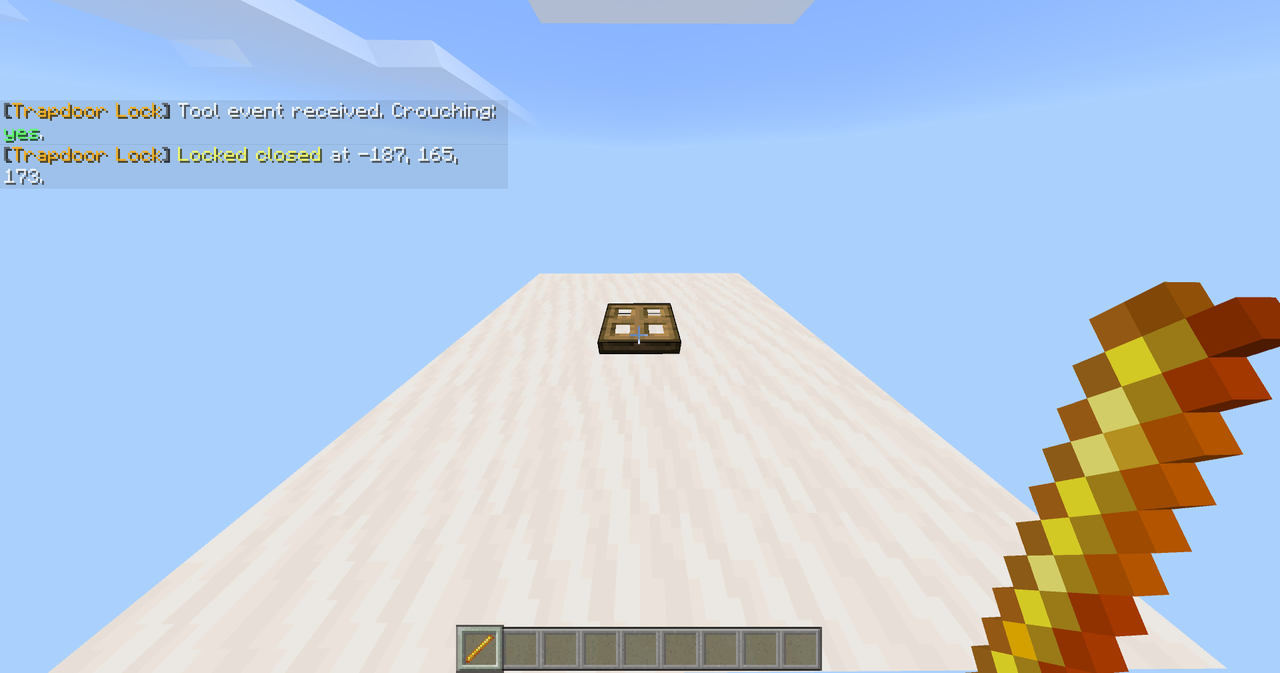  |
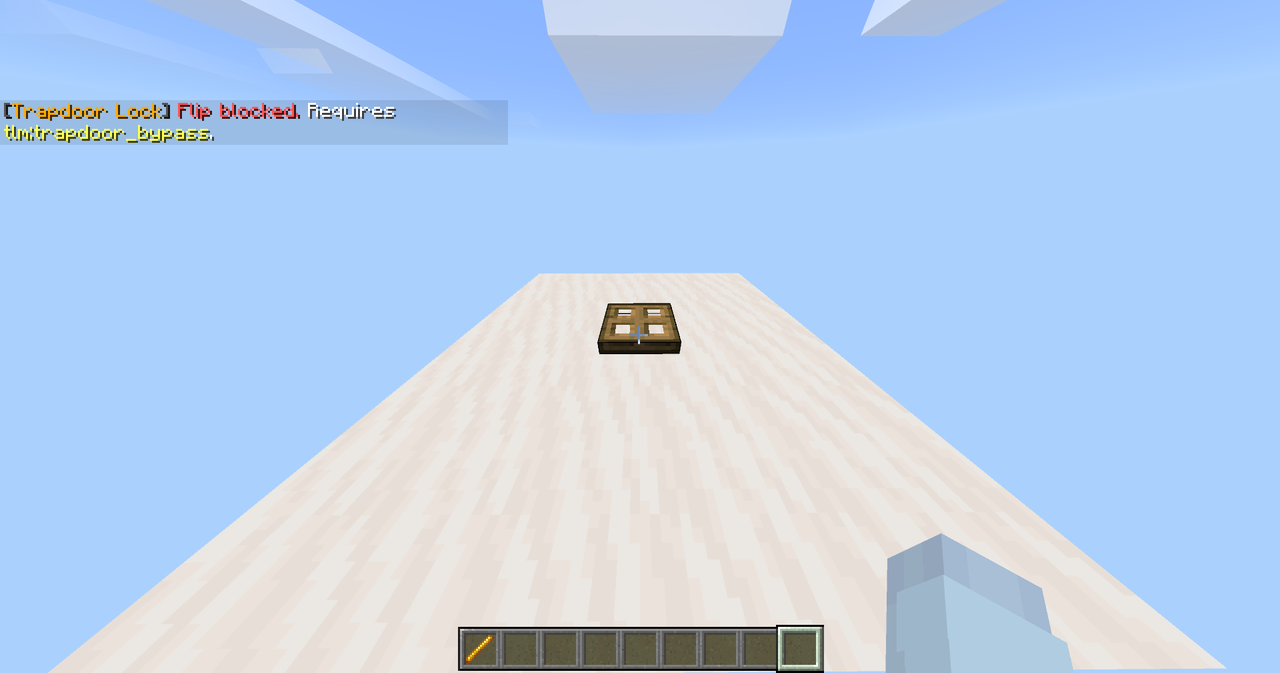
4. The add-on will cancel any attempts by unauthorized players without the tlm:trapdoor_bypass tag to modify the state of a locked trapdoor or break it. Verify the output of your action through the chat messages sent by the add-on. The lock persists across world restarts until it is manually unlocked by a TLM administrator. |
  |
| 5. The method to unlock a locked trapdoor is the same as locking it. While crouching, hold the Trapdoor Lock Tool and use it on the locked trapdoor. Verify the output of your action through the chat messages sent by the add-on. | 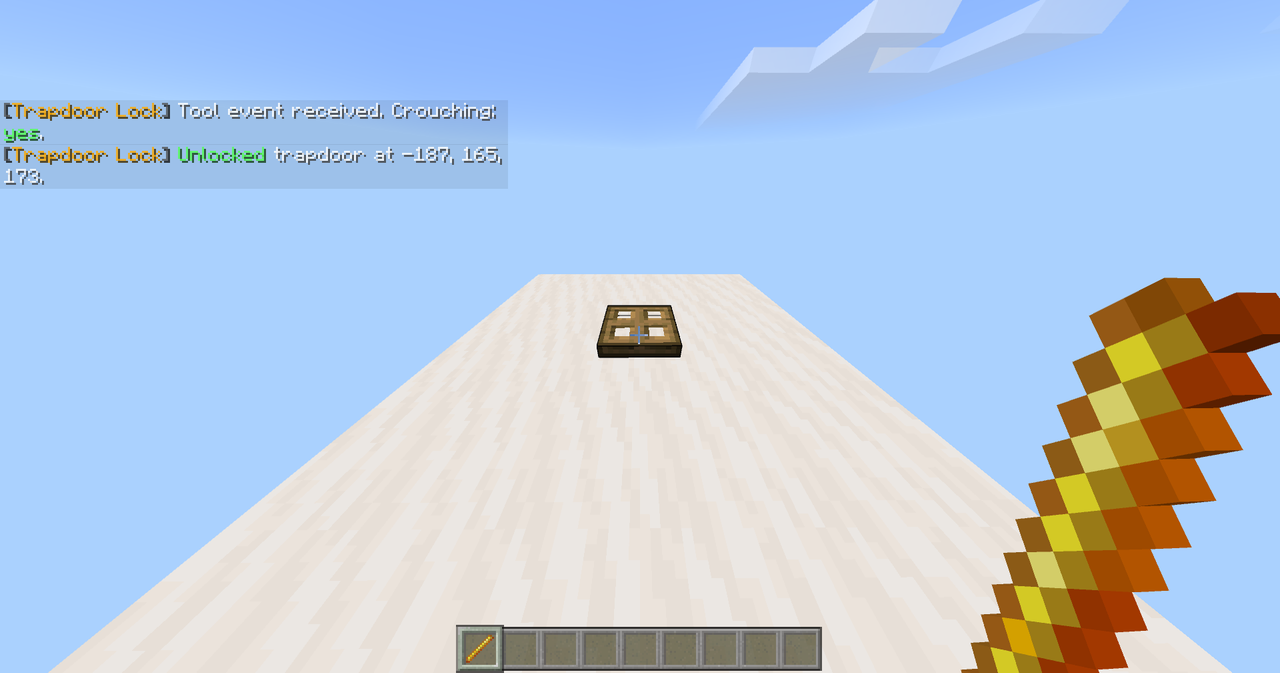  |
Behavior of locked trapdoors
| Behavior | Description |
|---|---|
| Opening and closing without bypass | A player without tlm:trapdoor_bypass cannot open or close a locked trapdoor. |
| Opening and closing with bypass | A player with tlm:trapdoor_bypass can operate a locked trapdoor normally. |
| Updating the locked state | When a bypass holder changes the trapdoor’s position, its new open or closed position becomes the saved locked state. |
| Other permissions | Neither operator status nor tlm:trapdoor_admin provides the same permission as the bypass tag (tlm:trapdoor_bypass). |
| Redstone | The add-on checks locked trapdoors every game tick. If redstone changes a trapdoor from its saved state, the add-on restores it. A very brief visual state change may still occur because the script acts after Minecraft processes the redstone change. |
| Breaking | Locked trapdoors cannot be broken by any player. The bypass tag permits opening and closing only. An authorized operator must unlock the trapdoor with the Trapdoor Lock Tool before it can be broken. |
| Unloaded chunks | Trapdoors in unloaded chunks are skipped. The add-on resumes enforcing their saved states after Minecraft loads the chunks again. |
Actions & permissions
| Action | Operator status | Admin tag (tlm:trapdoor_admin) |
Bypass tag (tlm:trapdoor_bypass) |
|---|---|---|---|
Run /tlm:help |
Required | Not required | Not required |
| Possess the lock tool | Required | Not required | Not required |
| Lock a trapdoor | Required | Required | Not required |
| Unlock a trapdoor | Required | Required | Not required |
| Open or close a locked trapdoor | Not required | Not required | Required |
| Break a locked trapdoor | Always blocked | Always blocked | Always blocked |
| Add or remove TLM tags | Required | Required | Not required |
| List players with a TLM tag | Required | Required | Not required |
| Enable or disable personal debug feedback | Required | Required | Not required |
| Receive any add-on chat message | Required | Depends on the message | Not required |
Commands
| Function | Command |
|---|---|
| Give yourself the initial admin tag. | /tag @s add tlm:trapdoor_admin |
| Give yourself the Trapdoor Lock Tool. | /give @s tlm:trapdoor_lock_tool |
| Display the complete in-game guide. | /tlm:help |
| Enable personal debug feedback. | /tlm:debug_feedback enable |
| Disable personal debug feedback. | /tlm:debug_feedback disable |
| Give a player the admin tag. | /tlm:tag add [player] admin |
| Remove the admin tag from a player. | /tlm:tag remove [player] admin |
| Allow a player to open or close locked trapdoors. | /tlm:tag add [player] bypass |
| Remove a player’s permission to open or close locked trapdoors. | /tlm:tag remove [player] bypass |
| List online players with the admin tag. | /tlm:list admin |
| List online players with the bypass tag. | /tlm:list bypass |
Replace [player] in tag commands with a player name or Bedrock player selector.
Supported trapdoors
| Icon | Trapdoor & Identifier |
|---|---|
 |
Oak Trapdoorminecraft:trapdoor |
 |
Spruce Trapdoorminecraft:spruce_trapdoor |
 |
Birch Trapdoorminecraft:birch_trapdoor |
 |
Jungle Trapdoorminecraft:jungle_trapdoor |
 |
Acacia Trapdoorminecraft:acacia_trapdoor |
 |
Dark Oak Trapdoorminecraft:dark_oak_trapdoor |
 |
Mangrove Trapdoorminecraft:mangrove_trapdoor |
 |
Cherry Trapdoorminecraft:cherry_trapdoor |
 |
Pale Oak Trapdoorminecraft:pale_oak_trapdoor |
 |
Bamboo Trapdoorminecraft:bamboo_trapdoor |
 |
Crimson Trapdoorminecraft:crimson_trapdoor |
 |
Warped Trapdoorminecraft:warped_trapdoor |
 |
Iron Trapdoorminecraft:iron_trapdoor |
 |
Copper Trapdoorminecraft:copper_trapdoor |
 |
Exposed Copper Trapdoorminecraft:exposed_copper_trapdoor |
 |
Weathered Copper Trapdoorminecraft:weathered_copper_trapdoor |
 |
Oxidized Copper Trapdoorminecraft:oxidized_copper_trapdoor |
 |
Waxed Copper Trapdoorminecraft:waxed_copper_trapdoor |
 |
Waxed Exposed Copper Trapdoorminecraft:waxed_exposed_copper_trapdoor |
 |
Waxed Weathered Copper Trapdoorminecraft:waxed_weathered_copper_trapdoor |
 |
Waxed Oxidized Copper Trapdoorminecraft:waxed_oxidized_copper_trapdoor |
Debug feedback
Debug feedback is intended to provide useful operational information without flooding ordinary players' chat. Depending on the action, it can report:
- Whether the tool-use event was detected.
- Whether the user was crouching.
- Whether a targeted block was recognized as a trapdoor.
- Lock and unlock results.
- Block coordinates.
- Blocked interaction or breaking attempts.
- Successful bypass interaction and the newly saved state.
- Saved lock count when an authorized administrator joins.
- Save or target-check failures.
Only operators with tlm:trapdoor_admin receive debugging feedback. Non-operators receive no add-on messages under any circumstances. Personal debug preferences are stored under tlm:debug_feedback.
(Extra) Upcoming features
| Upcoming feature | Description | Status |
|---|---|---|
| Trapdoor state check | Using the Trapdoor Lock Tool on a trapdoor while uncrouched prompts the add-on to send a chat message clarifying the target trapdoor's lock state (locked/unlocked). | Planned |
tlm:trapdoor_omniadmin tag |
Granting a player the tlm:trapdoor_omniadmin tag will allow them to fully breach trapdoor protection and limitlessly operate any locked trapdoor regardless of their permission level or whether they have any other add-on permission tags. |
Planned |
(Extra) Troubleshooting
| Issue | Possible solutions |
|---|---|
/tlm: commands do not appear or cannot be used |
ㅤ
|
| The tool disappears | The add-on intentionally removes it from non-operators. Become an operator before receiving the tool. |
| The tool does nothing | ㅤ
|
| An administrator cannot open a locked trapdoor | This is intentional. The admin tag manages the add-on but does not bypass locks. Give the player tlm:trapdoor_bypass if they should be allowed to operate locked trapdoors. |
| A bypass holder cannot break a locked trapdoor | This is intentional. Bypass permits opening and closing only. Unlock the trapdoor with the management tool before breaking it. |
| A player does not receive feedback | Non-operators never receive add-on messages. An operator also needs tlm:trapdoor_admin for debug and management feedback. Their personal debug setting may be disabled. |
(Extra) Saved data
Locked trapdoors are stored in a world dynamic property under tlm:locked_trapdoors. Each saved entry contains:
- Dimension identifier
- X coordinate
- Y coordinate
- Z coordinate
- Saved open/closed state
The add-on uses the same behavior-pack UUID across its versions, so updating the existing pack is intended to preserve world data. Keep a world backup before changing add-ons because Minecraft import or world-storage problems are outside the script's control.
ㅤ
---
ㅤ
Enjoy the add-on! I will soon make a discord server for feature requests and issue reports once I publish more add-ons.

The Trapdoor Lock Manager Team