The Ore Finder Project - (X-Ray Goggles, Glowing Ores, Ore Detector)
- By
MCPEDL.png
Description
No Experamental Features!
No player.json!
Vibrant Visuals required for glowing effect!
1.1.4 - UPDATE
- Addon should no longer turn off achievements.
- This is a complete rebuild of the engine used to find blocks, it should be faster. NOTE: This does not change lag issues with double distance, that's based on the number of entities your device can handle.
- Added proper crafting catalogs so goggles are properly grouped in crafters.
- Cleaned up and standardized some code to allow for future expansions of the addon.
1.1.3 - UPDATE
- Fixed issue with Black and Pink block at top of screen (I've been experamenting with a custom UI, and accidentally released part of it)
- Removed code that was making indicator entities vanish when player was close
- Attempted to make addon achievment fiendly, needs testing
1.1.2 - MULTIPLAYER UPDATE
- BUGFIX: Players not wearing goggles will no longer cause indicator entities to vanish if they aren't close enough.
- Indicator entities are now controlled by the player closest to the block.
- Indicator entities will now dissappear if player is close, really close. (Beta feature... Feedback would be great)
1.1.1 - UPDATE
- Upgraded all scripting requirements to latest versions
- New feature added: Ore toggles
- On Overworld and Ultimate Goggles, you now have options to turn on/off any of the ores they are designed to highlight. For example, if you are just looking for diamonds, switch all the others off, and only diamond indicators will spawn.
1.1.0 - UPDATE
- 2 New indicator entity types. (Outline & Ore)
- A new glow effect has been added for all indicator entities. This makes the ores even easier to find. (NOTE: Your Settings > Video > Graphics Mode must be set to Vibrant Visuals for the glow effect to work!)
Unleash your inner miner with The Ore Finder Project, a groundbreaking addon for Minecraft Bedrock that revolutionizes your mining escapades. Craft stunning goggles that allow you to effortlessly detect valuable ores like coal, copper, gold, iron, and diamonds hidden beneath layers of blocks, giving you a significant advantage in your quest for riches.
These remarkable goggles not only unveil the treasures lurking nearby but also light up your path, ensuring you never overlook a precious find in the darkness. Combine them to create the Overworld and Universal Goggles, which grant you night vision for exploring those deep, shadowy caves. Embark on a thrilling journey of discovery and let the Ore Finder Project illuminate your way to untold wealth!
Features
- Each set of goggles can be held in the main hand, the off hand or used as a helmet. This allows you to stack 3 different goggles at one time!
- When used as a helmet, the single block goggles act as a light source. While the Overworld and Universal goggles grant night vision.
- If you USE a pair of goggles while sneaking/crouching you will open up an options menu for those googles. Options include…
- Changing the lighting effect granted by the googles: None, Torch, or Night Vision (Where allowed)
- Turn on/off Double Distance, which will allow you to see twice as far away. This can be very helpfull for rare blocks like Ancient Debris and Emerald Ore. (WARNING!!! Have double distance on with Overworld or Universal goggles can cause lag due to the number of entities it creates. Use with caution!!!)
- Changing the type of entity that marks the location of the ores (Box, Orb, Outline, Ore)
- NEW FEATURE - On Overworld and Ultimate Goggles, you can turn on/off any of the ores they are designed to highlight. For example, if you are just looking for diamonds, switch all the others off, and only diamond indicators will spawn.
Future (Possible) Updates
- Rebuilding the options screens using fully customized JSON-UI (Wish me luck)
- Collaborating with some of the ORE addons to make new goggles for their custom ores
Screenshots
Highlighting ores in the overworld.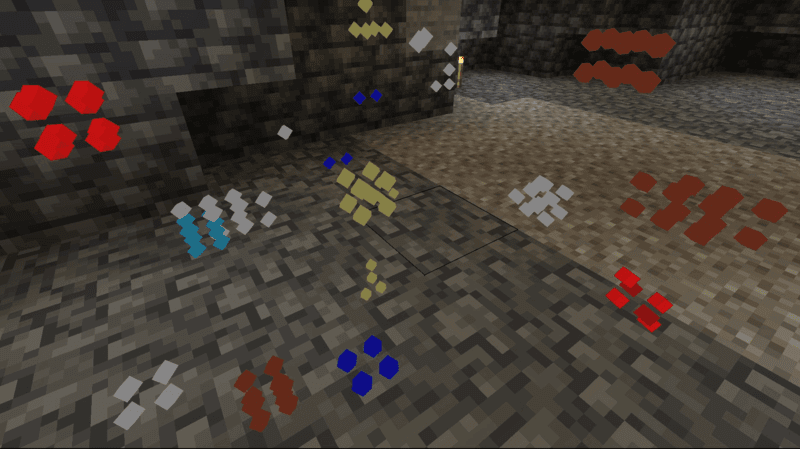


Recipes
The Ore Finder Project - (X-Ray Goggles, Glowing Ores, Ore Detector) Team