Teletransportadores
- By
Paired teleporter blocks: place two, step inside and get teleported after 3 seconds, even across dimensions. Pick particles and effect modes, toggle mob teleporting, and switch between 6 languages in the menu.
Teleporter – Teleporters in Pairs
Place two teleporters, step into one, and you appear in the other. It works anywhere in the world, including between the Overworld, Nether, and End. Each teleporter has a settings menu for particles, effects, and language.
Features
- Teleporters in pairs. Place the first one and then place the second at your destination. They connect automatically.
- Works between dimensions. Overworld, Nether, and End are supported. If the destination chunk is not loaded, the add-on loads it for you.
- You face outward. After teleporting, you will be looking outward from the entrance of the destination teleporter.
- Optional mob teleportation. Toggle on or off for each pair.
- 6 particles and 3 effect modes, all configurable via the menu.
- 6 languages, which can be switched in-game. The default language is English.
- Two blocks tall. The top half is placed automatically. Pistons move both halves together.
Recipe
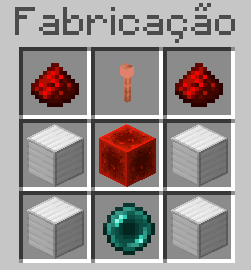
Craft it on a crafting table. The recipe yields 1 teleporter.
________________________________________
| Redstone | Lightning Rod | Redstone |
| Iron Block | Redstone Block | Iron Block |
| Iron Block | Ender Pearl | Iron Block |
________________________________________
| Redstone | Lightning Rod | Redstone |
| Iron Block | Redstone Block | Iron Block |
| Iron Block | Ender Pearl | Iron Block |
-------------------------------------------
How to use
- Place the first teleporter. The message "First teleporter placed" will appear.
- Go to your destination and place the second one. "Teleporters connected!" will appear.
- Step into either one and stay inside for about 3 seconds. You will feel a quick nausea effect, followed by a burst of particles, and then the teleportation happens. If you step out before it finishes, the teleportation is canceled.
- Breaking a teleporter unpairs the other one. Whoever broke it can reconnect the pair by placing a new teleporter.
How to open the menu
Right-click on a teleporter while not sneaking. While sneaking, you can place blocks next to it normally.
If the menu does not open, look at the teleporter and use the command
/scriptevent tp:menu.The menu has two parts:
- Language button (at the top). Shows the flag and the name of your language. Click it to choose English, Español, Português (BR), Português (PT), Deutsch, or Français. The choice is saved per player.
- Settings.
- Teleport mobs: on or off.
- Particle: Ender Pearl, Flame, Redstone dust (default), Soul, Green glow, or Totem.
- Mode: use the slider to choose how the particles appear.
Changes apply to both teleporters in the pair.
Particle modes
- Full. Fills both blocks of the teleporter, looking like a solid block of particles.
- Circle. A thick ring of particles around the character's torso.
- Cloud. A cloud of particles around the character.
Small particles (Redstone, Green glow, and Flame) appear in larger quantities and are more scattered.
Block details
- Breaks with a pickaxe and drops itself.
- Emits light (level 6).
- Blast resistant.
Compatibility
- Minecraft Bedrock Edition 1.21.90 or newer.
- Requires both the Behavior Pack and Resource Pack. Both are included in the
.mcaddonfile. - Works in survival, creative, and multiplayer.
Installation
Open the
.mcaddon file with Minecraft to import both packs. Then, activate both packs in your world settings.Updating
Import the new version over the old one. Already placed teleporters and their pairs will be preserved.
Feedback
Found a bug or have a suggestion? Leave a comment on the page.
Teletransportadores Team