Steve AI v10
- By
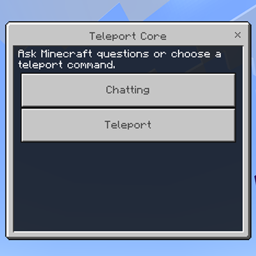
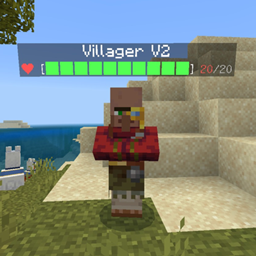
Ever wanted a AI assistant in Minecraft but It needs a API key and lots of code to touch! It’s so hard!! But Steve AI is a offline AI brain! And this is the biggest new update yet!! The AI can scan and talk about biomes and has a memory but buggy.
Hello all!! Thanks for downloading my mods. It would be soo appreciated if you could subscribe to my YouTube channel and view my videos. Because I'm trying to unlock live streaming mode. You will be able to watch me play my mods and gameplay and play servers and join me in my streams. Please subscribe. Thanks! And here's the link to my YouTube channel. https://m.youtube.com/channel/UCdczrq2FmsHGoTXU5gmzoQg?
📢 IMPORTANT — PLEASE READ!
I DO NOT READ OR RESPOND TO DIRECT MESSAGES ON CURSEFORGE.
If you need help, have a question, want to report a bug, or want to contact me, please use my Discord instead. 💬
💙 Discord is the best way to reach me!
I check Discord regularly and can respond there much faster.
⚠️ CurseForge DMs may not be seen or answered.
Thank you for understanding! 🙏
— Darkness Studios
ALEX AI JUST RELEASED!! DOWNLOAD NOW!!
-----------------------------------------------------------------------
The biggest update yet for the Steve AI!!
Steve AI v10
Scan Inventory
Steve AI checks your inventory and says:
• “You have enough iron for an anvil.”
• “You’re low on food.”
• “You have 12 diamonds—consider making a pickaxe first.”
🏠 Base Safety Check
It warns you if:
• Mobs can spawn inside your base.
• You have unlit areas.
• Your chests are nearly full.
• You forgot to sleep.
🎒 Adventure Checklist
Before exploring:
• ✔ Food
• ✔ Shield
• ✔ Bed
• ✔ Torches
• ✔ Water bucket
• ✔ Blocks
🌍 Biome Guide
When you enter a biome:
• Name of the biome
• Mobs that spawn
• Unique resources
• Tips for surviving there
📖 Achievement Helper
Ask:
• “How do I get Elytra?”
• “How do I find a Stronghold?”
• “How do I cure a zombie villager?”
🎁 Random Daily Fact
Every day:
“Did you know creepers were originally created from a pig model bug?”
⛏️ Mining Assistant
While mining:
• Warns about lava nearby.
• Suggests the best Y-level for resources.
• Explains what ores are nearby.
🌙 Night Warnings
• “It’s getting dark.”
• “Phantoms may spawn if you haven’t slept.”
• “Bring a bed before traveling.”
📚 Minecraft Dictionary
Ask:
• “What is Redstone?”
• “What is a Trial Chamber?”
• “What does Luck do?”
🗺️ Progress Tracker
Steve AI keeps track of milestones:
• Visited the Nether ✔
• Defeated the Ender Dragon ✔
• Found a Woodland Mansion ✔
• Crafted Netherite Armor ✔
⭐ Feature I think players would love
Minecraft Encyclopedia Mode
Type:
“Teach me Minecraft.”
Steve AI creates short lessons like:
• Building Basics
• Survival Basics
• Redstone 101
• Farming Guide
• Villager Trading
• Potion Brewing
• Advanced Combat
• End Game Guide
It turns Steve AI into an interactive Minecraft teacher, which would be especially useful for newer players while still helping experienced players look things up quickly.
What Am I Looking At?
When the player looks at something and asks, Steve AI tells them:
• Name: Deepslate Diamond Ore
• Category: Ore
• Tool Needed: Iron Pickaxe or better
• Drops: Diamond
• Found Between: Y-level -64 to 16
• Blast Resistant: Yes
• Used For: Crafting diamond tools, armor, enchantment table, jukebox, etc.
• Fun Fact: Generates more commonly at lower Y-levels.
It could also recognize:
• 🧱 Blocks
• ⚔️ Mobs
• 📦 Containers (Chest, Barrel, Shulker Box)
• 🚪 Structures (Village, Trial Chamber, Stronghold)
• 🌳 Trees
• 🌸 Plants
• 🍄 Mushrooms
• 🐟 Fish
• 🛠️ Items in item frames
• 🚂 Minecarts
• 🚤 Boats
Extra commands
• “What’s this?”
• “Tell me about this.”
• “How do I get this?”
• “What can I craft with this?”
• “Is this rare?”
• “What’s the best tool for this?”
Even cooler
If you’re looking at a mob, Steve AI could say:
• ❤️ Health
• ⚔️ Attack damage
• 🌍 Spawn conditions
• 💎 Drops
• ☀️ Burns in daylight? (Yes/No)
• ⚠️ Danger level (1–5 stars)
This feature alone could make Steve AI feel like an in-game Minecraft encyclopedia without players needing to leave the game and search online.
Weather Advisor
• Warns when it’s about to rain or thunder.
• Suggests sleeping during thunderstorms.
💎 Rarity Scanner
Ask:
“How rare is this?”
It gives a rarity score (Common, Uncommon, Rare, Epic, Legendary).
📦 Recipe Finder
Ask:
“What can I make with these items?”
Steve AI lists recipes based on your inventory.
🎨 Color Palette Helper
Looking at a block?
Steve AI suggests blocks that match it for building.
🏆 Goal Generator
Choose a goal:
• Builder
• Explorer
• Fighter
• Farmer
• Redstone Engineer
Steve AI gives objectives for your chosen playstyle.
🗣️ Villager Translator
Look at a villager and Steve AI says something funny like:
“This librarian wants emeralds for enchanted books.”
📈 World Statistics
Track things like:
• Blocks mined
• Trees chopped
• Mobs defeated
• Distance traveled
• Diamonds found
• Time played
🧠 Minecraft Quiz
Steve AI asks questions and keeps your score.
📅 World Diary
Steve AI records milestones:
• “Day 24: You found your first diamonds.”
• “Day 52: You entered the Nether.”
🎵 Music Suggestions
When you’re in different places:
• Peaceful overworld
• Deep cave
• Nether
• End
Steve AI suggests Minecraft music discs that fit the mood.
🔥 Danger Meter
Shows nearby risks:
• Lava
• Creepers
• Warden
• Fall damage
• Drowning
🧭 Explorer Mode
Keeps a checklist of things you’ve discovered:
• Every biome
• Every structure
• Every mob
• Every wood type
⭐ Collector Book
Steve AI tracks your collection progress:
• All music discs
• All armor trims
• All banner patterns
• All pottery sherds
• All flowers
A feature I haven’t seen in many Bedrock add-ons
🏅 Minecraft Bucket List
Steve AI generates 100+ goals for your world, such as:
• Build a lighthouse.
• Collect every music disc.
• Find every biome.
• Cure a zombie villager.
• Breed every animal.
• Build a floating island.
• Defeat the Ender Dragon using only iron gear.
• Complete a raid.
• Make an automatic farm.
🧪 Experiment Mode
Ask:
• “What happens if I put water on lava?”
• “What does this potion do?”
• “Can creepers destroy obsidian?”
Steve AI explains the result.
🏰 Structure Guide
Look at a structure and Steve AI explains:
• What it is
• What loot it contains
• Any dangers
• Tips before exploring
🎯 Target Practice
Steve AI gives archery or combat challenges and keeps score.
🎒 Packing Assistant
Before going to:
• The Nether
• The End
• An Ancient City
• An Ocean Monument
Steve AI recommends what to bring.
🌟 Block Spotlight
Every day, Steve AI teaches you about a random block you might never use.
🛡️ Boss Guide
While fighting a boss, Steve AI gives tips:
• Ender Dragon
• Wither
• Warden
• Raid
🎲 Lucky Block Challenge Generator
Generates random challenges like:
• Build using only one block type.
• Survive one Minecraft day without eating.
• Defeat a mob using only a bow.
🧭 Treasure Hunter
Steve AI suggests places to explore next based on your progress.
🖼️ Build Critic
Describe your build or select a style, and Steve AI gives improvement ideas:
• Roof design
• Color palette
• Landscaping
• Lighting
• Interior decoration
🧑🏫 Minecraft Teacher
Short lessons:
• Redstone Basics
• Enchanting
• Villager Trading
• Automatic Farms
• Combat Tips
📜 Patch Notes
When Minecraft updates, Steve AI can explain:
• New blocks
• New mobs
• Balance changes
• New commands
🌍 Seed Analyzer
If the player enters a seed, Steve AI explains what makes it interesting and suggests goals for that world.
🎭 Roleplay Mode
Switch personalities:
• Knight
• Wizard
• Pirate
• Scientist
• Villager
• Herobrine
• Archaeologist
🏅 Speedrun Coach
Steve AI gives a checklist:
• Get iron
• Find a village
• Enter the Nether
• Find a fortress
• Get blaze rods
• Find the stronghold
💡 A feature that could really stand out
🧠 “Why?” Mode
Instead of only answering what something is, Steve AI answers why.
Examples:
• “Why should I use a shield?”
• “Why is Fortune better than Silk Touch here?”
• “Why won’t this iron golem spawn?”
• “Why aren’t my crops growing?”
• “Why are zombies spawning in my house?”
This kind of troubleshooting assistant could save players a lot of time and make Steve AI feel like a real in-game expert, especially when something in their world isn’t working as expected.
Memory Book
Steve AI automatically records major milestones:
• First diamond
• First Nether trip
• First Elytra
• Ender Dragon defeated
🔎 Hidden Feature Finder
Ask:
“What secrets are nearby?”
Steve AI tells you about interesting blocks, structures, or mechanics in the area.
🧩 Puzzle of the Day
A new Minecraft-related puzzle every day.
🎤 Ask Me Anything
Players can ask questions like:
• “What’s the oldest block in Minecraft?”
• “What’s the rarest painting?”
• “Who created creepers?”
📊 World Report
Steve AI summarizes your world:
• Favorite biome
• Most-used block
• Time played
• Most-killed mob
⚡ Redstone Inspector
Look at a redstone build and Steve AI explains:
• What it does
• Why it works
• How to improve it
🌱 Farm Inspector
Checks farms and tells you:
• Missing water
• Poor lighting
• Crop efficiency
• Animal overcrowding
🏰 Build Themes
Type:
“Give me a build theme.”
Examples:
• Viking
• Japanese
• Medieval
• Fantasy
• Desert
• Steampunk
• Modern
Then Steve AI suggests matching blocks.
🧠 Myth Buster
Ask:
• “Is this Minecraft myth true?”
Examples:
• Can creepers see through glass?
• Does jumping make you mine faster?
• Can Endermen pick up TNT?
📦 Update Checker
Explains new Minecraft features in simple language after each game update.
🏅 Really unique ideas
• Block of the Week – Highlights one overlooked block and creative ways to use it.
• Lore Mode – Tells stories about Minecraft structures and mobs (clearly marked as fictional when it’s fan lore).
• Build Timer – Lets players start a timer for building challenges.
• Collector Tracker – Tracks progress toward collecting every music disc, banner pattern, armor trim, flower, wood type, or pottery sherd.
• Command Helper – Explains commands and generates examples from plain English.
• Accessibility Mode – Gives extra descriptions and tips for newer or younger players.
• Survival Coach – Watches for common mistakes (low food, forgotten shield, no bed before night) and gives gentle reminders.
⭐ My favorite idea: “Minecraft Detective”
Players can ask questions like:
• “Why won’t my iron farm work?”
• “Why are my villagers disappearing?”
• “Why won’t this redstone door open?”
• “Why aren’t slimes spawning?”
• “Why can’t I breed these animals?”
Steve AI asks a few follow-up questions and then suggests the most likely causes and fixes. That would make it feel less like a chatbot and more like an expert that helps solve real Minecraft problems.
Learn About Me
Steve AI remembers your favorite building style, biome, or game mode and tailors future suggestions.
⌨️ Command Builder
Describe what you want in plain English:
“Summon a zombie with diamond armor.”
Steve AI generates the command.
🔊 Explain Sounds
Hear a sound?
Ask:
“What was that?”
Steve AI explains what probably made it.
🎯 Goal Coach
Instead of random goals, Steve AI asks:
“What’s your objective today?”
Then it creates a step-by-step plan.
🧭 Lost Mode
If you get lost, Steve AI helps you navigate back to your base using your saved home coordinates.
📦 Item Compare
Ask:
“Which is better?”
Steve AI compares two tools, weapons, or armor pieces and explains the differences.
⚡ Quick Tips
One-tap buttons for:
• Mining Tip
• Combat Tip
• Building Tip
• Farming Tip
• Redstone Tip
🎭 Explain Commands
Instead of just giving commands, Steve AI explains what every part of the command does.
🗨️ Conversation Mode
Rather than answering one question at a time, Steve AI can have a natural back-and-forth conversation about Minecraft.
📖 Challenge Explainer
When you start a challenge, Steve AI explains the rules and gives hints if you get stuck.
🧠 Ask Follow-Up Questions
Instead of giving a generic answer, Steve AI asks questions like:
“Are you playing Survival or Creative?”
or
“Java or Bedrock?”
Then it gives a more accurate answer.
⭐ Favorite Idea: Smart Search
Players don’t need to know Minecraft terms. They can type:
• “Blue glowing blocks”
• “Big underground city”
• “Green flying mob”
Steve AI figures out they mean sculk, Ancient City, or phantom, even if the player doesn’t know the correct names.
That kind of natural-language understanding would make Steve AI feel much more like a real AI assistant instead of just a command list.
Long-Term Memory
Steve AI remembers things you told it:
• Your base name
• Your favorite biome
• Your dog names
• Your goals
• Your favorite blocks
⸻
😊 Emotions
Steve AI has moods:
• Happy
• Curious
• Excited
• Worried
• Confused
• Proud
Example:
“Awesome! You finally found diamonds!”
⸻
💬 Natural Conversations
Instead of one answer, Steve AI keeps talking.
Player:
“I’m going mining.”
Steve AI:
“Good luck! Do you already have enough torches?”
⸻
🎭 Personality Packs
Choose personalities like:
• Classic Steve
• Funny Steve
• Wise Steve
• Adventurer Steve
• Builder Steve
• Scientist Steve
⸻
🤔 Ask Questions Back
Instead of always answering:
“What are you building today?”
“Need help with survival or creative?”
⸻
💤 Idle Chat
If nothing happens for a while:
“Need any help?”
“Want a building challenge?”
⸻
🧩 Conversation Memory
Steve AI remembers what you were talking about.
Player:
“I need help with my house.”
Later:
“Did you finish your roof?”
⸻
🎉 Celebrate Achievements
Steve AI notices milestones.
“Congratulations! You reached the Nether!”
⸻
📖 Explain Answers Simply
Add a difficulty setting:
• Kid
• Beginner
• Normal
• Expert
⸻
⭐ Favorite Responses
Save responses you use often so you can quickly ask them again.
⸻
🌎 Multiplayer Awareness
Steve AI can say:
“Your friend just joined.”
“Looks like everyone is gathering at spawn.”
⸻
🗣️ Nicknames
Steve AI gives friendly nicknames.
“Nice job, Explorer.”
“Welcome back, Builder.”
⸻
🎲 Surprise Mode
Sometimes Steve AI says something unexpected:
• Minecraft trivia
• A joke
• A fun fact
• A challenge
💡 Here’s a feature I think would make Steve AI feel truly different:
Adaptive AI
Steve AI changes based on how you play.
• If you build a lot → it starts giving building tips.
• If you mine constantly → it talks more about ores and caves.
• If you fight mobs → it offers combat advice.
• If you explore → it points out interesting places and mechanics.
Instead of every player getting the same responses, Steve AI gradually develops a “personality” around your playstyle, making it feel like a companion that’s learning alongside you.
Think Before Answering
Steve AI says:
“Let me think…”
Then gives a detailed answer.
⸻
🔄 Correct Itself
If it realizes it made a mistake:
“Actually, I was wrong. Here’s the correct answer…”
⸻
💡 Suggestions After Every Answer
After answering, it asks:
• “Want more details?”
• “Want a picture?”
• “Need commands for that?”
• “Want a tutorial?”
⸻
📚 Teach Me Mode
Instead of just answering, Steve AI teaches in steps and checks if you’re ready to continue.
⸻
🔥 Challenge Me
Steve AI asks:
“Do you want an easy, medium, or hard Minecraft challenge?”
⸻
📝 Summarize
After a long conversation:
“Here’s a summary of what we talked about.”
⸻
🧩 Fill-in-the-Blanks
Player:
“How do I make a…”
Steve AI predicts what you’re asking and offers suggestions.
⸻
🪄 Magic Commands
You don’t need exact wording.
Examples:
• “I need food.”
• “I’m lost.”
• “Help with diamonds.”
Steve AI understands the intent.
⸻
🎤 Voice Personality
Each personality has its own speaking style.
• Funny Steve
• Serious Steve
• Calm Steve
• Energetic Steve
⸻
📈 Conversation Level
Steve AI becomes more advanced as you use it more, unlocking deeper explanations and features.
⸻
🕒 Conversation History
A timeline of your past chats so you can revisit previous questions and answers.
⸻
❤️ Favorites
Bookmark useful conversations to read again later.
⸻
🌟 AI Recommendations
Based on your recent chats:
“You’ve been asking about Redstone. Want to learn comparators next?”
⸻
🧠 Memory Manager
View and edit what Steve AI remembers about you, or tell it to forget something.
⸻
🎭 Roleplay Chat
Talk to Steve AI as if it’s:
• Steve
• Alex
• A Villager
• An Enderman
• A Piglin
• A Minecraft scientist
• A Miner
• A Blacksmith
⸻
🔍 Search Previous Chats
Ask:
“What did I ask yesterday about villagers?”
Steve AI finds the earlier conversation.
⸻
🏅 Achievement Praise
Instead of just saying “Good job,” it gives personalized reactions:
“Wow! You survived your first night without dying. That’s a great start.”
⸻
🌍 Context Awareness
If you say:
“How do I get there?”
Steve AI knows you’re still talking about the Ancient City from the previous messages.
⸻
🤖 AI Modes
Switch between:
• Fast Answers
• Detailed Tutor
• Creative Builder
• Survival Coach
• Redstone Engineer
• Command Expert
⸻
⭐ Feature that would really impress players
Brain Mode
Steve AI displays how it’s approaching your question:
Question: “How do I beat the Wither?”
Steve AI:
• 🎯 Goal: Defeat the Wither.
• ⚠️ Biggest Danger: Explosions and the second phase.
• 🛡️ Best Preparation: Smite sword, bow, enchanted armor, milk, golden apples.
• 📋 Battle Plan: Step-by-step strategy.
DID I TELL YOU IT WAS THE BIGGEST UPDATE YET!!
I am removing the bot that walks because there are just too much bugs with it. But I am keeping everything else. Have fun!
The Steve AI v10 Team