Smooth FreeCam

Leave your body standing still and fly the camera freely around the world with one simple command, then return to your body with another.

FreeCam lets you step out of your character and look around the world freely. When you turn it on, your body stays frozen exactly where you were standing, with your name shown above it, while your camera flies wherever you want. You can move through walls and blocks, explore caves and buildings from the inside, take great looking screenshots, or check what is happening around your base without walking there.
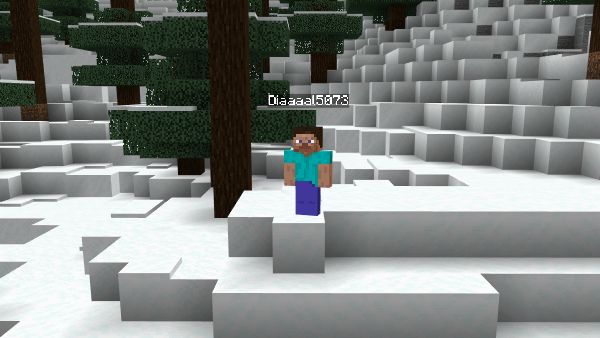

When you are done, turn it off and you return to your body instantly, in the same spot, facing the same direction and in the same game mode you were in before. Nothing about your character changes while you explore.

The frozen body uses the classic Steve look. If you leave the world while the free camera is on, you will be returned to your body the next time you join.

The commands work in any world, even when cheats are turned off, so every player can use them.

How to activate the add-on

1. Open the add-on file and let the game import it.
2. Create a new world or edit an existing one.
3. Go to Behavior Packs and activate FreeCam. The Resource Pack will be added automatically.
4. Enter the world. A welcome message will appear on your screen the first time you join.

How to use it

1. Open the chat and type /freecam:on to leave your body and start flying the camera.
2. Move around with your normal movement controls. Jump to go up and crouch to go down.
3. Type /freecam:off to return to your body.
4. You can also type /freecam:freecam to switch the free camera on or off with one command.

Smooth FreeCam Team

profile avatar
Owner
Forgeborn tier icon
  • 40
    Followers
  • 77
    Projects
  • 275.7K
    Downloads

Youtuber with over than 1,000,000 followers across social platforms. CEO of ModMaker App

More from ZerwView all

  • Sit project image

    Sit

    Sit on any block in the world. Just sneak and right click to take a seat on stairs, slabs, logs, grass and more.

    • 1.2K
    • November 17, 2026
  • Mob Sunscreen project image

    Mob Sunscreen

    Undead mobs no longer burn in sunlight, so zombies, skeletons and their relatives stay alive all day.

    • 68
    • November 15, 2026
  • Auto Elytra project image

    Auto Elytra

    Keep a pair of elytra in your inventory and fly like normal. Your chestplate swaps to elytra on its own when you jump off a high place, and comes back the moment you land.

    • 13
    • November 13, 2026
  • Easy Dynamic Light project image

    Easy Dynamic Light

    Hold a torch, lantern or any glowing block in your hand and it lights up the area around you as you walk. You can also hold torches, lanterns, candles and other small light items in your off hand.

    • 257
    • November 9, 2026
  • Sit project image

    Sit

    Sit on any block in the world. Just sneak and right click to take a seat on stairs, slabs, logs, grass and more.

    • 1.2K
    • November 17, 2026
  • Mob Sunscreen project image

    Mob Sunscreen

    Undead mobs no longer burn in sunlight, so zombies, skeletons and their relatives stay alive all day.

    • 68
    • November 15, 2026
  • Auto Elytra project image

    Auto Elytra

    Keep a pair of elytra in your inventory and fly like normal. Your chestplate swaps to elytra on its own when you jump off a high place, and comes back the moment you land.

    • 13
    • November 13, 2026
  • Easy Dynamic Light project image

    Easy Dynamic Light

    Hold a torch, lantern or any glowing block in your hand and it lights up the area around you as you walk. You can also hold torches, lanterns, candles and other small light items in your off hand.

    • 257
    • November 9, 2026