Simple Elevators (2.0)
- By
A simple elevator add-on that adds new elevator blocks. Place one below your floor and another above it, stand on it, jump, and voilà! (If you shift you'll go down, and there's no more need to jump while shifting in v2.0+)
IMG_20260926_044159.png
IMG_20260926_044123.png
IMG_20260926_044016.png
Description
Simple Elevators
Add elevator blocks to your world and forget about boring, slow stairs.
Simple Elevators is a Minecraft Bedrock add-on that adds vertical transport blocks. Place an elevator, stand on it, and jump or sneak to move up or down instantly. No commands, no redstone, no setup.
Important!
Version 2.0 is a new add-on, not an update to 1.0.
This release uses a new UUID and follows semantic versioning, so Minecraft registers it as a completely separate add-on from 1.0. It is safe to install in worlds that already have 1.0, because 2.0 does not replace the old blocks.
The old
ajr:elevatorblock from 1.0 (a single elevator with a default range of 30 blocks) still exists and works. However, you are encouraged to replace old elevators with the new tiered blocks for a better progression experience. This is recommended but not required.
Features
- Five elevator tiers: Copper, Iron, Gold, Diamond, and Netherite.
- Three reinforced variants for Copper, Iron, and Gold.
- Each tier has its own vertical range.
- Reinforced elevators add +4 blocks to their base range and are immune to explosions.
- Diamond and Netherite elevators are blast resistant by default.
- Works with or without a floor block placed on top.
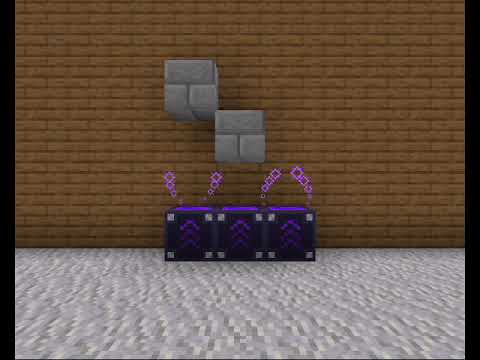
- Visual feedback through helicoid particles when an elevator is active.
- Compatible with shift toggle.
Elevator tiers
| Tier | Range | Blast Resistant | Notes |
|---|---|---|---|
| Copper | 8 blocks | No | Basic tier |
| Iron | 16 blocks | No | |
| Gold | 24 blocks | No | |
| Diamond | 34 blocks | Yes | Blast resistant by default |
| Netherite | 40 blocks | Yes | Blast resistant by default |
Reinforced variants
Reinforced elevators are upgrades for Copper, Iron, and Gold. They add +4 blocks to the base range and grant blast resistance.
| Reinforced variant | Range | Blast Resistant |
|---|---|---|
| Reinforced Copper | 12 blocks | Yes |
| Reinforced Iron | 20 blocks | Yes |
| Reinforced Gold | 28 blocks | Yes |
Diamond and Netherite elevators already have blast resistance and cannot be reinforced further.
How to use
Basic setup
- Place an elevator block.
- (Optional) Place a normal block on top of the elevator to use it as a floor. This hides the elevator and makes the setup look cleaner.
- Stand on the elevator or on the floor block above it.
Controls
- Jump to go up.
- Sneak to go down.
The elevator activates on the press event, not on release.
- With default sneak controls (hold to sneak), you go down when you press the sneak key.
- With shift toggle enabled, pressing the sneak key activates the elevator once. If you press the sneak key again to stop sneaking while still standing on an active elevator, the elevator activates again and attempts to send you down (if a valid destination exists below).
Each sneak press triggers a single activation. Holding the key after the press does nothing.
Range rules
You will only be teleported if there is another elevator block within the vertical range of the elevator you are standing on.
The range is determined by the origin elevator (the one under your feet), not by the destination. This means:
- A Diamond elevator can send you up to a Copper elevator 30 blocks above, because 30 is within the Diamond range (34).
- A Copper elevator cannot send you back down to a Diamond elevator 30 blocks below, because 30 is outside the Copper range (8).
Tiers do not need to match. Only the origin elevator's range matters.
Destination requirements
The destination elevator must be unblocked. An elevator is considered unblocked when it matches one of the following patterns:
Without a floor block:
[AIR]
[AIR]
[ELEVATOR]
With a floor block:
[AIR]
[AIR]
[FLOOR]
[ELEVATOR]
Both patterns require two air blocks above the elevator or above the floor.
Invalid patterns
If there is not exactly two air blocks above the destination, the teleport will not happen. For example, this will not work:
[BLOCK]
[AIR]
[ELEVATOR]
Here there is a solid block two spaces above the elevator, so the destination is blocked.
Visual feedback
An active elevator emits helicoid particles one or two blocks above it, depending on whether a floor block was placed. Particles only indicate that the elevator itself has valid free space above it. They do not detect or confirm that a valid destination elevator exists in range.
Recipes
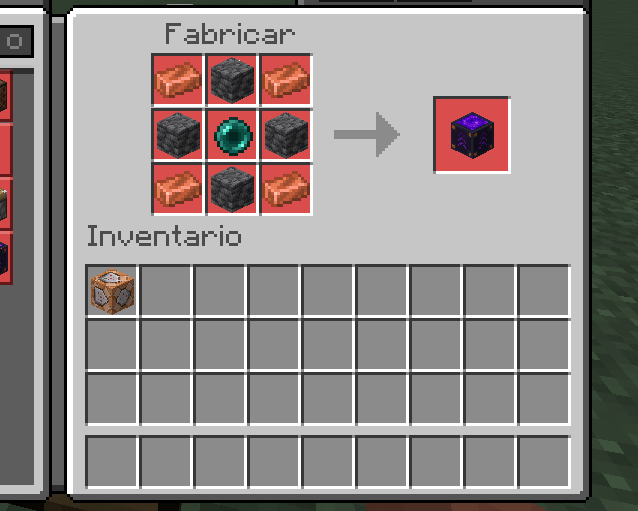
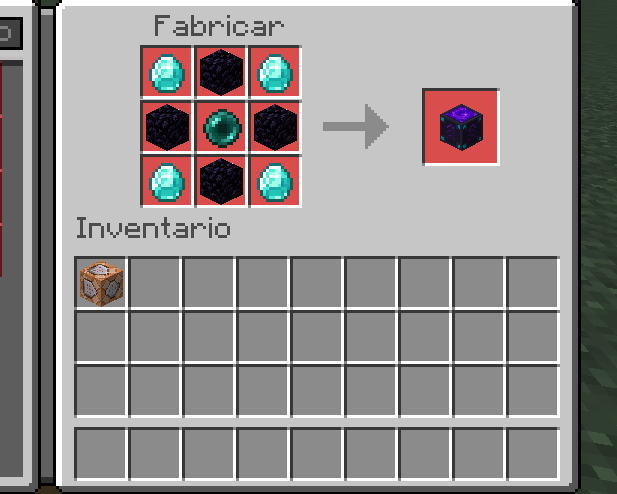
Elevator
[I] [B] [I]
[B] [P] [B]
[I] [B] [I]- I: Tier material (see table below)
- B: Base material (see table below)
- P: Ender Pearl
Base materials
| Tier | Base material |
|---|---|
| Copper | Deepslate (not cobbled) |
| Iron | Deepslate (not cobbled) |
| Gold | Blackstone |
| Diamond | Obsidian |
| Netherite | Obsidian |
Tier materials
| Tier | Material |
|---|---|
| Copper | Copper Ingot |
| Iron | Iron Ingot |
| Gold | Gold Ingot |
| Diamond | Diamond |
| Netherite | Netherite Ingot |
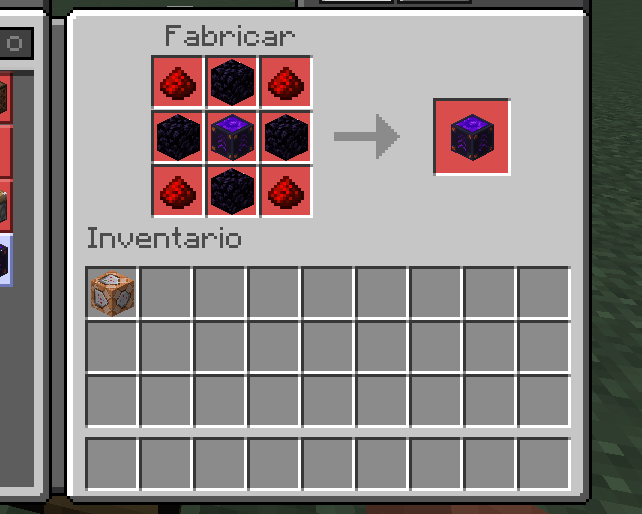
Reinforced Elevator (upgrade)
[R] [O] [R]
[O] [E] [O]
[R] [O] [R]- R: Redstone Dust
- O: Obsidian
- E: Elevator (Copper, Iron, or Gold)
Upgrading an elevator adds +4 blocks to its range and grants blast resistance.
Installation
- Download the
.mcaddonfile. - Open it with Minecraft Bedrock Edition.
- Enable both the behavior pack and the resource pack in your world settings.
Localization
This add-on supports multiple languages. Translations are maintained by the community in the simple-elevators-localization repository.
Contributions to that repository are reviewed and merged continuously, but they are only bundled into the .mcaddon published on CurseForge when a release includes breaking or major changes worth shipping. This means community translations may not appear in the CurseForge build immediately after they are merged.
To submit a translation or report an issue with one, see the contribution guidelines in the localization repository.
Support
- Ko-fi: ko-fi.com/ajr_uribe
- Discord Server: discord.gg/DZXNxywkbt
Credits
Created by @ajr-uribe.
Thanks to all translators who make it possible for Simple Elevators to reach more people around the world.
Simple Elevators (2.0) Team

![[Fire] AurorianCraft: Realistic Survival Addon project image](https://media.forgecdn.net/avatars/thumbnails/1562/917/256/256/639013913945430139.png)