🧭 Sethome Compass Addon - The Ultimate Home Management System
Select game versions on the right to choose the non-beta apis version or beta-api version with commands!
🎯 What This Addon Does
The Sethome Compass Addon introduces a sophisticated home management system built around a special compass item. When you spawn into any world with this addon enabled, you'll receive a beautifully crafted "Sethome Compass" that becomes your gateway to instant travel and location management.
Your homes are stored safely using Minecraft's world dynamic properties, ensuring they never disappear and are always accessible across game sessions, dimensions, and world reloads.
🧭 The Compass System
-
Every player receives a "Sethome Compass" upon first spawn with custom styling and lore
-
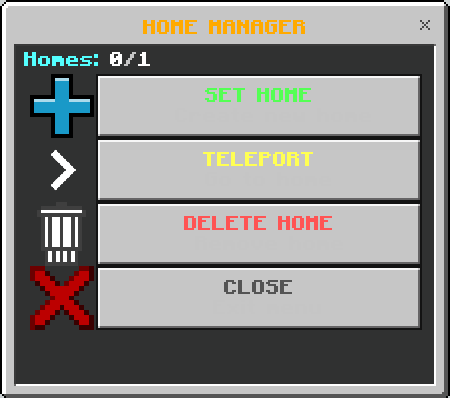
Right-click the compass to open the professional GUI interface
🏠 Complete Home Management
-
Set Home: Create homes with custom names at your current location
-
Instant Teleportation: Travel to any saved home with a single click
-
Smart Deletion: Remove homes with confirmation dialogs to prevent accidents
-
Cross-Dimensional Support: Save homes in Overworld, Nether, End, and custom dimensions
👑 Advanced Admin System
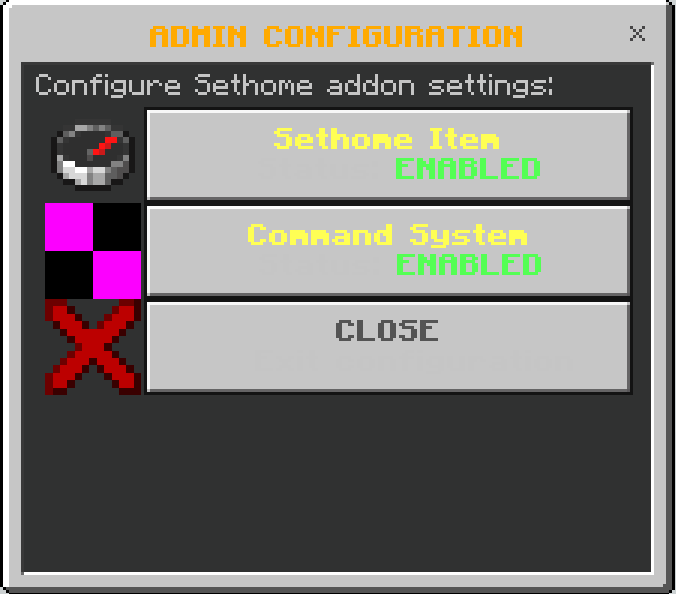
- /tag @a (do this when all players are online, or do it in a repeating command block) add homes<number of homes> (e.g /tag @a add homes5)
- /tag @s remove <previous_tag>: Remove old limit tags before setting new ones
- Default limit is 1 home, admins can increase to any number
- /tag @s add admin: Players with "admin" tag automatically gain access to admin commands
- !config : Use the command and close chat to open config menu (make sure tag admin 👆)
🎮 How to Use
For Players:
-
Getting Started: Spawn into your world and receive the Sethome Compass automatically
-
Opening the GUI: Right-click the compass anywhere to open the interface
-
Setting Homes: Click "Set Home" and give it a memorable name
-
Traveling: Click "Teleport" and select your desired home
Cleaning Up: Use "Delete Home" to remove unwanted locations
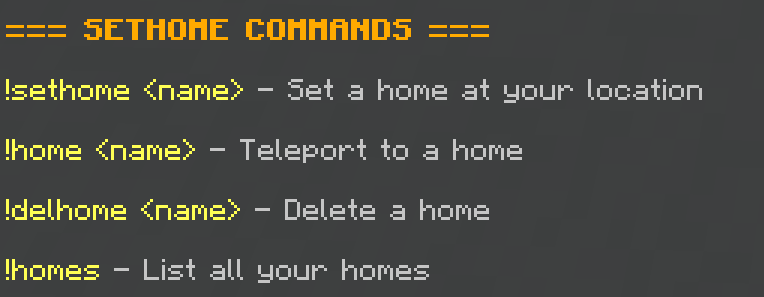
Commands: (Beta Apis Version only)
1. !help sethome (for command list)
2. !sethome <name>
3. !delhome <name>
4. !home <name>
🔧 Technical Details
-
Bedrock 1.21.80+ Compatible: Works with the latest Minecraft Bedrock version and older
-
No Experimental Features: An option to use only stable Minecraft API for maximum compatibility
-
Cross-Platform: Works on mobile, console, and PC versions
-
Persistent Storage: Uses world dynamic properties for reliable data storage
🌟 Why You Need This Addon
Getting lost in Minecraft worlds can be really annoying, and writing down coordinates all the time gets tiresome. This addon makes it easier to find your way around. If you're playing in survival mode and need to find your house or farm quickly, or if you build a lot in creative mode, this compass system helps you navigate easily.
The Sethome Team