Real Time
Real Time brings real-world time into Minecraft Bedrock, making your world react to the actual time, date, weekday, weather, and special occasions.
⏰ Smart Clock
The Smart Clock shows the current real-world time, date, weather, moon phase, and upcoming events.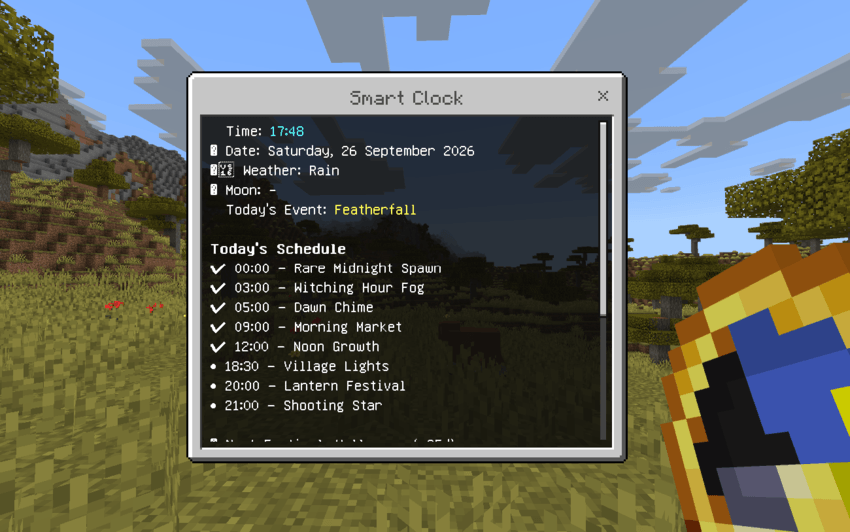
How to open: Hold a Clock and sneak twice quickly.
🌍 Real-Time Events
The world changes throughout the day with different events:
-
05:00 — Dawn Chime: Start your day with a morning chime.
-
09:00 — Morning Market: A special market event begins.
-
12:00 — Noon Growth: Crops receive a special growth effect.
-
18:30 — Village Lights: Villages enter their evening phase.
-
20:00 — Night Festival: A nighttime event begins.
-
21:00 — Shooting Star: Look at the sky for a special event.
-
00:00 — Rare Midnight Spawn: A rare nighttime event may occur.
-
03:00–04:00 — Witching Hour: Strange fog appears during the late night.
📅 Weekly Events
Each day of the week can trigger different effects and activities, giving every day a slightly different experience.
Examples include:
-
Market discounts
-
Special daily effects
-
Different activities based on the current weekday
🎃 Real-World Festivals
Real Time also recognizes several real-world holidays:
-
Halloween
-
Christmas
-
New Year
Special events and effects are activated around these occasions.
🌦️ Dynamic World Information
The addon keeps track of real-world information and displays it directly in Minecraft.
The Clock can provide information such as:
-
Current real-world time
-
Current date and weekday
-
Weather information
-
Moon phase
-
Current event
-
Upcoming festival
The vanilla Clock can also display real-time information through its name and lore.
🌐 Language Support
Real Time currently supports 10 languages:
-
English
-
Vietnamese
-
Chinese
-
Spanish
-
Russian
-
Portuguese
-
French
-
German
-
Japanese
-
Korean
🕐 Timezone Settings
Choose your timezone from UTC -12 to UTC +14 so the addon can match your local real-world time.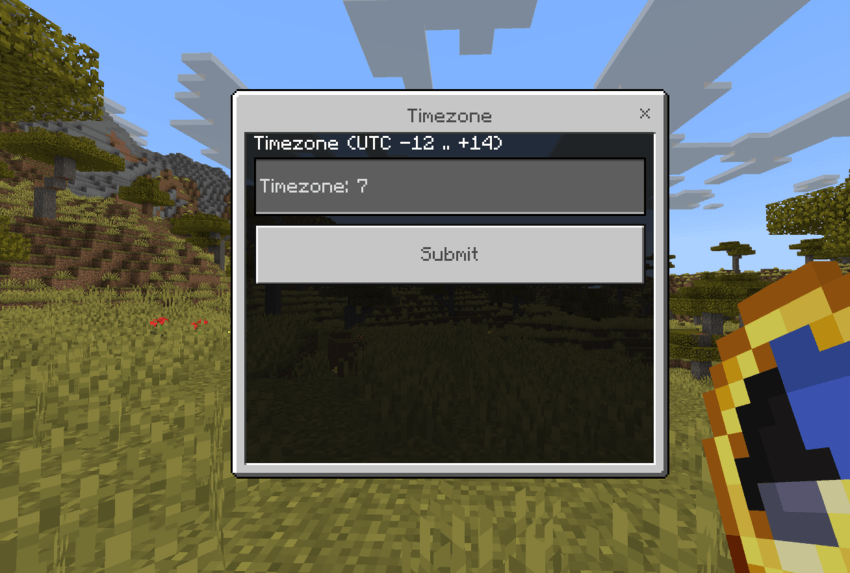
📦 Installation
-
Import the Real Time Behavior Pack into Minecraft Bedrock.
-
Activate the pack in your world.
-
Make sure the required scripting APIs are available.
-
Obtain a Clock to access the Smart Clock features.
Recipe
You can craft a Clock using:
1 Dirt → 1 Clock
⚙️ Compatibility
-
Minecraft Bedrock Edition
-
Uses
@minecraft/server -
Uses
@minecraft/server-ui -
Supports multiple languages
-
Designed for worlds where real-time synchronization is desired
Credits
Created by HuyNacl
Real Time-Living World Team


Owner