Description
Real Elevator
You want to add an elevator to your world but you're tired of all the "elevators" that are really just teleporters? You found your Add-On.
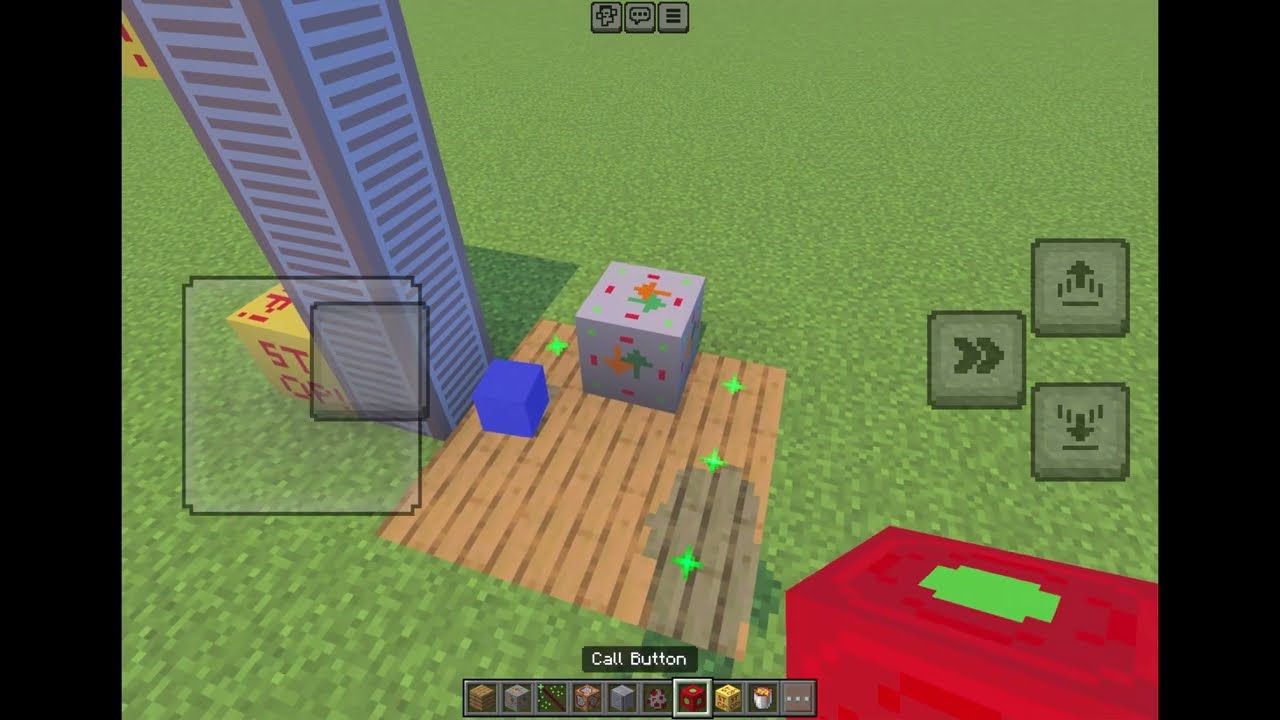
Real Elevator is a player-buildable lift for Minecraft Bedrock / Pocket Edition. You construct a shaft from custom blocks, dock a platform to a cart, and the whole thing physically rides block-by-block to the floor you pick. Stand on it and ride along. Call it to your floor with a button, just like a real elevator.
This is a Bedrock Add-On (behavior + resource pack). It is not a Java mod and needs no Forge/Fabric.
What you build with
- Vertical Rail - stack it into a continuous column to define the shaft.
- Floor Marker - place one next to the rail at every height you want to stop at.
- Cart (spawn egg) - the invulnerable anchor the platform is tied to.
- Controller - sits on the platform; tap it with an empty hand to open an Up / Down menu.
- Call Button - place it next to the shaft at a floor and tap to summon the elevator to that floor, even when it is parked somewhere else. Flashes black when the call is accepted, red when it cannot come.
- Dock Tool - use it on a block to attach (dock) it to the nearest cart. Docked blocks show green particles while the tool is held.
How it rides
Motion is discrete: the platform, the cart, and any player standing on it move one block at a time up to the next floor marker. A trip stops early if something blocks the way.
Quick start in-game
- Stack Vertical Rail blocks into a vertical column - that is your shaft.
- Place Floor Marker blocks next to the rail at each stop height.
- Place your platform block(s) and set a Cart on top, right next to the rail.
- Hold the Dock Tool and tap each platform block and the Controller to dock them (green particles confirm).
- Put the Dock Tool away, then tap the Controller with an empty hand and pick Up or Down.
- Optional: place a Call Button next to the shaft at any floor and tap it to call the elevator.
Installation
- Download the
.mcaddonfile below and open it - Minecraft imports it automatically. - It adds two packs: a behavior pack and a resource pack ("Real Elevator (Resources)").
- When you create or edit a world, activate the Real Elevator behavior pack. When Minecraft asks to also enable the required resource pack, confirm with Yes.
- Important: make sure both packs are active. If blocks appear without textures, go to the world's Resource Packs tab and activate "Real Elevator (Resources)" manually.
Requirements & notes
- Minecraft Bedrock 1.21.90 or newer.
- No experimental toggles required.
- Works in singleplayer and on Bedrock Dedicated Servers / Realms.
- Status: public beta (v0.9.0). Tested live with multiple players. Feedback and bug reports are very welcome.
Changelog (File upload field)
First public beta:
- Buildable shaft, dockable platform, ride up/down.
- Controller menu (Up / Down).
- Call button to summon the elevator to a floor.
- Fixed add-on import so the resource pack installs correctly alongside the behavior pack.
Deutsch
Du willst einen Aufzug in deine Welt bauen, hast aber genug von all den "Aufzuegen", die in Wirklichkeit nur Teleporter sind? Dann ist dieses Add-On genau richtig.
Real Elevator ist ein selbst baubarer Aufzug fuer Minecraft Bedrock / Pocket Edition. Du baust einen Schacht aus eigenen Bloecken, dockst eine Plattform an einen Cart an, und das Ganze faehrt Block fuer Block tatsaechlich bis zum gewaehlten Stockwerk. Stell dich drauf und fahr mit. Per Knopf rufst du den Aufzug in dein Stockwerk, genau wie bei einem echten Fahrstuhl.
Das ist ein Bedrock Add-On (Verhaltens- und Ressourcenpaket). Es ist kein Java-Mod und braucht weder Forge noch Fabric.
Womit du baust
- Vertical Rail (Schiene) - stapel sie zu einer durchgehenden Saeule, das ist dein Schacht.
- Floor Marker (Stockwerksmarkierung) - setze einen neben die Schiene auf jeder Hoehe, auf der der Aufzug halten soll.
- Cart (Spawn-Ei) - der unverwundbare Anker, an dem die Plattform haengt.
- Controller (Steuerung) - steht auf der Plattform; mit leerer Hand antippen oeffnet ein Menue mit Hoch / Runter.
- Call Button (Rufknopf) - setze ihn neben den Schacht auf einem Stockwerk und tippe ihn an, um den Aufzug in dieses Stockwerk zu rufen, auch wenn er gerade woanders parkt. Blinkt schwarz, wenn der Ruf angenommen wird, rot, wenn er nicht kommen kann.
- Dock Tool (Andock-Werkzeug) - benutze es auf einem Block, um ihn an den naechsten Cart anzudocken. Angedockte Bloecke zeigen gruene Partikel, solange du das Werkzeug haeltst.
Wie er faehrt
Die Bewegung erfolgt in Schritten: Die Plattform, der Cart und jeder Spieler, der darauf steht, bewegen sich Block fuer Block bis zur naechsten Stockwerksmarkierung. Eine Fahrt stoppt frueher, wenn etwas im Weg ist.
Schnellstart im Spiel
- Stapel Vertical-Rail-Bloecke zu einer senkrechten Saeule - das ist dein Schacht.
- Setze Floor-Marker-Bloecke neben die Schiene auf jeder Haltehoehe.
- Setze deine Plattformbloecke und stell einen Cart obendrauf, direkt neben die Schiene.
- Halte das Dock Tool und tippe jeden Plattformblock und den Controller an, um sie anzudocken (gruene Partikel bestaetigen es).
- Pack das Dock Tool weg, tippe dann den Controller mit leerer Hand an und waehle Hoch oder Runter.
- Optional: Setze einen Call Button neben den Schacht auf einem beliebigen Stockwerk und tippe ihn an, um den Aufzug zu rufen.
Installation
- Lade die
.mcaddon-Datei unten herunter und oeffne sie - Minecraft importiert sie automatisch. - Sie fuegt zwei Pakete hinzu: ein Verhaltenspaket und ein Ressourcenpaket ("Real Elevator (Resources)").
- Aktiviere beim Erstellen oder Bearbeiten einer Welt das Real-Elevator-Verhaltenspaket. Wenn Minecraft fragt, ob auch das benoetigte Ressourcenpaket aktiviert werden soll, bestaetige mit Ja.
- Wichtig: Achte darauf, dass beide Pakete aktiv sind. Falls Bloecke ohne Textur erscheinen, gehe im Welt-Menue auf den Reiter Ressourcenpakete und aktiviere "Real Elevator (Resources)" manuell.
Voraussetzungen & Hinweise
- Minecraft Bedrock 1.21.90 oder neuer.
- Keine experimentellen Optionen noetig.
- Funktioniert im Einzelspieler sowie auf Bedrock Dedicated Servern / Realms.
- Status: oeffentliche Beta (v0.9.0). Live mit mehreren Spielern getestet. Rueckmeldungen und Fehlerberichte sind sehr willkommen.
The Real Elevator Team