MCPEDL
Description
QuickBuild — Instantly Spawn Pre-Built Structures
Minecraft Bedrock Edition 26.3+ | Add-on v1.6.1.1 | Behavior Pack | No Resource Pack Required | Author: Bi11_Cypher
Join over 22,000 players who have streamlined their world-building with QuickBuild. This Bedrock Edition behavior pack gives you instant access to a growing library of pre-built structures through a simple, native in-game menu.
No long commands to memorize. No complicated setup. No resource pack required. Whether you're building a survival base, decorating a creative world, making a map, setting up a server, or creating content, QuickBuild makes structure placement fast and simple. Choose a build → click it → it's there.
✨ Key Features
-
🖱 Native In-Game Menu: Powered by Bedrock's
ActionFormDataUI system, QuickBuild ditches clunky chat-based selection. Just use your Compass to open a clean, categorized menu with built-in navigation and "Back" buttons. -
📍 Automatic Spawn Positioning: Simply look where you want your build. QuickBuild calculates your horizontal viewing direction and automatically loads the structure 10 blocks in front of you at your current Y level.
-
🔊 Instant Spawn Confirmation: Never guess if a build loaded. You'll receive a green actionbar confirmation and a level-up sound immediately upon successful placement.
-
👋 Automatic Welcome Guide: First-time players receive an automated, slightly delayed in-game panel explaining how to obtain the Compass and use the system, ensuring a smooth onboarding experience.
-
👥 Multiplayer-Friendly: Utilizing player-specific
@sselectors, the menu, spawn actions, and feedback sounds are tied exclusively to the player using the item, making it perfect for servers and Realms. -
⚙ Lightweight & Script-Powered: Built on
@minecraft/serverand@minecraft/server-ui, the UI is generated dynamically. Builds are stored natively as.mcstructurefiles, eliminating the need for a custom resource pack.
📚 The Structure Library
QuickBuild includes 21 pre-built structures divided into four distinct categories.
| Category | Count | Included Structures | Best For |
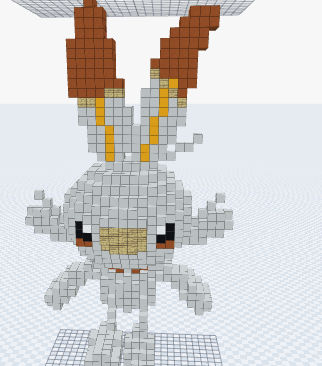
| 🐉 Pokemon | 9 | Charizard, Charmander, Haunter, Scorbunny, Vaporeon, Mudkip, Jolteon, Flareon, Giratina | Large character displays, pixel art, and themed decorations. |
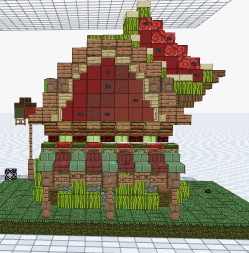
| 🏠 Buildings | 5 | House, Cherry House, Furnace, Melon House, Floating Island | Survival starter bases, landmarks, and village expansions. |
| 🚗 Vehicles | 3 | Boat, UFO, Balloon | Unusual environmental decorations and set pieces. |
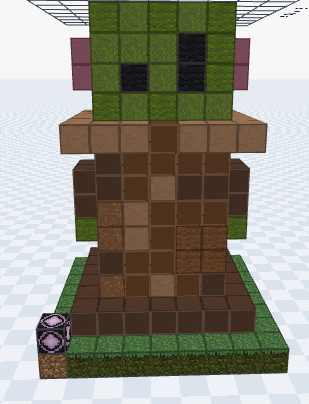
| ⚔ Extras | 4 | Sword, Bee, COMBO, Grogu | Miscellaneous creations and pop-culture additions. |
🚀 How To Install & Use
Installation
-
Import: Open the
.mcpackfile with Minecraft Bedrock to automatically import the behavior pack. -
Activate: In your World Settings under Behavior Packs, find QuickBuild and activate it.
-
Enable Experiments: Turn on the required Beta API / Scripting functionality in the Experiments tab for your Minecraft version.
-
Enable Cheats: Ensure commands/cheats are enabled so the setup function can run.
Usage
-
Open your chat and run
/function quickbuild. -
You will receive the QuickBuild Compass.
-
Right-click (or use) the Compass to open the native UI menu.
-
Select your desired category and structure.
-
Watch it instantly load 10 blocks ahead of you!
(Need another Compass? Just run /function quickbuild again.)
⚠️ Important Placement Tips
QuickBuild is designed for speed and does not perform automatic terrain flattening or collision checking. For the cleanest results:
-
Face a wide, open area.
-
Ensure there is ample horizontal space 10 blocks ahead of you.
-
Check your ground level (Y coordinate) before placing large builds.
-
Avoid spawning structures directly facing cliffs or walls.
📋 Requirements & Technical Specifications
-
Target Game Version: Minecraft Bedrock Edition 26.3+
-
Add-on Version: v1.6.1.1
-
Pack Type: Behavior Pack
-
Resource Pack: Not required
-
Scripting API: Required (
@minecraft/server,@minecraft/server-ui) -
Commands/Cheats: Required for
/function quickbuild
❓ FAQ
Why doesn't the Compass open the menu?
Ensure the QuickBuild behavior pack is active, Beta API/Scripting experiments are toggled on, and that you are using the specific Compass provided by the /function quickbuild command.
Where exactly does the structure spawn?
Approximately 10 blocks in front of you based on your horizontal line of sight, anchored to your current Y coordinate.
Can I spawn multiple structures?
Absolutely. After placing one, just use the Compass again to open the menu and select your next build.
Does QuickBuild need a resource pack?
No. All scripts, functions, and .mcstructure files are bundled into the behavior pack.
Does QuickBuild work on Java Edition?
No. This is exclusively a Minecraft Bedrock Edition add-on utilizing Bedrock's specific scripting and UI APIs.
Credits & Distribution
Developed by Bi11_Cypher (QuickBuild v1.6.1.1 for Bedrock 26.3+).
Pack Includes: 21 .mcstructure files, 1 function, 1 JavaScript module, native UI menus, custom icon, and English metadata.
Thx https://discord.com/invite/EpqRXAjNTQ and structuralab.com for structures.
Note: All structures are distributed as part of this add-on. If you modify or redistribute QuickBuild, please respect the original author's work and do not claim the add-on as your own. I will pour water on your pillow if you steal from me.
QuickBuild Team