Pixura Essentials
NEW UPDATE IS HERE!
We added a lot of features like /clan, /friend, /mail, /kills, /deaths, and much more! Go ahead and try it!!!
It is designed to improve multiplayer worlds and servers by adding usefl management tools, player information systems, and quality-of-life features while keeping the gameplay experience clean and organized.
Pixura Essentials combines multiple systems into one add-on, providing a simple and efficient experience for both players and server administrators.
Features
Hub & Lobby System
Pixura Essentials includes a simple teleport system for server hubs and lobbies.
- Added /hub and /lobby commands.
- Allows players to quickly return to the configured hub location.
- Uses the world spawn location as the destination.
- The world spawn location must be configured before using this system.
This makes navigating multiplayer worlds easier by providing a central location players can return to.
Join Tag System
The Join Tag system allows temporary player tags to be created.
- Added /join command.
- Adds a joined: tag to the selected player.
- The tag is automatically removed after 20 ticks.
This system can be used for temporary player states, events, or custom server mechanics.
Vanish System
Pixura Essentials includes a vanish system designed for server operators.
- Only operators can use the vanish command.
- The first use switches the player into Spectator Mode.
- The second use restores the player's previous game mode.
This allows administrators to observe the world without interfering with normal gameplay.
Chat & Name Rank System
Pixura Essentials includes a rank detection system for player names and chat.
- Supports ranks using rank: tags.
- Automatically detects custom ranks.
- Displays player ranks in chat messages and player names.
This allows servers to create a more organized and personalized player identity system.
Level Display System
Pixura Essentials supports displaying player levels using the Level scoreboard.
- Uses the Level scoreboard objective.
- Displays player levels in names and chat.
- Automatically hides the level when the scoreboard objective does not exist.
- Hides the level when the player's score is 0.
This keeps the chat and name display clean while showing useful progression information when available.
Play-Time Information System
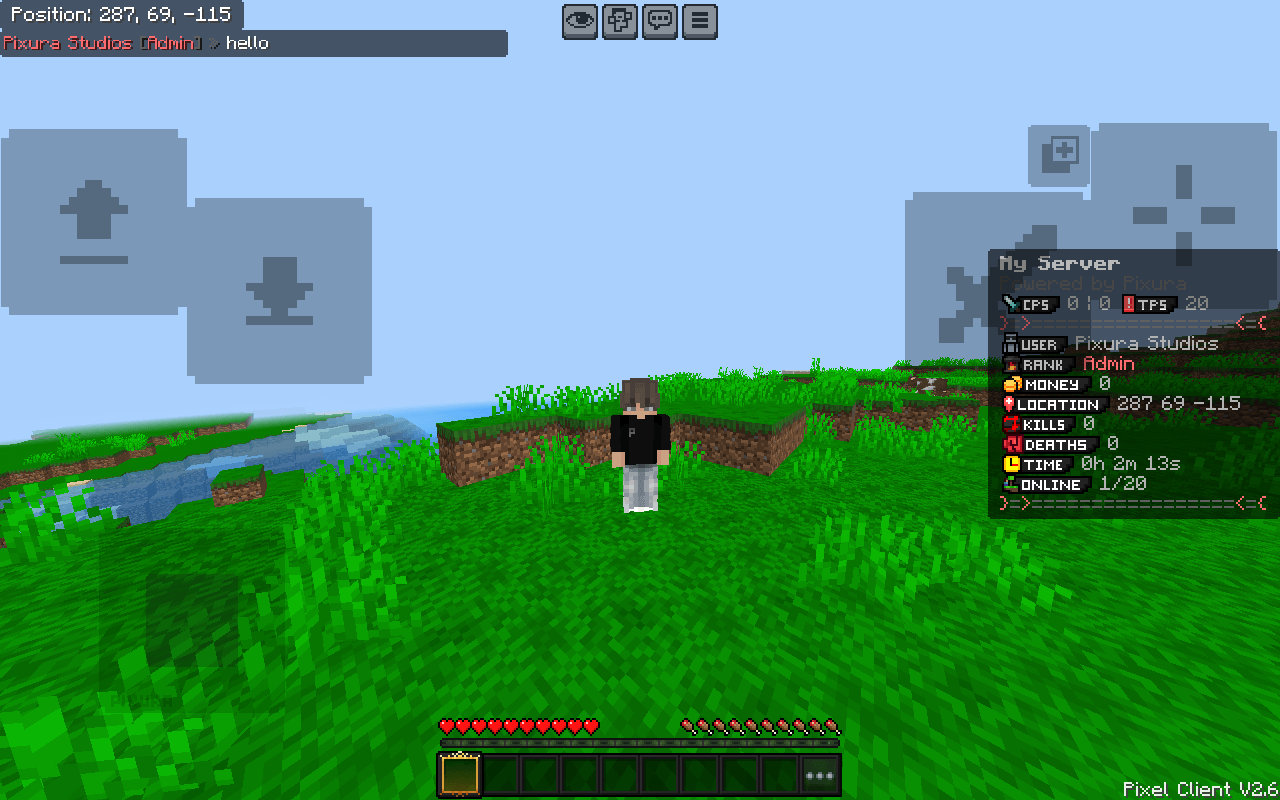
Pixura Essentials provides a play-time Actionbar information display.
The system can show:
- CPS (Clicks Per Second)
- RCPS (Right Clicks Per Second)
- TPS (Ticks Per Second)
- Kill Counter
- Death Counter
- Online Player Counter
- Player Location
- Playtime
All information is displayed directly on the player's screen, allowing quick access to important statistics without interrupting gameplay.
Development
Pixura Essentials is built using Minecraft: Bedrock Edition Script API.
The project focuses on performance, clean structure, and future expansion. Each system is designed to work together while keeping the add-on organized and maintainable.
Pixura Essentials is actively developed, with improvements, optimizations, and new features planned for future updates.
![[UPDATE] Pixura Essentials (Auto Pixura Customizer+) logo](https://media.forgecdn.net/avatars/thumbnails/1940/325/64/64/639204998121306028.png)


![Hive Ranks - Custom Chat & NameTags [Command Based] project image](https://media.forgecdn.net/avatars/thumbnails/1920/866/256/256/639196937692503110.png)