Nufuli's Horns
- By
Screenshot 2026-07-27 020628.png
Screenshot 2026-07-26 150935.png
Description
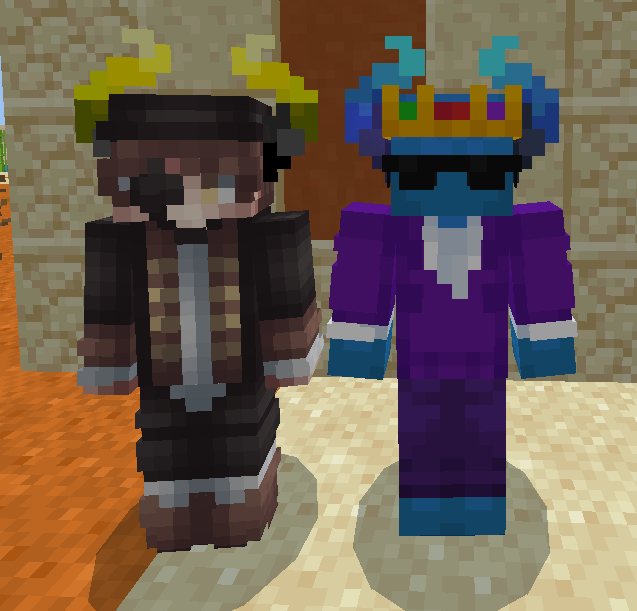
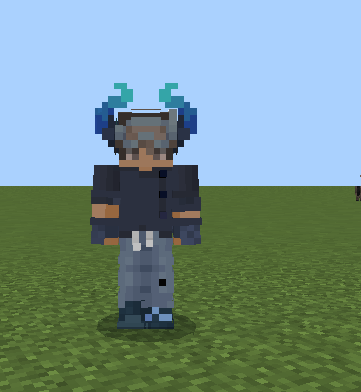
Nufuli's Horns
Eleven pairs of wearable horns for Minecraft Bedrock. They sit in your helmet slot, move with your head, and come in eleven colours — so you get the look without giving up your armour slot to something that does nothing.
Colours
Blue · Bright · Cotton Candy · Purple · Red · Gray · Black & Red · Black & Green · Black & Orange · Black & Yellow · Green & Black
All eleven live together in their own Nufuli's Horns group in the Equipment tab of the creative menu.
Stats
Every pair is built to netherite-helmet standard, so wearing them costs you nothing:
| Armour | 3 points |
| Durability | 407 |
| Enchantable | Yes — Protection, Unbreaking, and the rest |
| Repairable | Netherite ingots |
Install
- Download the
.mcaddonand open it. Minecraft installs both halves automatically. - Create or edit a world → add Nufuli's Horns under both Resource Packs and Behavior Packs. Both are required: the behaviour pack makes the item exist, the resource pack makes it visible.
- Open the creative menu, search Horns, and put a pair in your head slot.
Press F5 to see them — you can't see your own head in first person.
Notes
- Works on Windows and Android. Consoles can't install add-ons from files.
- Other players see the horns only if they have the add-on too.
- The horns are a helmet, so they replace whatever helmet you were wearing.
Help and requests
Need a hand with the horns, or want a colour that isn't here? Let me know in the comments, or join the Discord: https://discord.gg/RSQ76Xxrf
Colour requests are welcome.
Credits
Created by GuidingEgg19065
Rosefli — horn designs and textures.
The horn shape and its placement on the head follow the layout used by the Ears mod for Minecraft Java Edition by unascribed (MIT licensed). This add-on shares no code with it; it is an independent Bedrock implementation.
The Nufuli's Horns Team