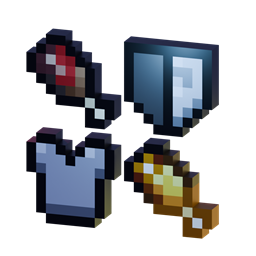
Novelty is a small addon that adds an additional equipment slot to the player. It adds 24 new slots, including a hat, face, neckless, 2 bracelets, 2 hands, 2 feet, belt, back, spellbook, 2 charms, and 10 trinkets. This addon doesn't add any accessories item; it is intended to be used by other addons.
compatibility:
if you want to add your items to be compatible with accessories slot, you have two opitions to make your own compatibility by usings tags and commands or scriptings with additional library.
option 1: using custom tags
you can add those tags to your custom items:
"novelty:is_hat": Add item can be eqipped at hat slot,
"novelty:is_belt": Add item can be eqipped at belt slot,
"novelty:is_face": Add item can be eqipped at face slot,
"novelty:is_hand": Add item can be eqipped at hand slot,
"novelty:is_bracelet": Add item can be eqipped at bracelet slot,
"novelty:is_trinket": Add item can be eqipped at trinket slot,
"novelty:is_back": Add item can be eqipped at back slot,
"novelty:is_neckless": Add item can be eqipped at neckless slot,
"novelty:is_foot": Add item can be eqipped at foot slot,
"novelty:is_spellbook": Add item can be eqipped at spellbook slot,
"novelty:is_charm": Add item can be eqipped at charm slot
player has equipped accessories slot will have tag "novelty:<item identifier>",
example code:
items/test_item.json
{
  "format_version": "1.20.80",
  "minecraft:item": {
  "description": {
    "identifier": "example:item_hat",
    "menu_category": {
      "category": "equipment"
    }
  },
  "components": {
    "minecraft:icon": "brush",
    "minecraft:tags": {
    "tags": [
        "novelty:is_hat"
      ]
    },
    "minecraft:max_stack_size":  1
    }
  }
}
and the command sample uses a tag selector:
execute at @a[tag=novelty:example:item_hat] run effect @s levitationoption 2: using custom library scripting
using a scripting library can be able to define vanilla items to accessouries slot, by using scripting you can also interacting into the item like see dynamic properties, durability, and also replacing the item.
you can copy the library inside the script behavior pack at path "scripts/public_lib/NoveltyManager.js".
here is some little documentation:
===== NoveltyManager API =====

Class NoveltyManager:
    --- Registration ---
    static registerAccessorySlot(accessory_id, tag_ids, variable_name, text, texture): return void
        accessory_id: string, e.g. "novelty:hat"
        tag_ids: string[], e.g. ["novelty:is_hat", "novelty:is_head"]
        variable_name: string, e.g. "hat_slot_var"
        text: string, e.g. "Hat Slot"
        texture: string, e.g. "textures/ui/hat_icon"

    static registerAccessoryItem(item_id, accessory_id): return void
        item_id: string, e.g. "minecraft:iron_helmet"
        accessory_id: string, e.g. "nvy:hat_slot"

    static registerAccessoryGroup(accessory_id, accessory_group_ids): return void
        accessory_id: string, e.g. "nvy:armor_group"
        accessory_group_ids: string[], e.g. ["nvy:hat_slot", "nvy:chest_slot"]

    --- Slot & Group Getters ---
    static getAllAccessorySlot(): return AccessorySlot[] | undefined

    static getAllAccessoryGroupSlot(): return AccessorySlot[] | undefined

    static getAccessorySlot(id): return AccessorySlot | undefined
        id: string, e.g. "nvy:hat_slot"

    static getAccessorySlotFromTag(tag): return AccessorySlot | undefined
        tag: string, e.g. "hat"

    static getAccessorySlotFromIndex(index): return AccessorySlot | undefined
        index: number, e.g. 0

    static getAccessoryGroupSlot(id): return AccessorySlot[]
        id: string, e.g. "nvy:armor_group"

    --- Player Inventory & Accessories ---
    static getAccessory(player, slot): return ItemStack | ItemStack[] | undefined
        player: Class Player
        slot: Object AccessorySlot | AccessorySlot[]

    static getAccessoryContainerSlot(player, slot): return ContainerSlot | ContainerSlot[] | undefined
        player: Class Player
        slot: Object AccessorySlot | AccessorySlot[]

    static getAllAccessories(player): return ItemStack[]
        player: Class Player

    static getAllAccessoryContainerSlot(player): return (ContainerSlot | undefined)[]
        player: Class Player

    static getAccessoryHasItem(player, itemStack): return boolean
        player: Class Player
        itemStack: Class ItemStack | string, e.g. "minecraft:apple"

    static setItem(player, slot, itemStack): return void
        player: Class Player
        slot: Object AccessorySlot | AccessorySlot[]
        itemStack: Class ItemStack
example code:
import { NoveltyManager } from "./lib/NoveltyManager";
import { system, world } from "@minecraft/server";

// 1. Register new slot
NoveltyManager.registerAccessorySlot(
    "test:bucket_slot",                             // accessory_id
    ["test:bucket", "test:fluid_container"],        // tag_ids
    "bucket_slot_var",                              // variable_name
    "Bucket Slot",                                  // text (display name)
    "textures/items/bucket_empty"                   // texture (path icon GUI)
);

// 2. Registering what item can be used
NoveltyManager.registerAccessoryItem("minecraft:bucket", "test:bucket_slot");
NoveltyManager.registerAccessoryItem("minecraft:water_bucket", "test:bucket_slot");
NoveltyManager.registerAccessoryItem("minecraft:lava_bucket", "test:bucket_slot");
NoveltyManager.registerAccessoryItem("minecraft:milk_bucket", "test:bucket_slot");
NoveltyManager.registerAccessoryItem("minecraft:powder_snow_bucket", "test:bucket_slot");

// 3. Getting spesific item
system.runInterval(() =>{
    world.getPlayers().forEach(player =>{
        const item = NoveltyManager.getAccessory(player, NoveltyManager.getAccessorySlot("test:bucket_slot"));
        if(item) player.onScreenDisplay.setActionBar(`using item of ${item.typeId}`);
    })
})
Here how it's looks like after adding new slot
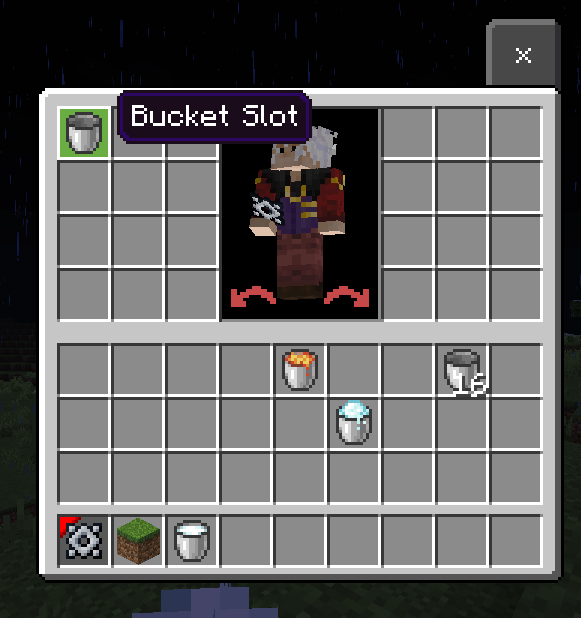
if you want to make it simple I recommend using option 1 but if you using more complex I recommend using option 2
Novelty API Team


Owner