


Mobile Gamepad Left-Stick Drift Fix
- By
Description
Mobile Gamepad Left-Stick Drift Fix v1.4.2
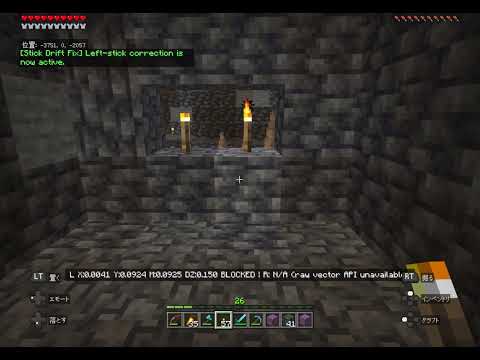
Reduce unwanted player movement caused by minor left-stick drift when using a gamepad on Minecraft Bedrock for supported mobile devices.
The pack activates automatically when Minecraft detects a mobile device using gamepad input. No cheats, commands, player tags, or manual activation are required.
Features
- Adjustable correction strength from 5 to 30 in steps of 1
- Current correction strength shown directly beside the slider
- Higher values suppress stronger drift; the default is 15
- Correction enabled by default for players who have not saved a setting yet
- Per-player enable, disable, and reset controls
- Settings saved per player in the world and retained after pack updates
- English and Japanese display based on the Minecraft language setting
- Clear explanations when correction is disabled or paused
- Does not affect jumping, attacking, item use, or camera controls
Opening the settings screen
The settings screen opens once when this version is first used by the player in a world. It does not open every time the world is loaded.
To open it again while using a gamepad, hold Jump + Sneak together for 2 seconds.
Correction strength
- 5–30: available range
- 15: default
- Increase the value gradually if unwanted movement remains
- Higher values also ignore more intentional fine movement
If correction is turned off, an in-game message explains why it is disabled and how to turn it back on.
Installation
- Back up the world where you plan to use the pack.
- Open
Mobile_Gamepad_Left_Stick_Drift_Fix_v1.4.2.mcpackwith Minecraft. - Edit the target world.
- Open Behavior Packs and activate Mobile Gamepad Left-Stick Drift Fix.
- Enter the world and use your gamepad.
If correction pauses
Tap the screen once, then use the gamepad again. The in-game message explains why correction paused and confirms when it resumes.
Compatibility
- Minecraft Bedrock Edition on supported mobile devices
- Tested on iPad with a Nintendo Switch Pro Controller
- Other mobile devices and gamepads may work but are not yet verified
- Left analog stick only
Limitations
This pack does not repair controller hardware or change system-level calibration. Intentional fine movement below the selected correction strength may also be filtered.
Right-stick correction is not included because the stable Minecraft Bedrock Script API does not currently expose the required raw camera-stick vector.
License
All Rights Reserved.
Project logo created with generative AI and edited by the project author.
日本語説明
Minecraft Bedrock Editionを対応するモバイル端末でプレイしているときに、ゲームパッドの左スティックのわずかなドリフトによる、意図しないプレイヤー移動を軽減します。
Minecraftがモバイル端末とゲームパッド入力を検出すると、自動的に補正を開始します。チート、コマンド、タグ付けなどの手動操作は必要ありません。
主な機能
- 「補正の強さ」を5~30の範囲で1刻みに設定
- 現在の補正強度をスライダーの横へ直接表示
- 数値が大きいほど強いドリフトを抑制。初期値は15
- 設定を保存していないプレイヤーは初回から補正がオン
- プレイヤーごとの有効化、無効化、初期化
- 設定をワールド内へ保存し、パック更新後も維持
- Minecraftの表示言語に応じた日本語・英語表示
- 補正が無効または一時停止した理由と復帰方法を表示
- ジャンプ、攻撃、アイテム使用、視点操作には影響しません
設定画面を開く方法
このバージョンをワールド内で初めて使用するとき、プレイヤーごとに一度だけ設定画面が開きます。ワールドを開くたびには表示されません。
もう一度開く場合は、ゲームパッド使用中に「ジャンプ+スニーク」を同時に2秒間長押ししてください。
補正の強さ
- 5~30:設定可能範囲
- 15:初期値
- 意図しない移動が残る場合は、数値を少しずつ上げてください
- 数値を上げるほど、意図的な細かい移動も反応しにくくなります
補正をオフにした場合は、無効になった理由と、有効に戻す手順がゲーム内に表示されます。
導入方法
- 念のため、導入するワールドをバックアップします。
Mobile_Gamepad_Left_Stick_Drift_Fix_v1.4.2.mcpackをMinecraftで開きます。- 対象ワールドの編集画面を開きます。
- 「ビヘイビアーパック」から本パックを有効にします。
- ワールドに入り、ゲームパッドを操作します。
補正が一時停止した場合
画面を一度タップしてから、ゲームパッドをもう一度操作してください。停止理由と再開時のメッセージが表示されます。
対応状況
- Minecraft Bedrock Editionの対応するモバイル端末
- iPadとNintendo Switch Proコントローラーで動作確認済み
- その他のモバイル端末やゲームパッドは未検証
- 左アナログスティックのみ対応
注意事項
コントローラー本体の修理や、システム設定の変更を行うものではありません。設定した補正強度未満の意図的な細かい移動も、補正される場合があります。
安定版のMinecraft Bedrock Script APIでは必要な生の視点入力値を取得できないため、右スティックは補正対象外です。
ライセンス
All Rights Reserved.
プロジェクトロゴは生成AIで作成し、作者が編集しています。
Mobile Gamepad Left-Stick Drift Fix Team
