MCLOCK - Automatic HUD Clock
- By
A clean, automated 12-hour digital scoreboard clock for Minecraft Bedrock Edition (Behavior Pack).
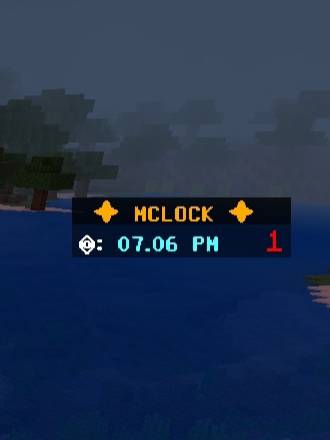
Light Blue Color For Night.
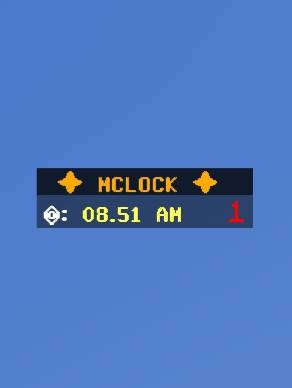
Yellow for day.
NEW VERSION

Description
## ✦ MCLOCK - Automatic HUD Clock ✦
**MCLOCK** is a lightweight, clean, and modern Behavior Pack that introduces a real-time HUD clock directly onto your screen via the sidebar scoreboard. Perfect for survival worlds, multiplayer servers, and Realms!
---
### 🚀 Key Features:
* **Dynamic Time Conversion:** Automatically converts Minecraft world ticks into a clean 12-hour digital format (AM/PM).
* **Smart Day/Night Color Coding:** The clock dynamically changes its theme color—**Bright Yellow** for daytime and **Light Blue** for nighttime.
* **Bold & Futuristic Design:** Uses a sleek bold font setup alongside a futuristic crown/server symbol (⏣) to elevate your HUD aesthetics.
* **Pure Behavior Pack:** Built 100% using the official Minecraft Scripting API (`@minecraft/server`). **NO Resource Pack required!**
* **Realm & Multiplayer Friendly:** Since it doesn't use textures, other players joining your world **don't need to download any resource packs**. It works instantly for everyone!
---
### 🛠️ How to Install & Setup:
1. Download and import the `.mcaddon` file into your Minecraft.
2. Apply the **MCLOCK** to your World Behavior Packs.
3. **CRITICAL:** Go to your World Settings -> Experiments, and toggle **Beta APIs** to **ON** (Required for the script to run).
4. Launch your world!
> ⚠️ **Note for Upgrading/Troubleshooting:** If you are upgrading from an older version or the clock doesn't appear immediately, open your chat and type:
> `/scoreboard objectives remove mclock`
> The system will automatically safely reboot
the clock in 1 second.
MCLOCK - Automatic HUD Clock Team

![M Clock [BP only] project image](https://media.forgecdn.net/avatars/thumbnails/1819/806/256/256/639149858994976561.png)