Logistics Node
- By
Build smarter storage networks with automated transport, centralized item access, crafting, sorting, and cross-dimensional logistics.
⚠ This add-on requires Beta APIs to function.
Logistics Node
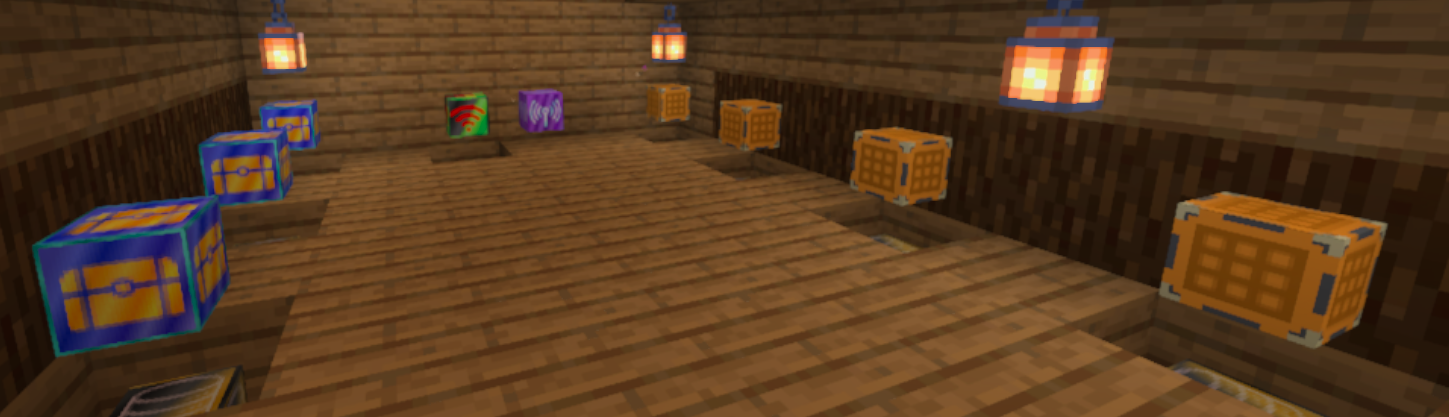
Build powerful, expandable storage and logistics networks in Minecraft Bedrock Edition.
Logistics Node is a storage automation add-on designed for transporting, organizing, accessing, and crafting with items across connected storage networks.
Connect containers with specialized nodes, access the entire network from a Network Controller, search for items, extract or deposit inventory, craft directly from network storage, and even connect storage networks across dimensions.
Quick Start
For a basic storage network, place the blocks like this: Network Controller → Storage Node → Container The Network Controller must be directly connected to a Storage Node. The container must also be directly connected to the Storage Node for network storage detection.
Basic Example
[Network Controller] [Storage Node] [Chest]
[!IMPORTANT] Side Nodes and Center Nodes are transport nodes. Placing them between the Network Controller and Storage Node, or between the Storage Node and container, may prevent the container from being detected as network storage.
Features
Storage Networks
Build connected networks using nodes and containers.
The network system can discover connected storage automatically and combine multiple inventories into one accessible storage network.
Features include:
- Connected container discovery
- Network-wide item aggregation
- Multiple physical containers treated as one storage network
- Automatic topology updates when nodes or containers are added or removed
- Duplicate-container detection
- Support for branched and looped networks
- Local and remote storage integration
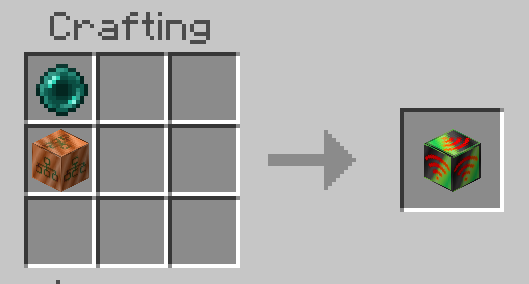
Network Controller
The Network Controller is the main interface for accessing your storage network.
Use it to:
- Browse items stored across the network
- View total item quantities
- Search for items
- Navigate large inventories with multiple pages
- Extract items directly into your inventory
- Deposit items into network storage
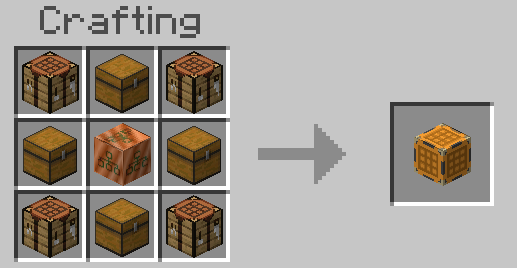
- Access the Crafting Terminal
- Access both local and remote storage
The interface supports English and Japanese item names based on the player's language settings.
Crafting Terminal
Craft items directly through the Logistics Node network.
The Crafting Terminal integrates crafting with network storage, allowing the storage system to supply required ingredients and safely process crafting operations.
Remote Order
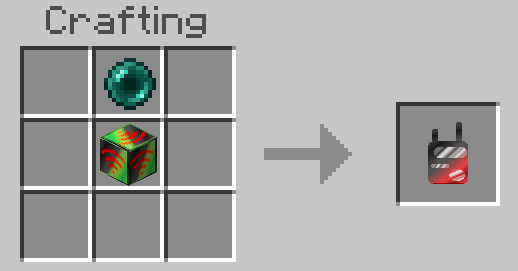
The Remote Order provides remote access to the storage network.
It supports:
- Network inventory browsing
- Item searching
- Item extraction
- Crafting Terminal access
This allows network storage to remain accessible without standing directly beside the Network Controller.
Storage Node
The Storage Node connects inventories to the logistics network and handles item transfer.
- Connects containers to the network
- Supports item input and output
- Supports configurable transfer behavior
- Supports Node-to-Node transport
- Supports redstone-controlled transport
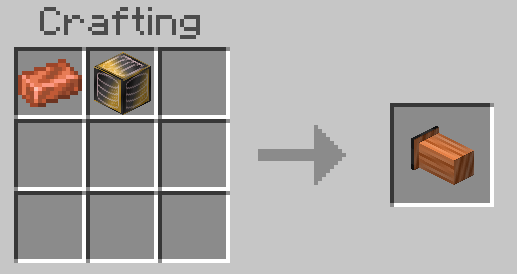
Side Node
A directional transport node for building organized logistics routes.
- One configurable INPUT side
- Five OUTPUT sides
- Supports North, South, East, West, Up, and Down
- Visual connection indicates the configured direction
- Supports Node-to-Node item transfer
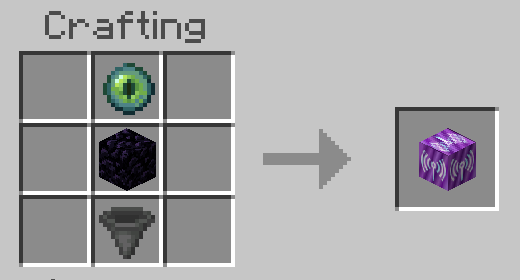
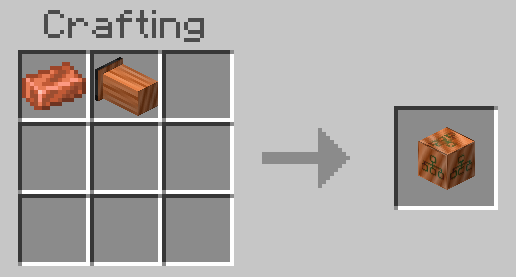
Center Node
A flexible six-sided routing junction.
Each side can independently operate as:
- INPUT
- OUTPUT
- Disabled
This makes Center Nodes useful for branching and combining transport routes.
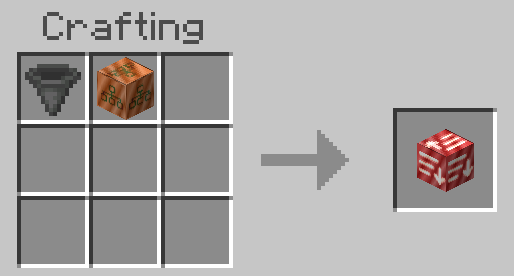
Sort Node
Route specific items through your logistics system using filtering and sorting behavior.
Sort Nodes can work together with other transport nodes to build more advanced automated storage layouts.
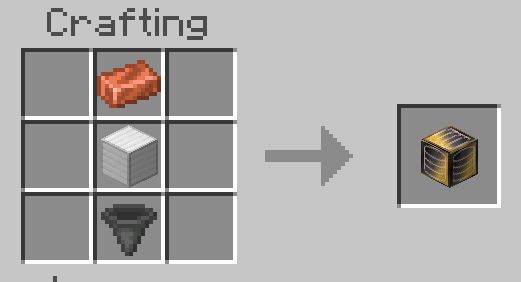
Vacuum Node
Automatically collects dropped items and feeds them into the logistics system.
Useful for:
- Farms
- Collection systems
- Automated processing areas
- General item cleanup
Large Container
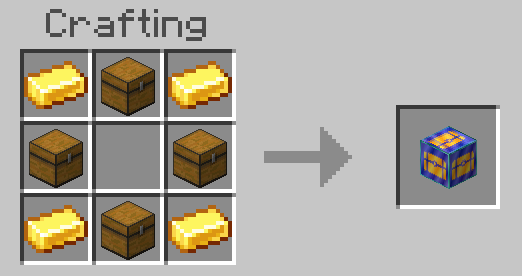
A dedicated high-capacity storage option designed for Logistics Node networks.
Large Containers integrate directly with the storage system and can also provide redstone output based on stored capacity.
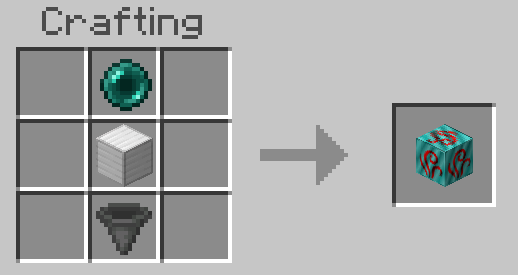
Ender Node
Connect distant logistics systems without requiring a physical node path between them.
Ender Nodes support:
- Long-distance transfer
- SEND / RECEIVE roles
- Multiple independent channels
- Cross-dimensional connections
- Overworld, Nether, and The End
Remote Storage Networks
Logistics Node can bridge entire storage networks through Ender connections.
Remote storage can appear alongside local storage in the Network Controller, allowing items across different locations and dimensions to participate in the same storage workflow.
Safe Item Operations
Storage operations are designed to avoid item loss when conditions change during a transfer.
The system re-evaluates network topology before important inventory mutations and includes rollback handling for situations such as:
- Full player inventories
- Full storage containers
- Disconnected storage
- Broken network paths
- Remote network loss during an operation
If an operation cannot safely complete, items are returned whenever possible instead of being silently lost.
Redstone Integration
Selected Logistics Node components support redstone control.
Storage transport can be stopped using a redstone signal, while Large Containers can provide output based on their storage capacity.
This allows Logistics Node networks to integrate with larger redstone automation systems.
Recipes
Storage Node
Vacuum Node
Ender Node
Center Node
Side Node
Network Controller
Sort Node
Large Container
Craft Node
Remote Order
Requirements
⚠️ Logistics Node uses the Minecraft Bedrock Script API.
Make sure the required behavior pack and resource pack are enabled for the world.
Language Support
Logistics Node currently includes support for:
- English
- Japanese
The Network Controller can display item names according to the player's selected client language.
Designed for Survival Automation
Logistics Node is designed to grow with your world.
Start with simple item transport between containers, then expand into a complete storage network with centralized access, searching, crafting, sorting, remote access, high-capacity storage, redstone integration, and cross-dimensional logistics.
Build the network. Connect your storage. Let Logistics Node handle the logistics.
The Logistics Node Team