
The LiDAR add-on adds a raycasting-based spatial scanning system to Minecraft Bedrock. The tool visualizes the environment in complete darkness using particles. The modification features three types of scanners. Two of them are designed for classic survival, and one is a fully customizable tool for map makers.
Survival Scanners
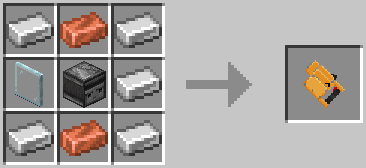
LiDAR Basic: The starter scanner. The scanning range is 20 blocks. It has a wide field of view, low ray density with a step of 3.0, and a base signal drop chance of 0.3.
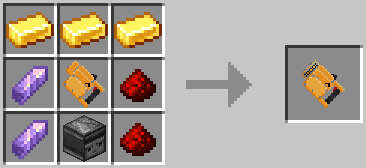
LiDAR Advanced: An upgraded model. The scanning range is increased to 30 blocks. It features high detail with a step of 1.8 and a reduced signal drop chance of 0.1.
System Commands
System commands are provided to manage the add-on and give custom scanners.
Command: /lgamerule <rule: string> [value: Boolean]
Sets or queries the values of the add-on's internal game rules. Requires GameDirectors permission level.
rule parameter:
- commandOutput — Controls the output of system messages about successful command execution.
- actionBarOutput — Controls the output of messages and scanner statuses to the action bar above the hotbar.
- warningOutput — Controls the output of system warnings about possible logic errors or invalid configurations.
value parameter: A boolean value of true or false. If not specified, it outputs the current state of the rule.
Command: /lpreset
Opens the in-game interface for creating and editing custom scanner presets. Requires Admin permission level. It does not take any additional arguments.
Command: /lgive <player: target> <shortID: string> [slot: string] [lock: string] [keep: Boolean]
Gives the target player a custom scanner based on the specified preset ID.
player parameter: A player selector.
shortID parameter: The string ID of the preset. It is highly recommended to enclose the ID in quotation marks (/lgive @s "e20f1a31") so Minecraft does not mistakenly interpret it as a number.
slot parameter:
- auto — Automatically places the item into the first available inventory slot.
- mainhand — Places the item directly into the player's active hand.
- slot.0 – slot.35 — Places the item into a specific inventory slot by its internal index.
lock parameter:
- none — No restrictions. The item can be freely moved, dropped, and destroyed.
- inventory — Locked in the inventory. The item cannot be dropped or destroyed, but can be freely moved between slots.
- slot — Strict lock. The item is strictly fixed in the given slot and cannot be moved or dropped.
keep parameter: A boolean value of true or false. Determines whether the item is kept after death.
Customizable LiDAR Scanner
The custom scanner is made specifically for minigame developers and map makers. It allows you to create unique sensor configurations through the in-game menu.
Scan Category
Field of View X: The horizontal viewing angle. A number from 0 to 180.
Field of View Y: The vertical viewing angle. A number from 0 to 90.
Scan Step: Ray density or angular step. A number with a minimum value of 0.1.
Max Distance: The maximum scanning distance in blocks. A number with a minimum value of 1.
Rows Per Update: The number of horizontal rows scanned per update. A number with a minimum value of 1.
Tick Delay: The delay in ticks between scanning updates. A number with a minimum value of 1.
Sensor Category
Drop Chance: The base chance of losing a ray. A number from 0.0 to 1.0.
Include Passable Blocks: Enables the detection of passable blocks. A boolean value of true or false.
Include Liquid Blocks: Enables the detection of liquids. A boolean value of true or false. Works only when Include Passable Blocks is enabled.
Enable Scatter: Enables the physical ray scattering algorithm. A boolean value of true or false.
Scatter Min Angle: The minimum ray deviation angle. A number from 0.0 to 180.0. Cannot exceed the Scatter Max Angle value. Depends on Enable Scatter.
Scatter Max Angle: The maximum ray deviation angle. A number from 0.0 to 180.0. Depends on Enable Scatter.
Scatter Favorite Percent: A percentage from the scatter range to create interference patterns. A number from 0.0 to 1.0. Depends on Enable Scatter.
Scatter Favorite Chance: The trigger chance of the favorite scatter angle. A number from 0.0 to 1.0. Depends on Enable Scatter.
Particle Category
Particle ID: The particle identifier. String.
Particle Lifetime: The lifetime of the particle in seconds. A number with a minimum value of 0.1.
Base Size: The base size of the particle. A number with a minimum value of 0.001.
Block Offset: The particle's offset from the block's surface. A number with a minimum value of 0.0.
Enable Fade: Enables the particle distance fading system. A boolean value of true or false.
Fade Start Percent: The percentage of the maximum distance at which fading begins. A number from 0.0 to 1.0. Depends on Enable Fade.
Min Brightness: The minimum brightness of the particle at the maximum distance. A number from 0.0 to 1.0. Depends on Enable Fade.
Fade Power: The degree of the fading curve. A number with a minimum value of 0.1. Depends on Enable Fade.
Color: Color settings for solid blocks, liquids, and entities. Each color consists of red, green, blue, and alpha parameters. All of them take a number from 0.0 to 1.0. The liquid setting depends on the Include Liquid Blocks parameter.
Custom Color: Custom color overrides for specific string IDs of blocks, liquids, or entities.
Sound Category
Enable Sound: Global toggle for sounds. A boolean value of true or false.
Enable Scan Sound: Enables the scanning sound. A boolean value of true or false. Depends on global Enable Sound.
Scan Sound ID: The system sound identifier. String. Depends on Enable Scan Sound.
Scan Sound Pitch: The pitch of the sound. A number with a minimum value of 0.0. Depends on Enable Scan Sound.
Scan Sound Volume: The volume of the sound. A number with a minimum value of 0.0. Depends on Enable Scan Sound.
Important Performance Warning
The Minecraft Bedrock engine lacks an optimized method for directly rendering multiple points on the user's screen. This modification uses the built-in particle system. Setting high distance values and a low ray step in a custom preset will spawn a massive number of particles, which can cause a severe frame rate drop on low-end devices.