
LandClaim LITE
- By
 LandClaim
The Ultimate Lightweight Land Protection, Economy, and Rewards System.
For Bedrock Servers!
🏆 Core Features
-
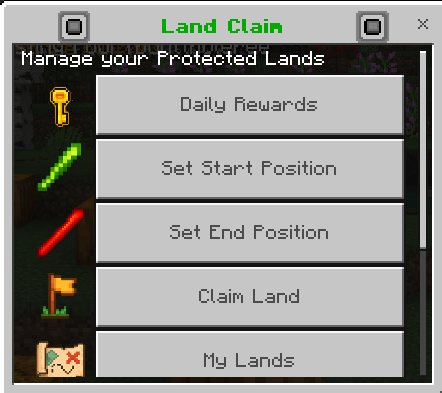
(NEW) Floating Headers: Custom floating text inside claims (purchasable with LandCoins, edit any time, admins can override permissions).
-
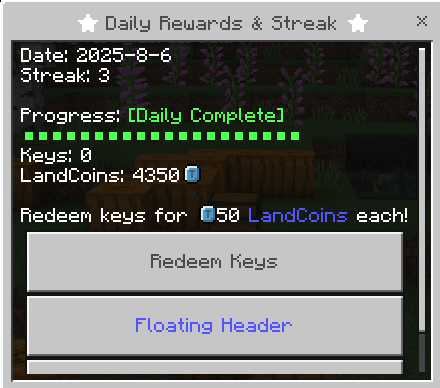
LandCoins & Daily Rewards: Automated currency system; earn coins for playtime and achievements.
-
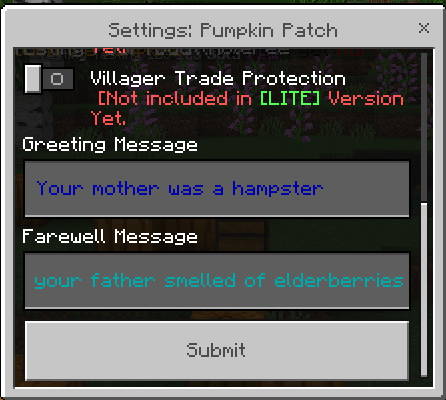
Granular Permissions: Control building, chest/door access, and more per land. (Plenty more protection elements coming soon to LITE Version!)
-
Powerful Admin Tools: Live claim editing, instant moderation, and advanced commands.
-
Plug-and-Play: No lag, no bloat. Works perfectly with all survival and semi-vanilla servers.
-
Always Updated: Full support for Bedrock 1.21.x and Scripting 2.2.0-beta.
-
Full Configuration: Tweak features, items, starter kits, permissions, and more via
1-Config.js.
LandClaim Activity Logging: All blocked events and chest entries are logged within the Land "Inbox".
(Includes search filter to seek any action at any time!)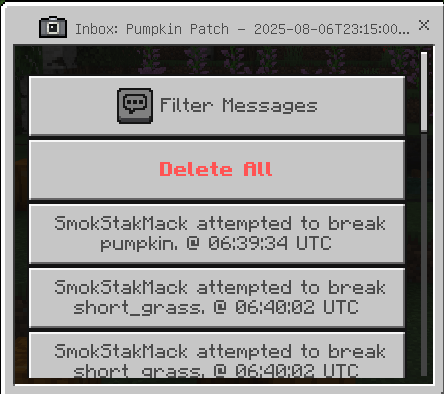
Advanced Territory Management for Bedrock Servers
A comprehensive land claim system with an intuitive GUI, economy integration, and powerful admin controls. Players can claim territory, manage permissions, invite members, and customize their land—all without typing commands.
✨ Key Features
✅ GUI-Driven Interface — Claim and manage land through an easy-to-use menu system
✅ Economy Integration — LandCoins and ClaimBlocks currency system
✅ Permission Management — Fine-tune access control for members and visitors
✅ Daily Rewards — Automatic playtime-based LandCoin rewards
✅ Floating Headers — Optional visual markers for claimed territory
✅ Admin Controls — Powerful commands for server management
✅ Starter Kits — Configurable initial resources for new players
✅ Live Config Reload — Update settings without restarting the server
🚀 Installation
1. Download & Extract
- Copy
NH_LandClaim BPfolder into/behavior_packs/ - Copy
NH_LandClaim RPfolder into/resource_packs/
2. Enable Scripting
- Go to World Settings → Experiments
- Enable "Beta APIs" or "Experimental Scripting"
3. Configure (Optional)
- Edit
scripts/general/1-Config.jsfor advanced options - Customize currencies, permissions, starter kits, and more
4. Start Your Server
- On first launch,
[NH_LandClaim]will appear in console - Everything is now ready to use!
5. Set Admin Permissions
/tag YourPlayerName add admin⚙️ Configuration Reference
All settings are found in scripts/general/1-Config.js:
| Setting | Description |
|---|---|
| Feature Toggles | Enable/disable specific modules |
| Starter Kits | Set initial gear, LandCoins, and ClaimBlocks for new players |
| Command Permissions | Choose which tags are required for admin commands |
| Menu Item | Select which item opens the claim UI (default: minecraft:stick) |
| Floating Headers | Configure cost, Y offset, and visual settings |
| Daily Rewards | Set playtime required to claim daily LandCoins |
💡 Pro Tip: Type reload in the console to reload config changes without restarting!
💻 Command Reference
Player Commands
| Command | Function |
|---|---|
!spawn |
Teleport to global spawn |
| (Use menu item) | Open claim menu (default: stick) |
| (GUI actions) | Claim land, set name, invite members, edit permissions |
Admin Commands
| Command | Function |
|---|---|
!setspawn |
Set world spawn to your current location |
!lc delete |
Delete the land claim you're standing in |
!lc set <player> <amount> |
Set a player's LandCoins |
!lc add <player> <amount> |
Add LandCoins to a player |
!lc remove <player> <amount> |
Remove LandCoins from a player |
!cb set <player> <amount> |
Set ClaimBlocks for a player |
!cb add <player> <amount> |
Add ClaimBlocks to a player |
!cb remove <player> <amount> |
Remove ClaimBlocks from a player |
📌 Note: All admin commands require the proper tag (default: admin). Configure custom admin tags in 1-Config.js.
🏡 How to Claim Land (Player Guide)
Step 1: Earn ClaimBlocks
- Earned via LandCoins (from playtime or daily rewards)
- Granted by admin events or starter balance
Step 2: Open the Claim Menu
- Use your configured item (default: stick)
- Set two corners to define your territory
Step 3: Manage Your Claim
- Name your land for easy identification
- Invite members to share access
- Adjust permissions for different player groups
- Purchase floating headers to mark your territory
🎨 Intuitive UI: All claim management is menu-driven—no manual commands needed!
❓ FAQ & Troubleshooting
Why doesn't this work on Realms?
Minecraft Realms do not support scripting APIs that this addon requires:
❌ "modules": [{ type: "scripting" }] in manifest.json
❌ Use of the @minecraft/server module
❌ JavaScript files using GameTest or Scripting API
What doesn't work:
- Dynamic property handling
- Server-side logic (scoreboards, events)
- Command execution via script
Supported platforms: Bedrock Dedicated Server (BDS), custom server software (PocketMine with proper support), or local worlds with experimental features enabled.
🆘 Support & Community
Need help? Have suggestions? Join our community:
🎮 Discord: Join for support, bug reports, and feature requests
📖 Documentation: Full guides available on our website
🐛 Bug Reports: Report issues on Discord or our support portal
👤 About the Creator
Created by Mack (DataOverlord/Linkage) — building Minecraft addons and tools since 2012. My focus is on delivering performance, reliability, and innovative server solutions.
📅 Monthly Releases: Watch for new free addons and updates every month—always designed for stability and compatibility.
🔧 Custom Development Services
Need something unique for your server?
I create custom Bedrock addons, gameplay mechanics, UIs, and specialized server tools.
Contact me:
- Discord:
linkage3656(ID: 351378596130062336) - Website: NerdHerdMC.net
Whether it's a custom economy system, unique PvP mechanics, or specialized admin tools—let's bring your vision to life!
🖥️ Server Management Tools
Running a Bedrock server?
Check out [ Bedrock Commander ]— a native Windows GUI for server management:
Free Features:
- Ban/Kick Manager (works directly with server files, never breaks)
- Organized log management
- Easy server configuration
Premium Features:
- Addon Manager (one-click install/update)
- Automated world backups
- Smart windows notifications (player events with avatars)
- Scheduled commands
Built for reliability and ease-of-use. Learn more at NerdHerdMC.net
💚 Support My Work
If this addon powers your server, consider supporting development through Premium Accounts at NerdHerdMC.net for:
- Exclusive features
- Personalized support
- Early access to new tools
- Priority custom development
Let's make Bedrock servers smarter, faster, and more fun—together.
~ DataOverlord / Linkage, NerdHerdMC
LandClaim LITE Team
