Keep Inventory Plus (Achievement Friendly)
- By
Keep Inventory with achievements ON! Choose what you keep on death: armor, hotbar, inventory, XP and durability cost. No experiments, no cheats.
Keep Inventory Plus

Keep your items when you die, and keep your achievements too! No experiments and no cheats. And you decide exactly what stays.
🏆 Achievements stay ON
- Earn achievements as usual. This add-on doesn't disable them.
- No experimental features and no cheats needed.
- Just add it to your world. With the default settings, you keep everything.
⚙️ Choose what you keep
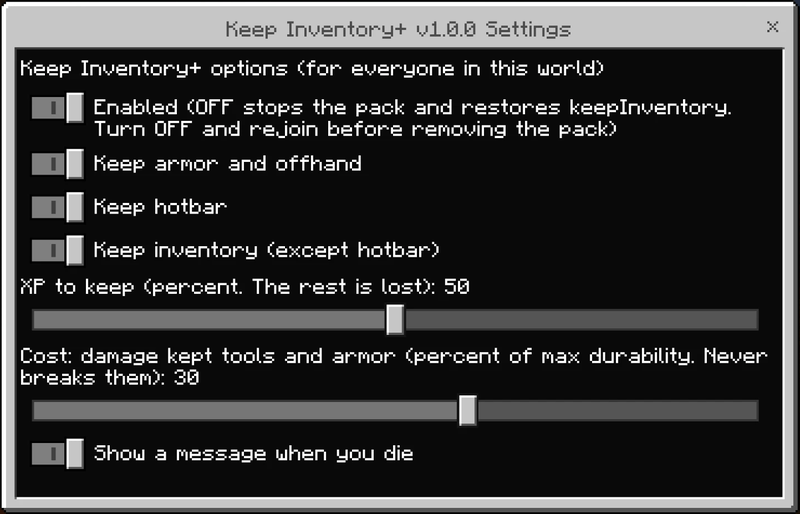
Open Settings > Packs > gear icon, in game or from the world settings.
- Armor and offhand – keep or drop
- Hotbar – keep or drop
- Inventory – keep or drop
- XP – keep 0 to 100 percent
- Durability cost – kept tools and armor lose up to 50 percent durability, but never break
- Death message – on or off
What you don't keep drops where you died, so you can run back for it.
Settings apply to everyone in the world.
🎮 Make your own rules
- Casual: keep everything
- Fair: keep armor and hotbar, drop the rest
- Hard: keep only your armor, and pay a durability cost
⚠️ Good to know
- Removing the add-on: turn Enabled OFF in the settings and rejoin the world first. This puts keepInventory back to how it was. No cheats needed.
- Grave & Death Point: don't use both together. If both are installed, Grave takes priority and Keep Inventory+ pauses. Don't switch between them in the same world.
- Other add-ons that change keepInventory or death behavior may conflict.
✅ Compatibility
- No experimental features required
- Minecraft Bedrock 26.30 or later (tested on Windows)
- English & Japanese
Install: open the .mcaddon file, then activate Keep Inventory+ under Behavior Packs in your world settings (the Resource Pack is added automatically).
Feel free to use this add-on in videos and streams (a link is appreciated). Re-uploading to other sites is not allowed. Bug reports: please leave a comment with your Minecraft version and device.
Keep Inventory Plus (Achievement Friendly) Team

Owner