Java Essentials (Adds 20+ New Commands)
- By
Adds a ton of commands that are almost essential for command users. It adds commands plus they are very performant.
This adds a lot more new commands to the game.
This adds a lot more possibilities with commands.
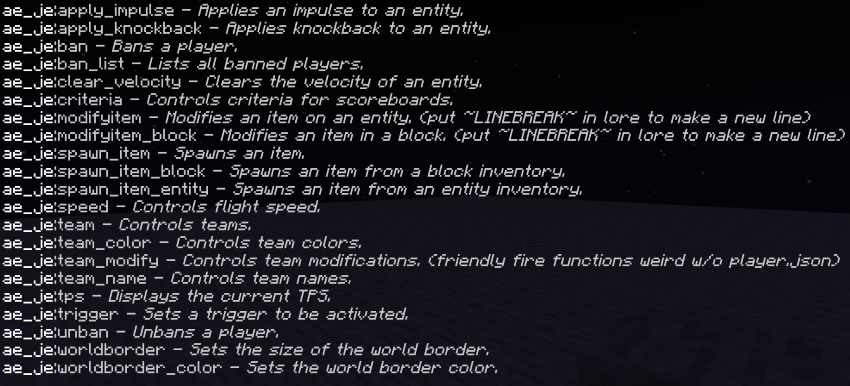
Command list:
/apply_knockback
Applies knockback to an entity.
Parameters:
<target: entity> The entities or entity to apply knockback to
<direction: x y z> The location to apply knockback towards
<horizontal_velocity?: float> The horizontal velocity
<vertical_velocity?: float> The vertical velocity
/apply_impulse
Applies knockback to an entity.
Parameters:
<target: entity> The entities or entity to apply impulse to
<direction: x y z> The location to apply impulse towards
<velocity?: float> The velocity of the impulse
/ban
Bans a player.
Parameters:
<player: string> The player to be banned
<reason?: string> The reason of the ban
<days?: float> The amount of days to be banned
<hours?: float> The amount of hours to be banned
<minutes?: float> The amount of minutes to be banned
<seconds?: float> The amount of seconds to be banned
/ban_list
Lists all banned players.
/clear_velocity
Clears an entity's velocity.
Parameters:
<target?: target> The entities that will get their velocity cleared
/criteria
Controls criteria for scoreboards.
This essentially adds some scoreboard criteria from Java.
Parameters:
<"get" | "set": enum> The parameter to either get or set the criteria
<objective> The scoreboard objective
<criteria?: enum> A list of criteria that can be set for the objective
If this isn't put for set, it will clear the criteria for the objective.
<value?: string> The value to set for the criteria
Some criteria will be affected by the value, such as ones
that up the score based on what a plyer did.
/modifyitem
Modifies an item in an entity inventory.
This lets you modify item names and lore.
Parameters:
<target: target> The entity to get the item from.
<equipment_slot: enum> The equipment slot to get the item from.
<slot: number> The slot of the equipment slot to get the item from.
<item_modifier: "name" | "lore"> The modification to apply.
<value?: string> The value to set.
/modifyitem_block
Modifies an item in a block inventory.
This lets you modify item names and lore.
Parameters:
<block: x y z> The block to get the inventory from.
<slot: number> The slot to get the item from.
<item_modifier: "name" | "lore"> The modification to apply.
<value?: string> The value to set.
/spawn_item
Spawns an item.
This lets you spawn a basic item stack anywhere without the hassle that you'd normally have to go through.
Parameters:
<location: x y z> The location to spawn the item at.
<item: string> The item to spawn.
<amount?: number> The number of items to spawn.
<random_velocity?: boolean> Sets if there will be a random velocity when spawned.
/spawn_item_block
Spawns an item from a block inventory.
This duplicates an item from a block inventory and spawns it at the desired location.
Parameters:
<block: x y z> The block to get the inventory from.
<location: x y z> The location to spawn the item at.
<slot: number> The slot to get the item from.
<random_velocity?: boolean> Sets if there will be a random velocity when spawned.
/spawn_item_entity
Spawns an item from an entity inventory.
This duplicates an item from an entity inventory and spawns it at the desired location.
Parameters:
<target: target> The entity to get the slot from.
<equipment_slot: enum> The equipment slot to get the item from.
<slot: number> The slot of the equipment slot to get the item from.
<location: x y z> The location to spawn the item at.
<random_velocity?: boolean> Sets if there will be a random velocity when spawned.
/speed
Controls flight speed.
This command can be found in many Java plugins or server software.
Parameters:
<value?: float> The fly speed
If it's less than or equal to 0, it will set flight speed back to default.
/team
Controls teams.
Because of limitations, this command was split into 4 commands.
/team_color - Controls team colors.
/team_name - Controls team names.
This lets you control the name prefix and affix.
/team_modify - Controls team modifications.
This lets you change stuff like friendly fire and displaying the player's name.
When someone is on a team, they will have a tag.
Lets say the team was called test, the tag would be 'ae_je:team:test'.
/tps
Displays the current TPS.
Parameters:
<constant?: boolean> This sets if it will constantly display the TPS in your actionbar.
/trigger
Sets a trigger to be activated.
This won't work with all objectives, the scoreboard will need the trigger criteria to activate this.
Parameters:
<objective: string> The objective to trigger.<value?: string> The scoreId to up on the objective.
If not set, it'll up the user's score.
/unban
Unbans a player.
Parameters:
<player: string> The player to unban
/worldborder
Sets the size of the world border.
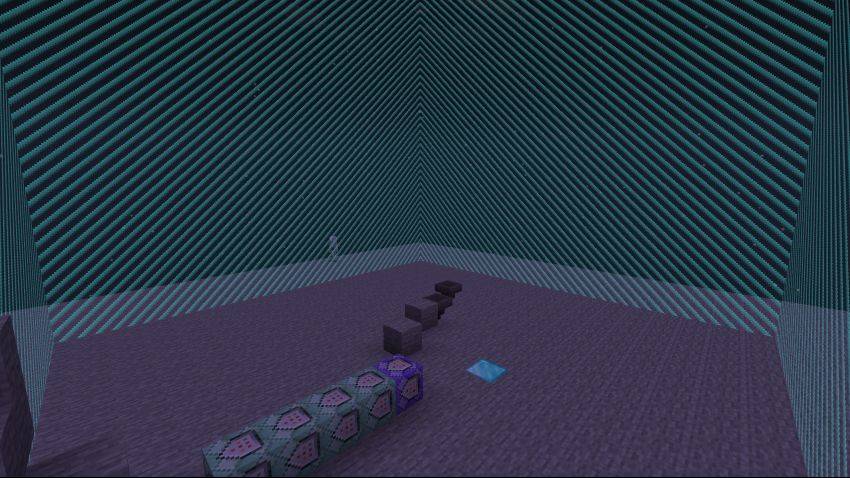
Once set to something that is more than 0, it will spawn the world border.
The world border will keep players inside of it at all times besides players in spectator or creative mode.
Parameters:
<size?: number> The size of the world border.
/worldborder_color
Sets the world border color.

If any of these parameters aren't set, it will use the default for that parameter.
Parameters:
<red?: number> The value for red.
<green?: number> The value for green.
<blue?: number> The value for blue.
<alpha?: number> The value for the transparency of the border.
That's all that this addon adds for now!
If you have any suggestions, feedback, or want a community: Join the discord!
Showcase Video:
The Java Essentials (Adds 20+ New Commands) Team


Owner