promotional bannermobile promotional banner

TradeMaster

The ItemXchange addon is designed to introduce a simple and efficient trading system for Minecraft Bedrock Edition. It enables players to trade items through a virtual market without relying on villagers or traditional trading mechanics.


ItemXchange Usage Guide


Step 1: Get the ItemXchange item
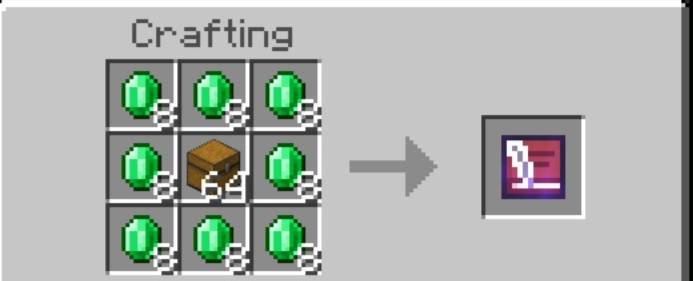


Step 2: Open the ItemXchange Menu
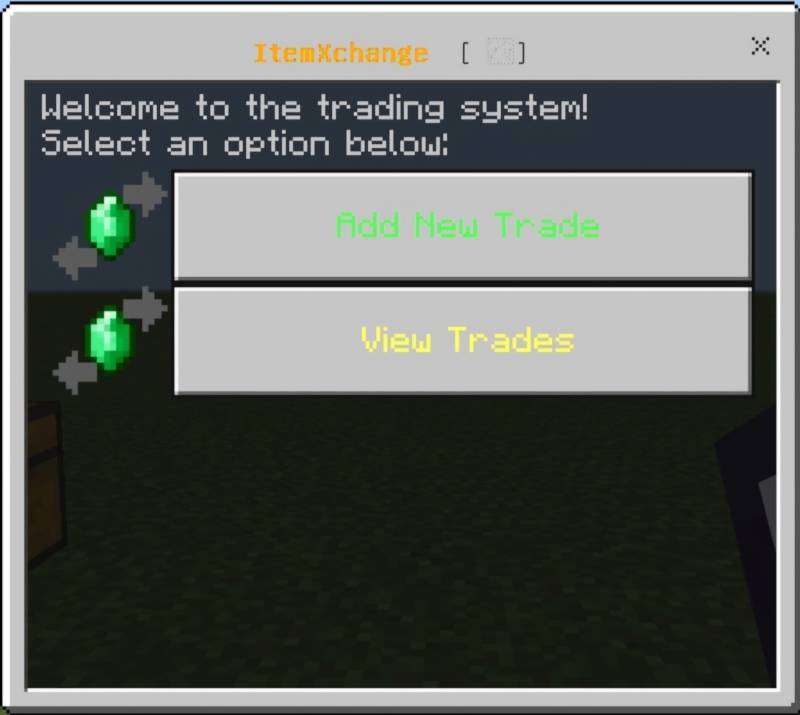
  • Hold and use the um:itemxchange item in-game
  • You will see two options:
    1. Add New Trade
    2. View Trades

Step 3: Add a New Trade

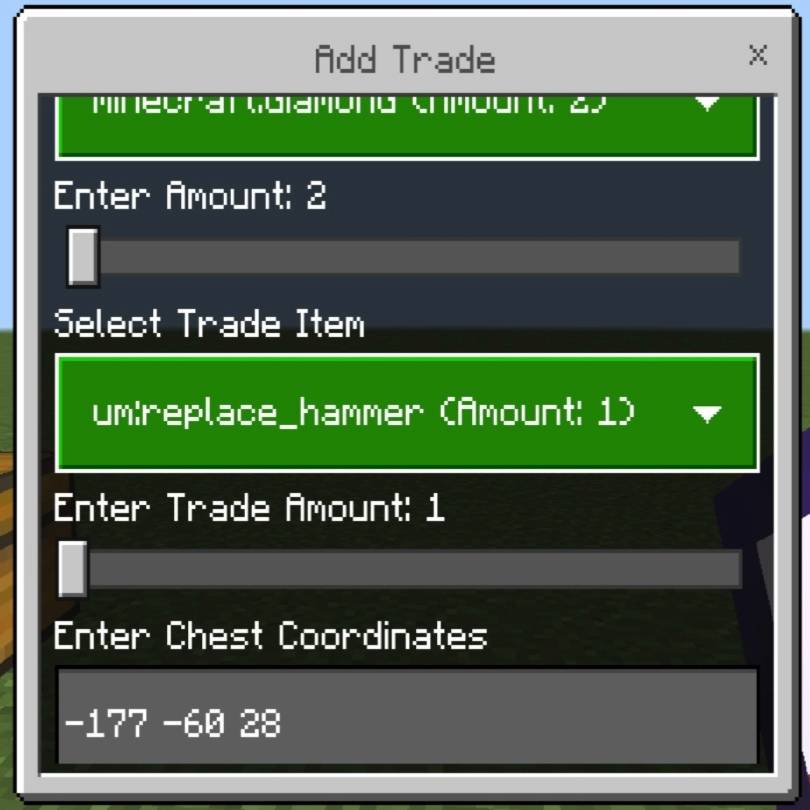
  • Select "Add New Trade" from the menu
  • Choose an item from your inventory to offer in trade
  • Set the quantity (1–64)
  • Select the item you want in exchange
  • Set the quantity (1–64)
  • Enter the coordinates of the chest to store traded items (format: x y z) Example: 100 64 200
  • Confirm the trade
  • Your offered item is removed and listed as an available trade

Step 4: View and Buy Trades
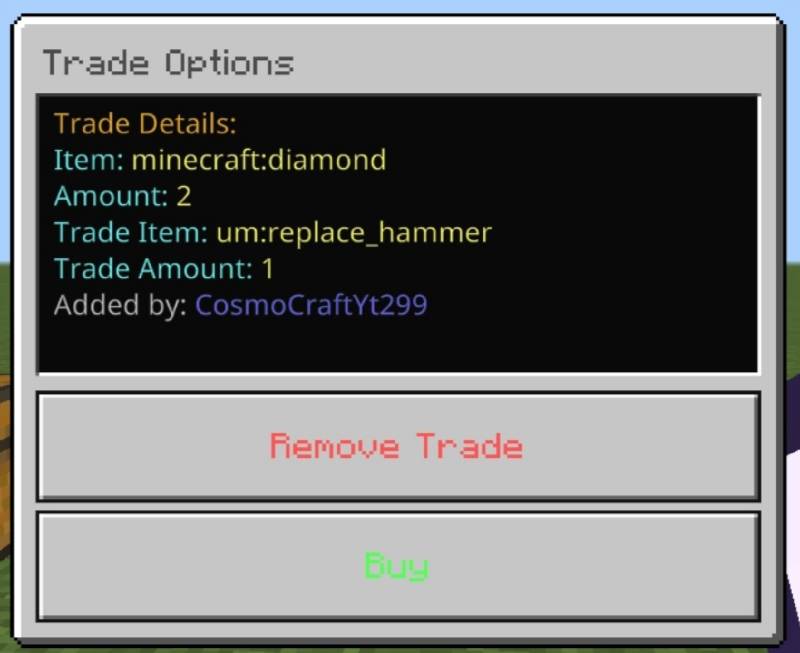
  • Select "View Trades" to browse all available trades
  • Click any trade to view its details:
    • Offered item
    • Offered quantity
    • Required item and quantity
    • Trade creator
  • Choose "Buy" to accept the trade (if you have the required item)
  • On confirmation:
    • Required item is removed from your inventory
    • You receive the offered item
    • Trade is removed
    • Offered item is sent to the designated chest

Step 5: Remove Your Trade


  • You can only remove trades you created
  • Select your trade and choose "Remove Trade"
  • Confirm to cancel the trade
  • Your item is returned to your inventory (if space is available)

Important Notes:

  • Make sure the specified chest exists and has space
  • If your inventory is full or you don’t have the required item, you’ll be notified

The TradeMaster Team

profile avatar
  • 39
    Followers
  • 14
    Projects
  • 256.8K
    Downloads
Donate

More from UnknownMcpeView all

  • Geode+  [Achievement Friendly] project image

    Geode+ [Achievement Friendly]

    • 8.7K
    • Addons

    More Ores Amethyst Cluster And Shard.

    • 8.7K
    • May 12, 2026
    • Addons
  • UBI project image

    UBI

    • 10.9K
    • Addons

    Welcome to the Thinks Addon for Minecraft Bedrock Edition! This addon introduces powerful tools and blocks to make your gameplay more advanced and creative. Below is a detailed guide on how to use each item and block in this addon.

    • 10.9K
    • May 1, 2026
    • Addons
    • +2
  • Bees+ project image

    Bees+

    • 6.9K
    • Addons

    Automate Minecraft Resources.

    • 6.9K
    • April 21, 2026
    • Addons
    • +3
  • Destory Wand  [Achievement Friendly] project image

    Destory Wand [Achievement Friendly]

    • 62.7K
    • Addons

    The Destroy Wand addon allows players to quickly break multiple blocks in Minecraft using a special wand and a pickaxe. Select two points, confirm, and watch the blocks vanish instantly!

    • 62.7K
    • April 6, 2026
    • Addons
    • +3
  • Geode+  [Achievement Friendly] project image

    Geode+ [Achievement Friendly]

    • 8.7K
    • Addons

    More Ores Amethyst Cluster And Shard.

    • 8.7K
    • May 12, 2026
    • Addons
  • UBI project image

    UBI

    • 10.9K
    • Addons

    Welcome to the Thinks Addon for Minecraft Bedrock Edition! This addon introduces powerful tools and blocks to make your gameplay more advanced and creative. Below is a detailed guide on how to use each item and block in this addon.

    • 10.9K
    • May 1, 2026
    • Addons
    • +2
  • Bees+ project image

    Bees+

    • 6.9K
    • Addons

    Automate Minecraft Resources.

    • 6.9K
    • April 21, 2026
    • Addons
    • +3
  • Destory Wand  [Achievement Friendly] project image

    Destory Wand [Achievement Friendly]

    • 62.7K
    • Addons

    The Destroy Wand addon allows players to quickly break multiple blocks in Minecraft using a special wand and a pickaxe. Select two points, confirm, and watch the blocks vanish instantly!

    • 62.7K
    • April 6, 2026
    • Addons
    • +3