promotional bannermobile promotional banner

Item Shops Addon

Create, Sell, and Trade! This addon adds customizable shops to Minecraft Bedrock Edition. Set prices, choose currencies (like emeralds or diamonds), and manage sales with an easy-to-use UI. Perfect for survival worlds, multiplayer servers.

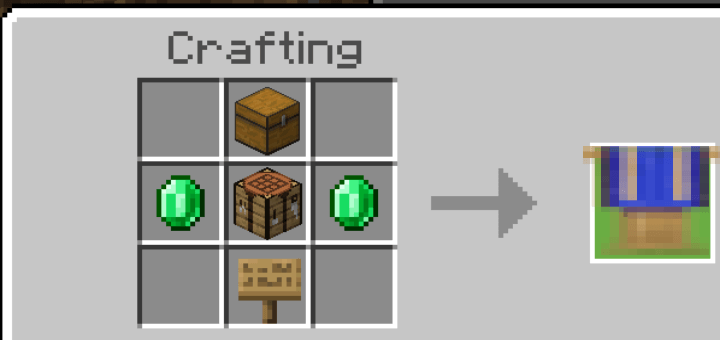
HOW TO CRAFT:
-To craft the item shops you need a crafting table.

RECIPE:
1x Crafting Table
2x Emerald
1x Oak Sign
1x Chest
HOW TO REMOVE:
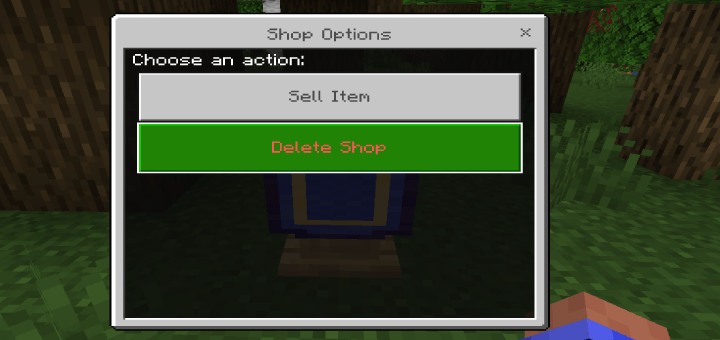
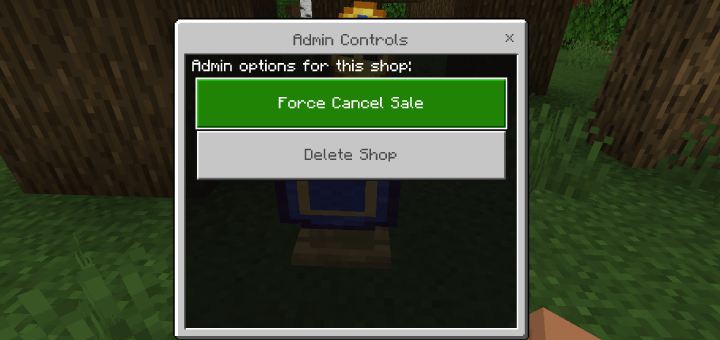
-The shops are not breakable, to remove the shops there are 3 options

  1.  Be the player that placed down the shop.
  2.  Change gamemode to creative.
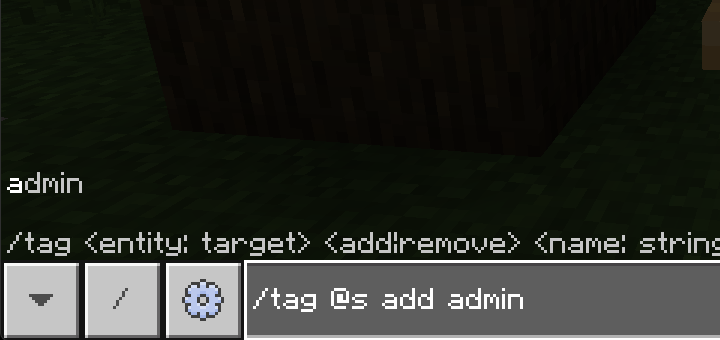
  3. Give yourself the admin tag using the command "/tag @s add admin"

when you have either one of those three options when you interact with the shops it will display the
option to remove the shop.
-When pressed it will drop the block and any item that was for sale.
To give yourself the admin tag use this command "/tag @s add admin"
HOW TO SELL:
-To sell an item place the item you want to sell in your inventory and interact with the shop and select "Sell Item"
-A dropdown will appear with all the items inyour inventory, select the item you want to sell and click "Submit"
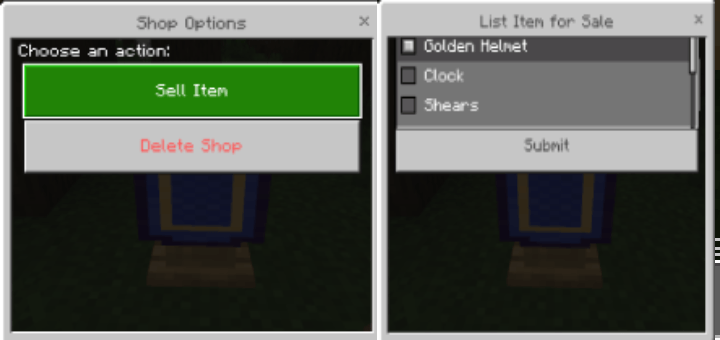
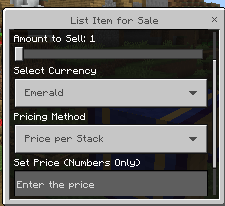
-When selling an item you get a few options
- "Shop name": this option allows you to rename your shop.
- "Amount to Sell": Sets the amount of the item you are selling.
- "Select Currency": Allows you to change what item you want to use as currency, to use a different item simply place the item in your inventory and it will be listed in the currency options.

- To sell items using scoreboard create a scoreboard and it will be list in the currency section.

- "Pricing method": allows you to sell each item individually or sell the whole stack by a set price
- "Set Price": Allows you to set the amount of the item you selected as currecy.
 

HOW TO CANCEL THE SALE:
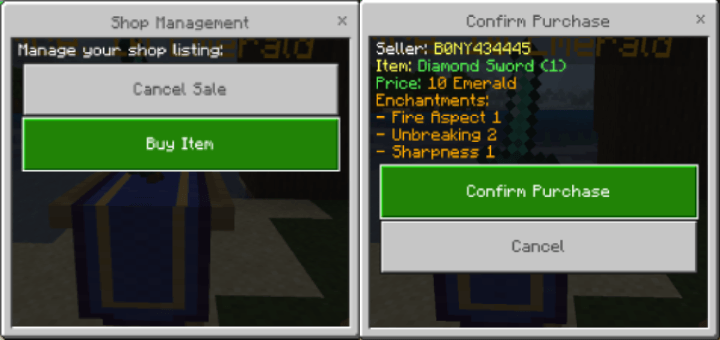
-If you place an item for sale and no longer wish to sell it interact with the shop and select "Cancel Sale".
-The item that was for sale will return to your inventory.
HOW TO BUY:
-To buy the item you interact with the shop and select "Buy Item" you will get a confirmation page showing you the items you are buying and the price.
-If you do not have enough of the item the player set as currency the sale will NOT gotrough and will be canceled.
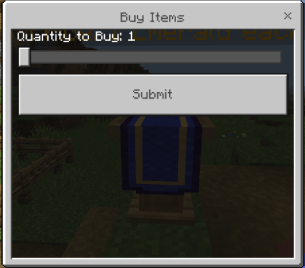
  • If the items are being sold individually you will get a form with 
    a slider, select the amount you want to purchase. each item is 
    priced individually.
 

HOW TO COLLECT REWARD:
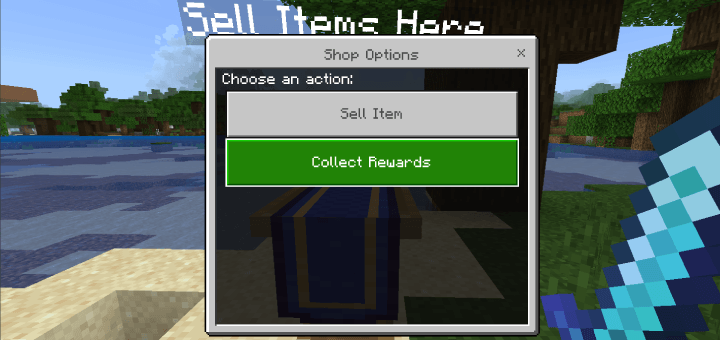
-After the item has sold to collect your reward interact with any shop and select "Collect Rewards" and you will receive the rewards from all the items you have sold.
The Item Shops Addon Team

profile avatar
Owner
  • 190
    Followers
  • 14
    Projects
  • 2.7M
    Downloads

More from bony162View all

  • WorldEdit Addon project image

    WorldEdit Addon

    • 346.4K
    • Addons

    Tired of placing blocks one by one? This WorldEdit-style addon lets you shape terrain, paint blocks, copy-paste structures, and automate tasks with ease. Build faster, smarter, and take full control of your Minecraft creations!

    • 346.4K
    • April 9, 2026
    • Addons
  • BONY162's Backpacks project image

    BONY162's Backpacks

    • 125.3K
    • Addons

    Say goodbye to inventory clutter! This addon adds 10+ fully functional, upgradable Backpacks to your survival world. Unlike basic mods, you can place these down to interact with them or carry them on your adventures.

    • 125.3K
    • February 16, 2026
    • Addons
    • +4
  • Security Cameras project image

    Security Cameras

    • 690.3K
    • Addons

    Discover the Security Camera Addon for Minecraft Bedrock! Place cameras, view live feeds, and monitor your world from anywhere using a special tablet.

    • 690.3K
    • February 15, 2026
    • Addons
  • Loot Randomizer project image

    Loot Randomizer

    • 185.2K
    • Addons

    Loot Randomizer is an add-on that make every block and entity in Minecraft drop a different item when broken or killed. The item is chosen randomly from all possible items in the game.

    • 185.2K
    • December 13, 2025
    • Addons
  • WorldEdit Addon project image

    WorldEdit Addon

    • 346.4K
    • Addons

    Tired of placing blocks one by one? This WorldEdit-style addon lets you shape terrain, paint blocks, copy-paste structures, and automate tasks with ease. Build faster, smarter, and take full control of your Minecraft creations!

    • 346.4K
    • April 9, 2026
    • Addons
  • BONY162's Backpacks project image

    BONY162's Backpacks

    • 125.3K
    • Addons

    Say goodbye to inventory clutter! This addon adds 10+ fully functional, upgradable Backpacks to your survival world. Unlike basic mods, you can place these down to interact with them or carry them on your adventures.

    • 125.3K
    • February 16, 2026
    • Addons
    • +4
  • Security Cameras project image

    Security Cameras

    • 690.3K
    • Addons

    Discover the Security Camera Addon for Minecraft Bedrock! Place cameras, view live feeds, and monitor your world from anywhere using a special tablet.

    • 690.3K
    • February 15, 2026
    • Addons
  • Loot Randomizer project image

    Loot Randomizer

    • 185.2K
    • Addons

    Loot Randomizer is an add-on that make every block and entity in Minecraft drop a different item when broken or killed. The item is chosen randomly from all possible items in the game.

    • 185.2K
    • December 13, 2025
    • Addons