✦ Item Rarity System
Make your Minecraft gear feel like actual loot.
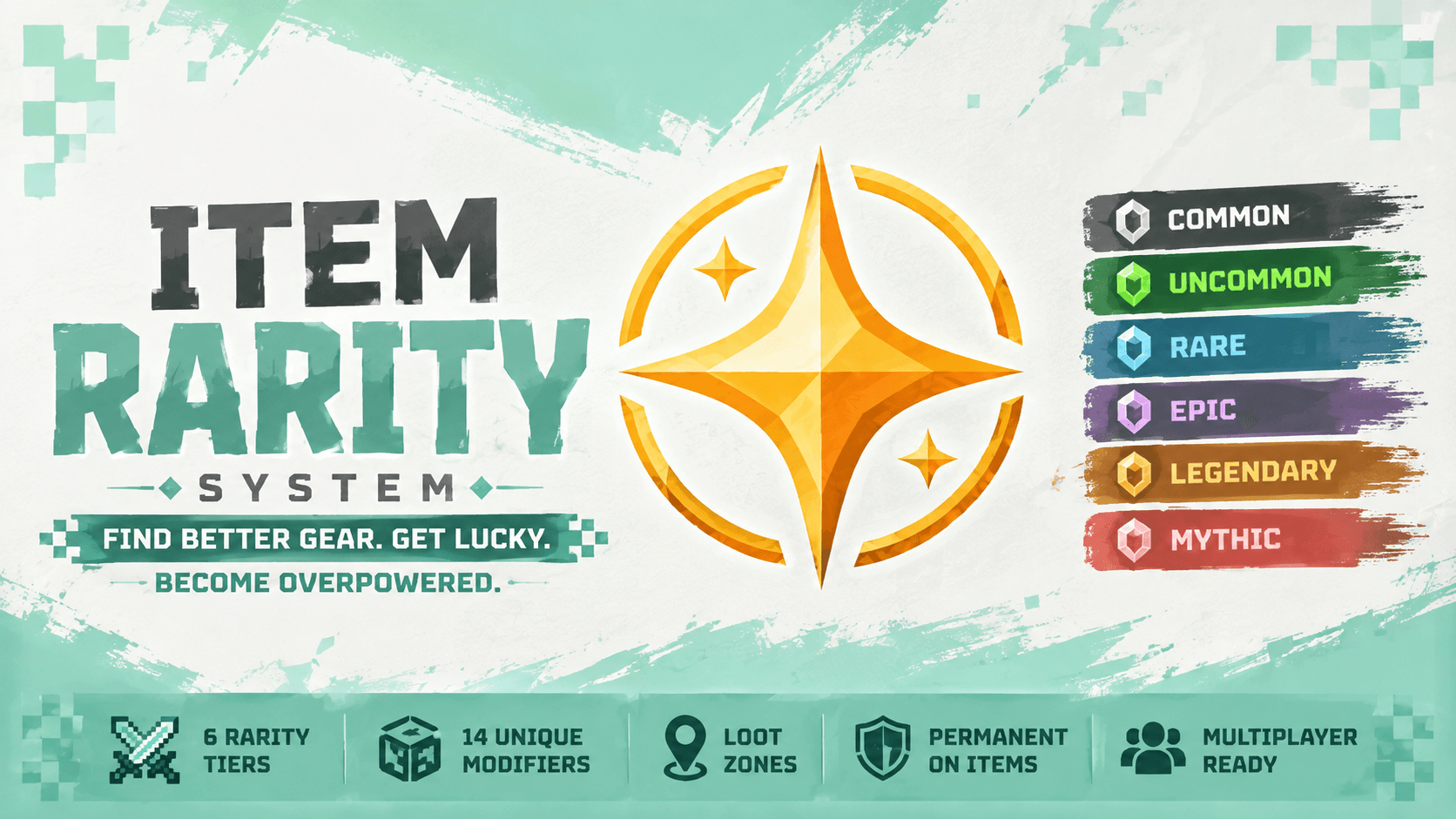
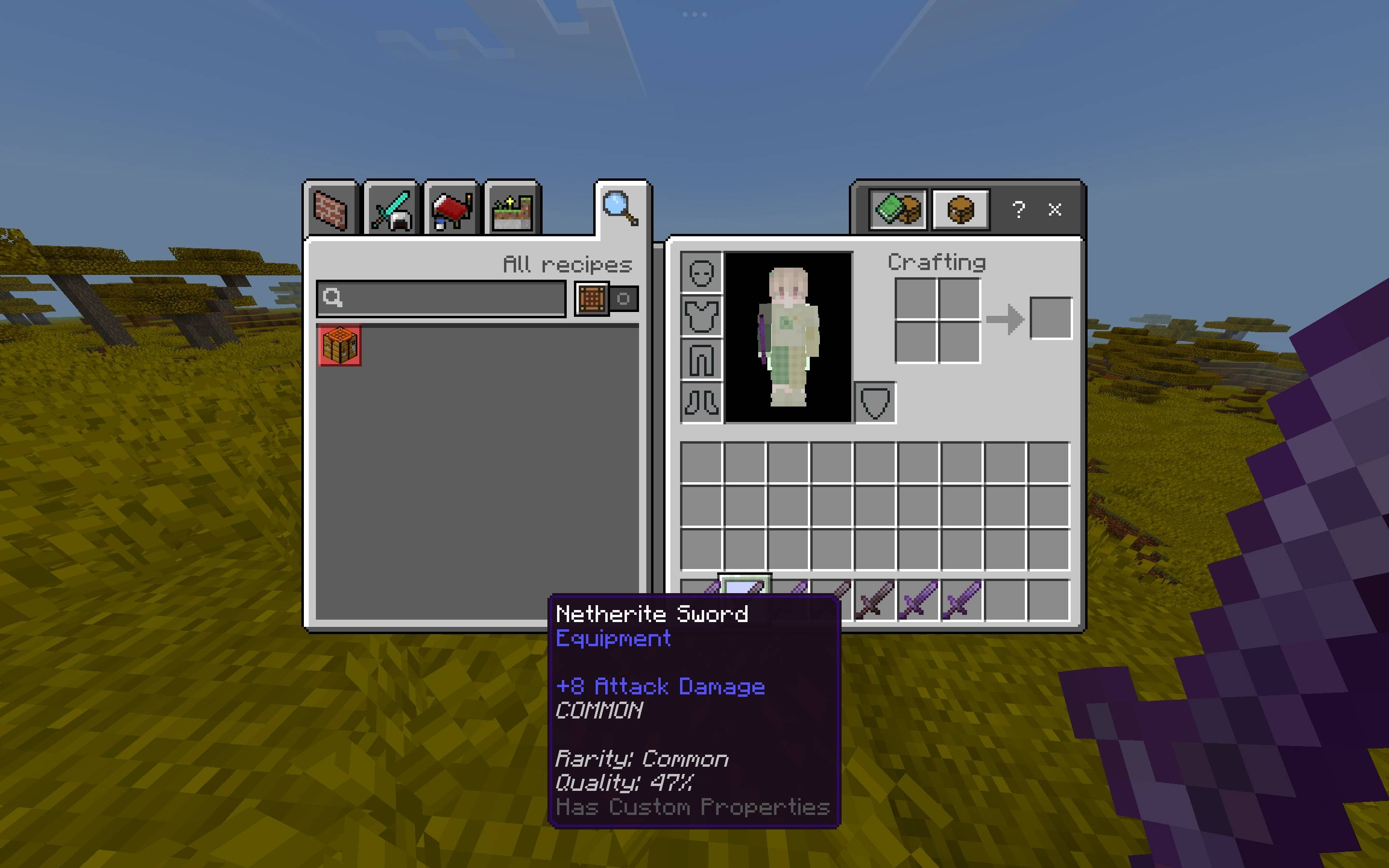
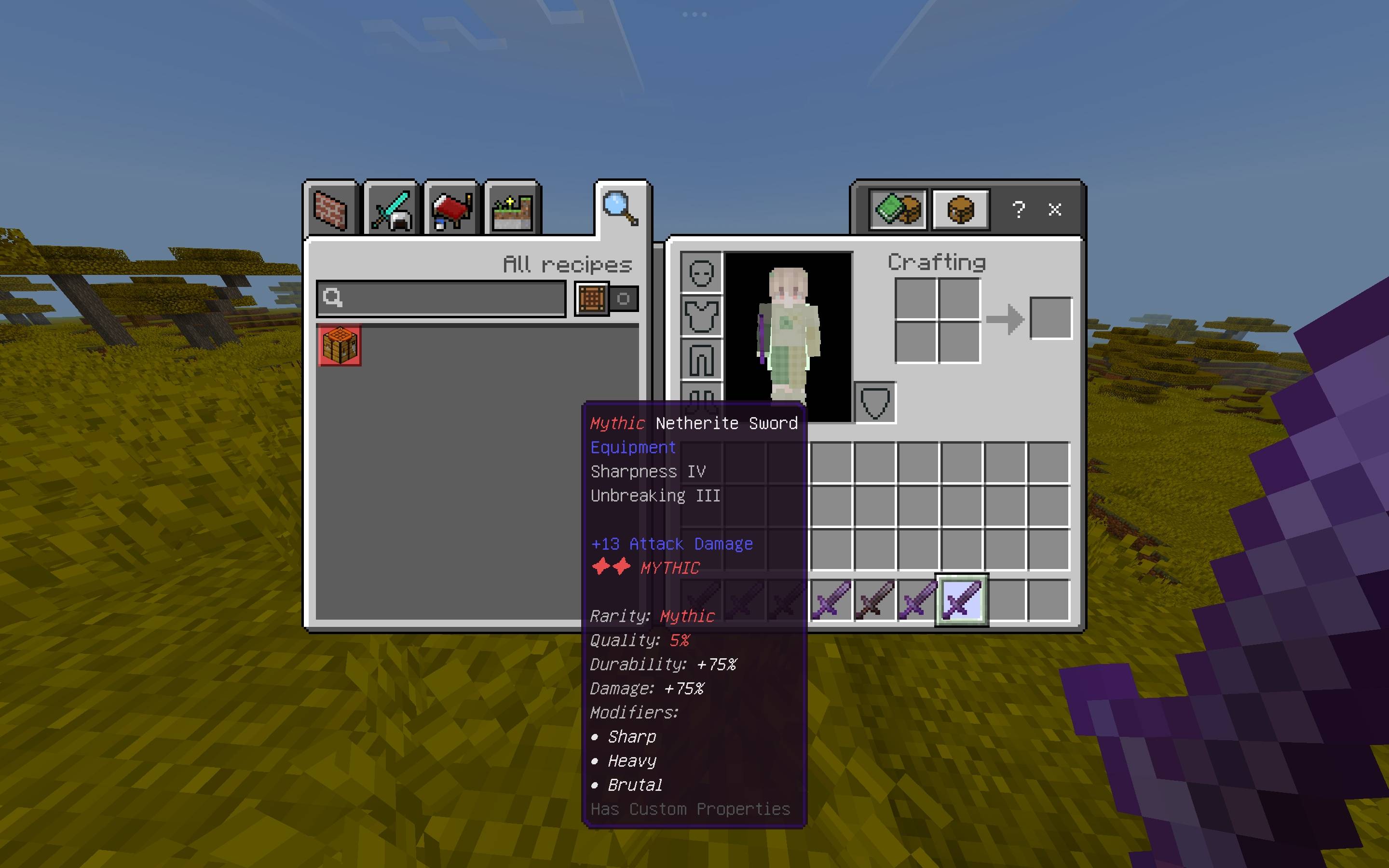
Item Rarity System gives weapons, tools, and armor randomized rarities ranging from Common to Mythic. Higher rarities provide stronger bonuses, better modifiers, and more exciting feedback when you find them.
Built for survival worlds, fantasy maps, servers, and Minecraft videos.
✦ Six Rarities
| Rarity |
Chance |
Multiplier |
| ⚪ Common |
55% |
1.00× |
| 🟢 Uncommon |
25% |
1.10× |
| 🔵 Rare |
12% |
1.20× |
| 🟣 Epic |
5% |
1.35× |
| 🟠 Legendary |
2.5% |
1.50× |
| 🔴 Mythic |
0.5% |
1.75× |
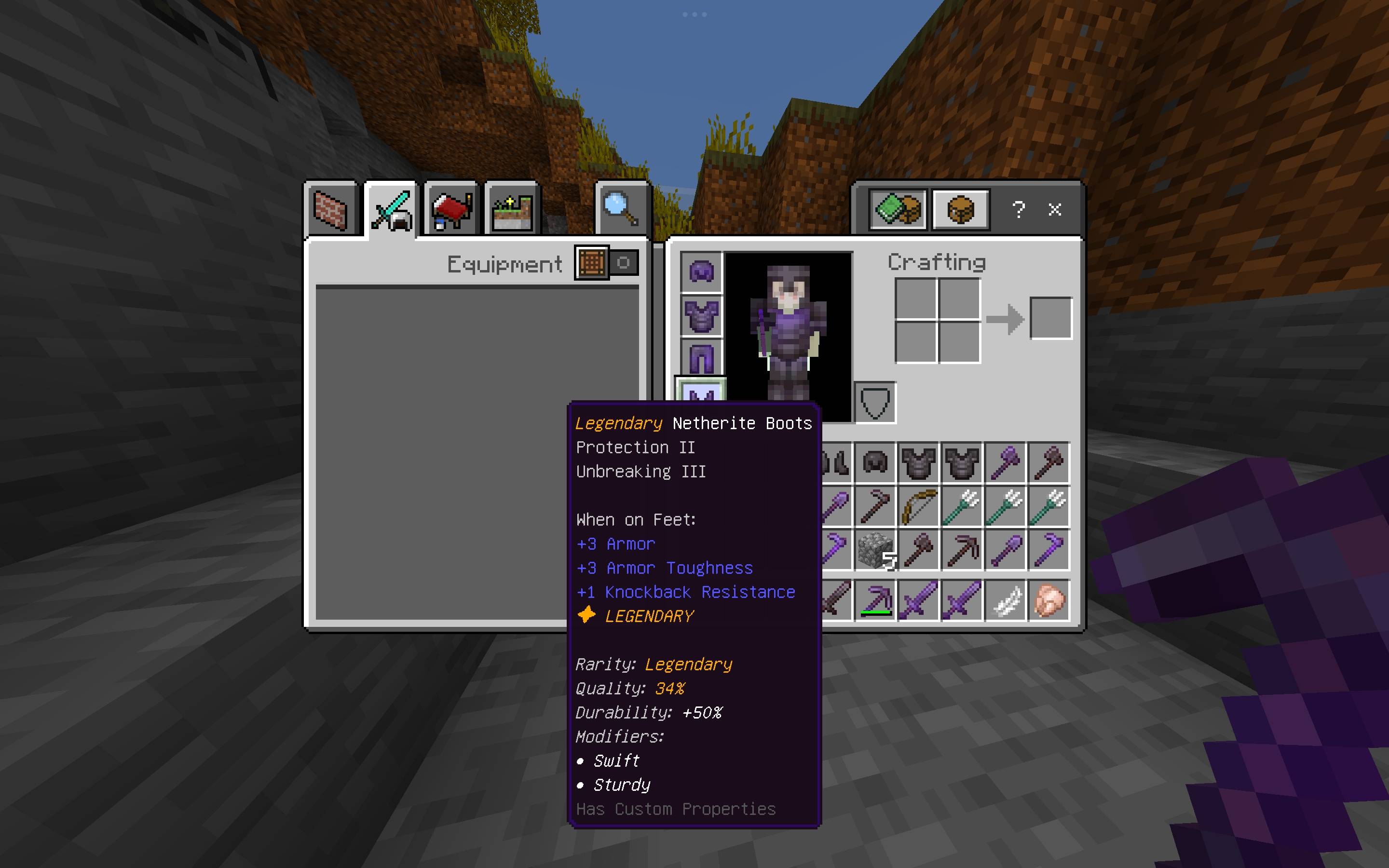
Higher rarities can receive more secondary modifiers. Once an item receives a rarity, it is permanently stored on that item.
⚔️ 14 Unique Modifiers
Higher-rarity gear can also receive special modifiers:
- Sharp — Weapons — Bonus Sharpness
- Brutal — Weapons — Chance of a bonus strike
- Swift — Weapons & Armor — Speed while equipped
- Vampiric — Weapons — Heal on hit
- Burning — Weapons — Sets targets on fire
- Heavy — Weapons — Slows targets
- Durable — Weapons, Tools & Armor — Bonus Unbreaking
- Efficient — Tools — Bonus Efficiency
- Lightweight — Tools — Haste while held
- Prospector — Pickaxes & Shovels — Bonus Fortune
- Reinforced — Armor — Bonus Protection
- Sturdy — Armor — Bonus Unbreaking
- Guardian — Armor — Resistance after being hit
- Vital — Armor — Health Boost while worn
Modifiers have minimum rarity requirements and are restricted to appropriate item categories.
🛡️ Supported Items
⚔️ Weapons
- Wooden, Stone, Iron, Golden, Diamond & Netherite Swords
⛏️ Tools
- Wooden, Stone, Iron, Golden, Diamond & Netherite Pickaxes
- Axes
- Shovels
- Hoes
🛡️ Armor
- Leather
- Chainmail
- Iron
- Golden
- Diamond
- Netherite
- Helmets, Chestplates, Leggings & Boots
🔧 Custom Item Support
The Full Edition can also detect compatible weapons, tools, and armor from other addons.
Custom items are classified using their actual Bedrock item tags, including:
minecraft:is_swordminecraft:is_pickaxeminecraft:is_axeminecraft:is_shovelminecraft:is_hoeminecraft:is_armorminecraft:is_trident
Identifier-based detection is only used as a fallback when no matching tag is available. Unusual custom items can also be manually registered if automatic detection cannot identify them.
🗺️ Loot Zones
Turn specific areas of your world into places worth exploring by creating boosted-rarity loot zones.
Available profiles:
dungeonstrongholdancient_cityend_cityboss
Perfect for custom dungeons, treasure rooms, boss arenas, and other important locations.
Minecraft does not expose vanilla structure identity to the Script API, so loot zones allow you to define these locations yourself.
✨ Make Rare Loot Feel Rare
Finding better gear comes with increasingly noticeable feedback. Depending on the rarity, the addon can use:
- Actionbar messages
- Titles
- Sounds
- Particles
- World-wide announcements
Finding a Mythic item should feel like finding something special.
💾 Your Items Stay Theirs
Rarity and modifiers are stored directly on the item using persistent dynamic properties. They survive:
- Renaming
- Trading
- Storage
- Dropping
- Death
- World/server restarts
Player-created item names are also preserved.
⚙️ Commands
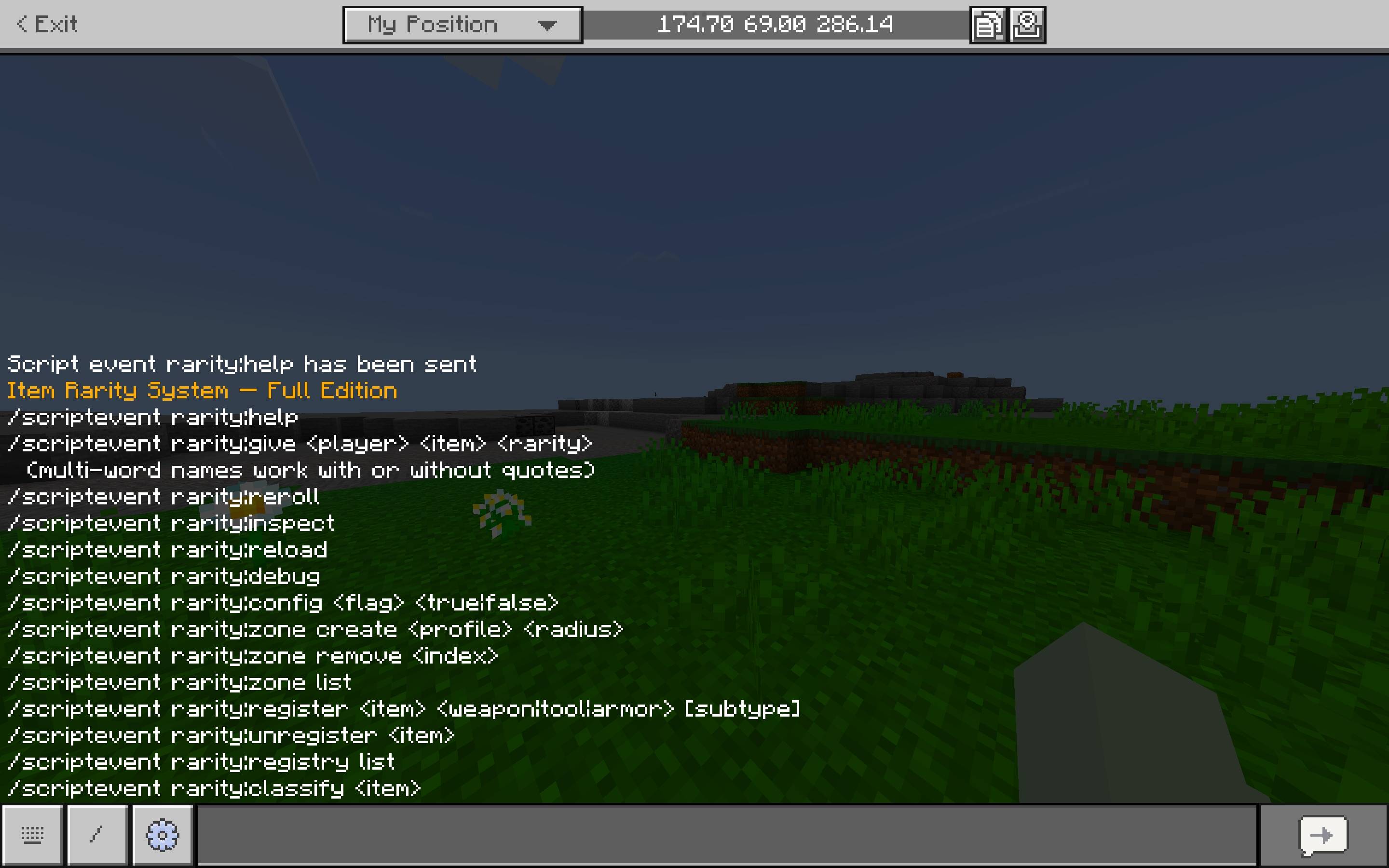
All commands use Minecraft Bedrock's /scriptevent system.
Both Editions
/scriptevent rarity:help
/scriptevent rarity:give <player> <item> <rarity>
/scriptevent rarity:reroll
/scriptevent rarity:inspect
/scriptevent rarity:reload
/scriptevent rarity:debug
/scriptevent rarity:config <flag> <true|false>
/scriptevent rarity:zone create <profile> <radius>
/scriptevent rarity:zone remove <index>
/scriptevent rarity:zone list
Full Edition Only
/scriptevent rarity:register <item> <weapon|tool|armor> [subtype]
/scriptevent rarity:unregister <item>
/scriptevent rarity:registry list
/scriptevent rarity:classify <item>
rarity:classify shows how the Full Edition would classify an item before actually using it.
rarity:inspect inspects the item currently held by the command runner.
⚙️ Configuration
enableddebugModeapplyOnCraftapplyOnLootcreativeModeAutoAssign
Configuration can also be changed through the addon's configuration file.
⚡ Built With Performance in Mind
The addon uses event-driven processing instead of constantly scanning player inventories.
The Full Edition only performs custom-item classification when necessary, while the Lite Edition uses a small vanilla-only registry.
📦 Editions
Full Edition
Recommended for fantasy worlds, modded worlds, servers, and worlds containing custom gear.
- Vanilla item support
- Automatic custom-item classification
- Custom item registry
- Full command set
Vanilla Lite Edition
A separate project for vanilla-only worlds.
The Lite Edition removes custom-item processing and uses a small static vanilla registry for the lowest possible processing overhead.
Only install one edition on a world. Do not use both at the same time.
⚠️ Bedrock Limitations
Minecraft Bedrock's Script API does not allow the addon to directly increase an individual item's maximum durability or base attack damage.
Instead, rarity bonuses use real vanilla mechanics such as:
- Unbreaking for durability
- Sharpness for weapon damage
- Protection for armor
These are actual gameplay effects, not cosmetic stats.
Vanilla structure types also cannot be directly identified by scripts, which is why the addon uses configurable loot zones instead.
🛠️ Installation
- Download the edition you want.
- Import the
.mcpack.
- Open your world settings.
- Go to Behavior Packs.
- Activate the pack.
✓ No resource pack required.
✓ No experimental toggles required.
🎮 Multiplayer
Built with multiplayer in mind.
Rarity data is stored on the individual item rather than in a shared player variable, so crafting, trading, storage, dropping, and looting work independently for different players.
🐛 Troubleshooting
Nothing happens when I get an item?
Make sure the system is enabled and at least one of applyOnCraft or applyOnLoot is enabled.
Enable debug mode with:
/scriptevent rarity:debug
Custom item isn't being detected?
Full Edition:
/scriptevent rarity:classify <item>
If automatic classification doesn't work, the item can be manually registered.
Loot zone isn't working?
Check your zones with:
/scriptevent rarity:zone list
Installed both editions?
Disable one. Both editions use the same rarity:* item data and should never run together.
✦ Find Better Gear. Get Lucky.
Every chest could contain something incredible.