Gilded Ledger: Player Auction House Addon
- By
Premium auction house addon for Minecraft Bedrock with real-time bidding, secure claim box, and full localization support.
MCPEDL
Description
Gilded Ledger: Player Auction House Addon
A premium, fully-featured, and highly customizable Player Auction House addon for Minecraft Bedrock Edition (1.20.10+). Players can list items for auction, bid on other players' listings, manage active auctions, and claim their rewards (items/money) from a secure Claim Box.
Styled with a premium medieval slate-charcoal and gold-trimmed GUI, it integrates seamlessly with companion addons like RPG/Dynamic Economy Addons and uses Ducats as its default currency.
Achievement Friendly: no experimental toggles required, so achievements stay fully enabled in your world.
Main Auction Menu: the primary listing browser where players see all active auctions, item icons, current bids, and remaining time. 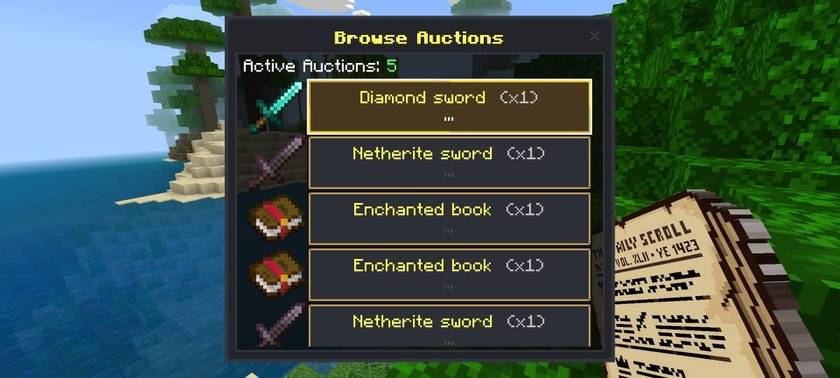
Listing an Item: the form players use to select an item from their inventory, set a starting price, and choose a listing duration. 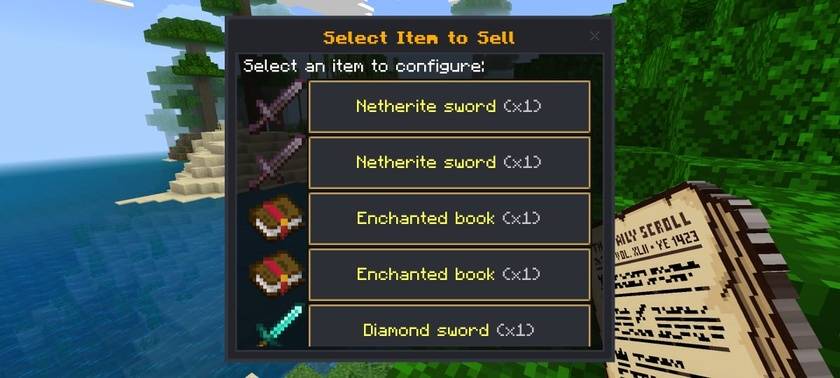
Placing a Bid: the bid screen showing the current highest bid, minimum next bid, and an input field for the player's offer. 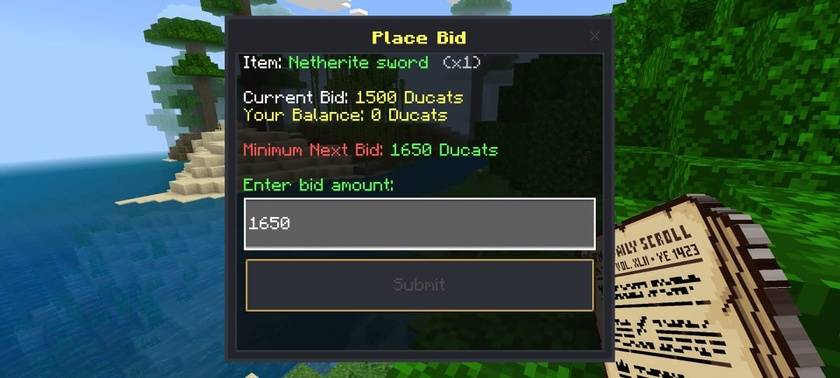
Claim Box: where players collect won items, refunded bids, or Ducats from completed auctions, especially useful for offline transactions. 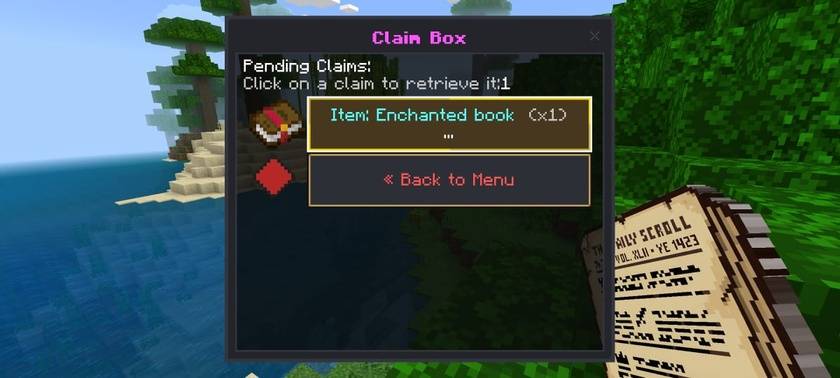
Key Features
-
Dynamic Auction Loop & Bid System Players can list items from their inventory for custom durations. Other players can place real-time bids, with minimum bid increments enforced via a flat value or percentage rate. Outbid players are refunded automatically, if they're offline, the refund is placed safely in their personal Claim Box.
-
Upfront-Fee-Less Listing (Tax-on-Sale) No upfront listing fees, every listing is free. A customizable sales tax (default 5%) is only deducted from the final sale price once an auction is successfully won. A minimum listing price of 50 (customizable) keeps listings high-value.
-
High-Value Whitelist Economy Selling is restricted by default to high-value, non-farmable items (Diamond/Netherite equipment, Elytras, Tridents, Totems, and Enchanted Books), keeping the server economy clean and clutter-free.
-
Multilingual & Localized UI The entire interface, messages, logs, and error warnings are fully localized, with built-in support for English (US) and Indonesian (ID). Fully compatible with in-game language settings using client-side translation keys (
rawtext). -
Dynamic Custom Item Texture Resolver & Interceptor Automatically resolves texture paths for custom items added by other addons. A block path interceptor redirects any block icons to a clean generic fallback (like paper), since Bedrock script forms can't render terrain/block atlas paths directly on buttons. Explicit custom icons can also be set manually in the config.
-
Advanced NBT and Lore Serialization Automatically serializes and deserializes item counts, custom name tags, enchantments, damage/durability, and lore, preventing item duplication and ensuring items return with their exact properties intact.
-
Interactive Audio Feedback Clean success sounds (
random.orb,random.levelup) play when listing, bidding, winning, or claiming, and a warning sound (note.bass) plays on errors like bidding too low, insufficient funds, or a full inventory.
How to Install & Use
Installation
- Double-click the
Gilded_Ledger_v1.0.0.mcaddonfile to import both packs into Minecraft. - Activate both the Behavior Pack and Resource Pack in your World Settings.
- No experimental toggles required, achievements stay enabled.
Accessing the GUI
- Hold the Auction Ledger item (
auction:ledger) and right-click/tap the screen. - Or run
/scriptevent auction:openin chat.
Earning the Ledger
New players automatically receive one Auction Ledger in their inventory on first join.
Customization Guide
Behavior Pack Configuration
File: GildedLedg_BP/scripts/config.js
moneyScoreboard: Scoreboard objective used to track player balances (default:"money").currencyName¤cyNamePlural: Your server's currency name (default:"Ducat"/"Ducats").salesTaxRate: Percentage taken from successful sales (e.g.0.05= 5% tax). Set to0to disable.minListingPrice: Minimum price a player can list an item for (default:50).defaultStartPrice: Fallback recommended price for items not explicitly whitelisted.durations: Available listing durations, their timeouts, and matching translation keys.minBidIncrementRate&minBidIncrementFlat: Rules for how much higher a new bid must be than the current one.whitelistNamespaces: Array of prefixes that auto-allow all custom items from other addons (e.g.["custom_addon:", "addon:"]).items: The single-source registry of allowed items, each defined in a clean structure:
  "minecraft:diamond_sword": {
    displayName: "Diamond Sword",
    recommendedPrice: 500,
    icon: "textures/items/diamond_sword.png"
  }
How to Whitelist & Customize Items
1. Adding a vanilla item
"minecraft:golden_apple": {
  displayName: "Golden Apple",
  recommendedPrice: 300,
  icon: "textures/items/apple_golden.png"
}
2. Adding a specific custom item from another addon
"custom_addon:epic_sword": {
  displayName: "Epic Sword",
  recommendedPrice: 2500,
  icon: "textures/items/epic_sword.png"
}
3. Whitelisting all items from another addon in bulk
whitelistNamespaces: [
  "custom_addon:" // Allows any item starting with "custom_addon:"
]
Note: bulk whitelisted items use their default game name tag and fall back to the generic paper icon unless explicitly registered in the items mapping.
Language & Localization
Files: GildedLedg_RP/texts/en_US.lang & GildedLedg_RP/texts/id_ID.lang
- Customize all titles, buttons, descriptions, notifications, chat broadcasts, and error dialogs.
- Add your own language file by registering it in
GildedLedg_RP/texts/languages.json.
Companion Addon Integration (Dynamic Economy)
This addon is fully compatible and designed to integrate seamlessly with the companion Dynamic Economy Addon (loose coupling).
-
Opening the Auction House from RPG Economy Other scripts/addons can trigger
scriptevent auction:openon the player to open the Auction House main menu. -
Preventing duplicate spawn ledgers In
config.js, setdisableLedgerGive: trueto stop this addon from giving its starting ledger on first spawn, letting the Dynamic Economy ledger serve as the sole entry point. -
Returning to the RPG Economy Market In
config.js, setenableReturnToMarket: trueto show a "Return to Market" button in the main menu, which runs/scriptevent economy:marketto send players back to the Dynamic Economy menu.
Compatibility
- Integrates seamlessly with RPG/Dynamic Economy Addons and uses the same Ducat currency system.
- Custom items from other addons are auto-resolved to matching icons without extra setup.
- No experimental toggles required, safe for achievement-enabled worlds.
The Gilded Ledger: Player Auction House Addon Team