Farm Controller
Farm Controller – Grow ANY seeds instantly! Insert seeds, speed them up with Bone Meal, and collect your harvest — even offline! Supports vanilla and add-on crops. No farmland needed. Your ultimate virtual farm in one block!
1000792415.jpg
1000792414.jpg
1000792418.jpg
1000792416.jpg
Description
# Farm Controller Add-on by Lomipe
**Version:** 1.0.0
**Minecraft Bedrock Edition:** 1.21.0+
**Script API Version:** @minecraft/server 1.17.0
---
## Overview
Farm Controller is a **Virtual Farming Machine** for Minecraft Bedrock Edition. No farmland needed! Simply insert seeds into the controller, wait for them to grow, and collect your harvest!
Works with ANY seed including seeds from other add-ons!
---
## Features
- ✅ **No Farmland Needed** - Virtual growing system!
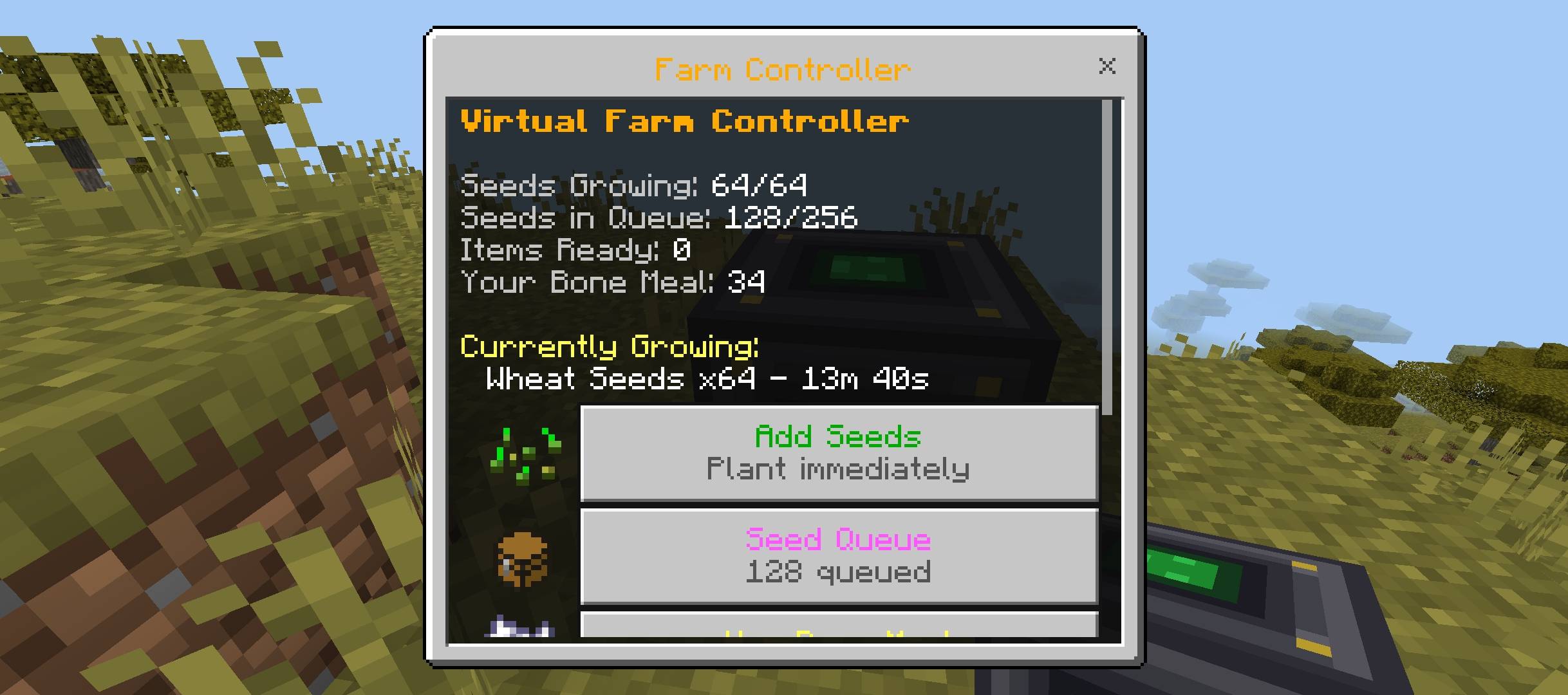
- ✅ **Insert Seeds** - Up to 64 seeds growing at once
- ✅ **Auto-Harvest** - Crops harvest automatically when ready!
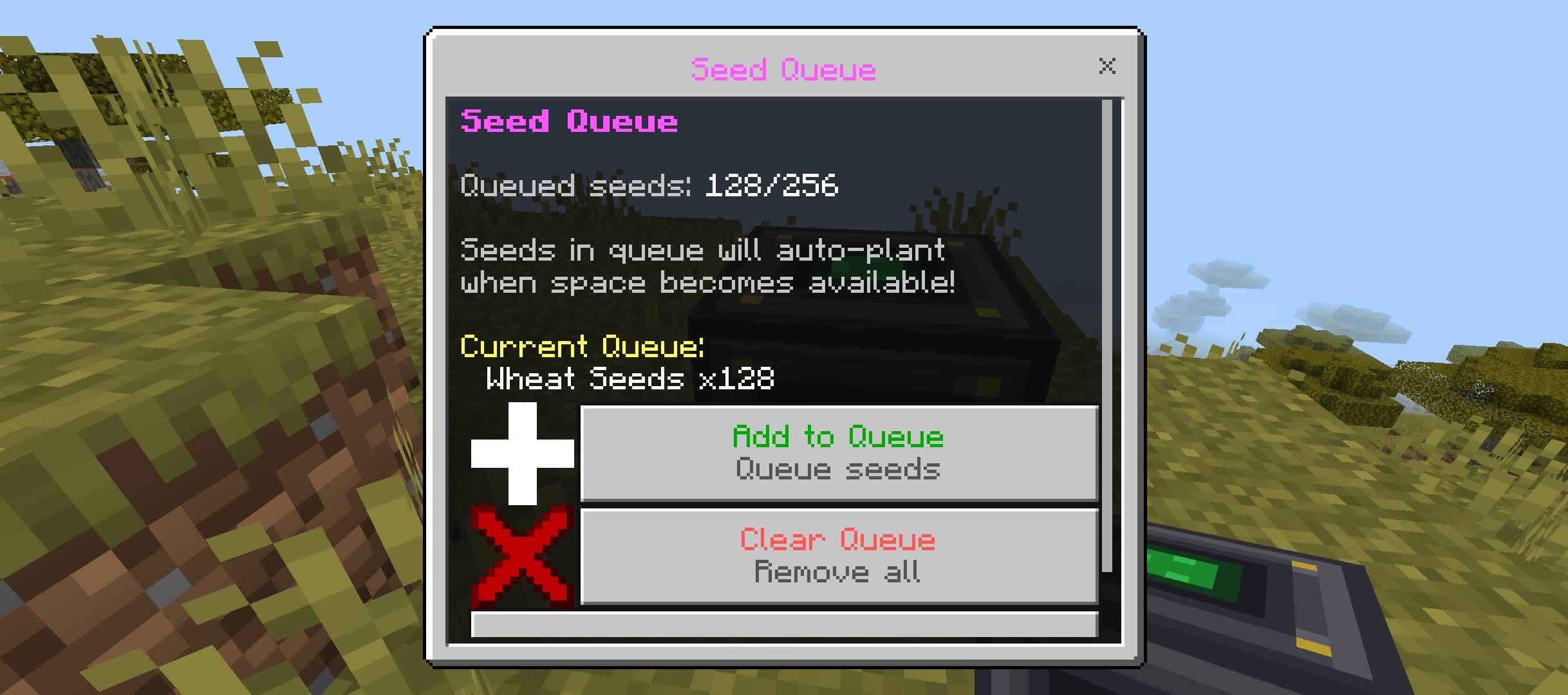
- ✅ **Seed Queue** - Queue up to 256 seeds for continuous farming!
- ✅ **Bone Meal Speedup** - Each bone meal saves 2 minutes!
- ✅ **Sound Effects** - Ding sounds for feedback!
- ✅ **Built-in Guide** - Learn how to use right in the UI!
- ✅ **UNIVERSAL SEED SUPPORT** - Auto-detects ANY seed from ANY add-on!
- ✅ **Internal Storage** - Harvested items stored safely until collected
---
## Installation
1. Download the `.mcaddon` file
2. Double-click to import into Minecraft
3. Create a new world or edit an existing world
4. Enable the behavior pack AND resource pack
5. Enable "Beta APIs" in Experiments (required for Script API)
---
## How to Use
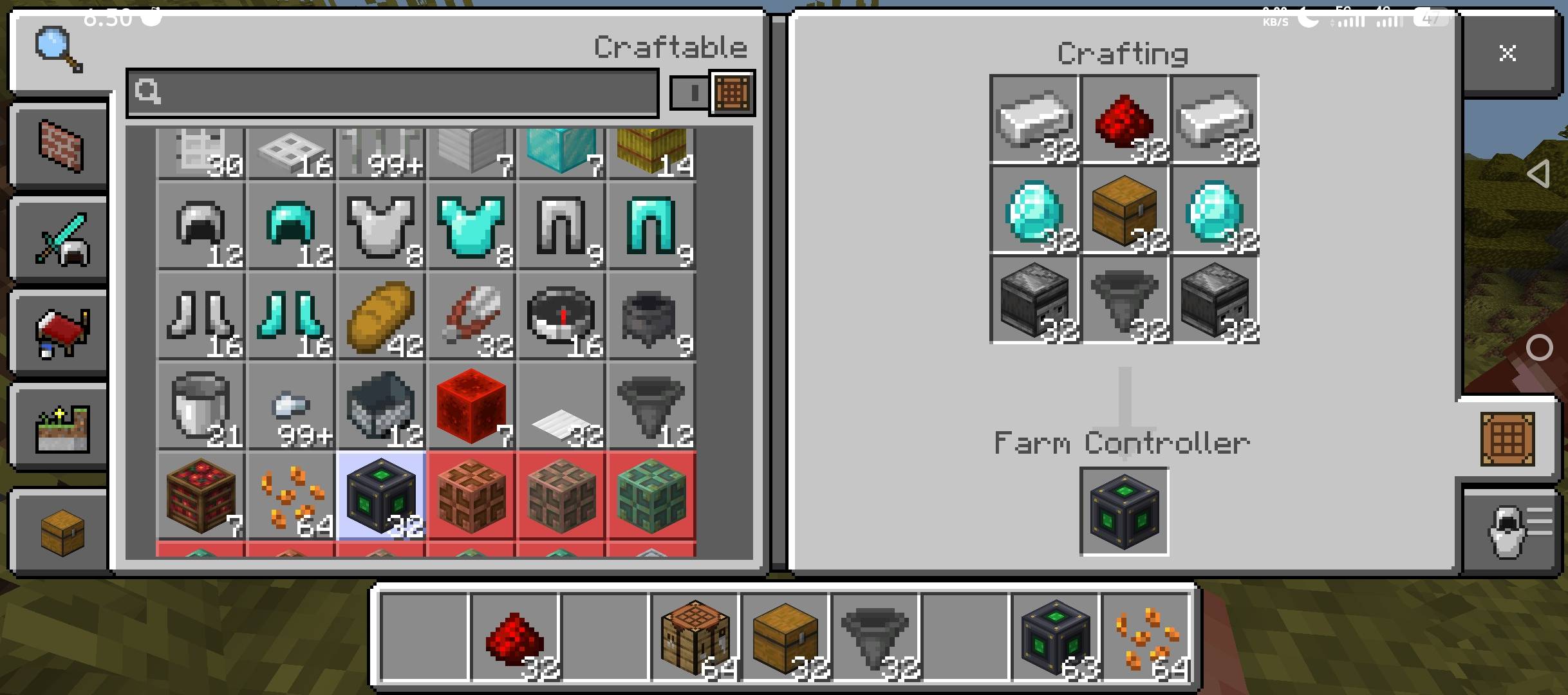
### Step 1: Craft the Farm Controller
**Recipe:**
```
[ Iron Ingot ] [ Redstone ] [ Iron Ingot ]
[ Diamond ] [ Chest ] [ Diamond ]
[ Observer ] [ Hopper ] [ Observer ]
```
### Step 2: Place and Open Menu
1. Place the Farm Controller anywhere
2. **Right-click** to open the menu (you'll hear a click sound!)
### Step 3: Add Seeds
1. Click **"Add Seeds"** in the menu
2. Select which seeds from your inventory
3. Choose how many to plant (up to 64 total)
4. Seeds will start growing automatically!
### Step 4: Use Seed Queue (Optional)
Farm is full? No problem!
1. Click **"Seed Queue"** in the menu
2. Add seeds to the queue (up to 256!)
3. When current crops harvest, queued seeds **auto-plant**!
### Step 5: Speed Up with Bone Meal (Optional)
1. Click **"Use Bone Meal"** in the menu
2. Select how many bone meal to use
3. Each bone meal reduces growth time by **2 minutes**!
### Step 6: Collect Harvest
Crops **auto-harvest** when fully grown!
1. Open the menu and click **"Collect Harvest"**
2. Items transfer directly to your inventory!
3. You'll hear a level-up sound!
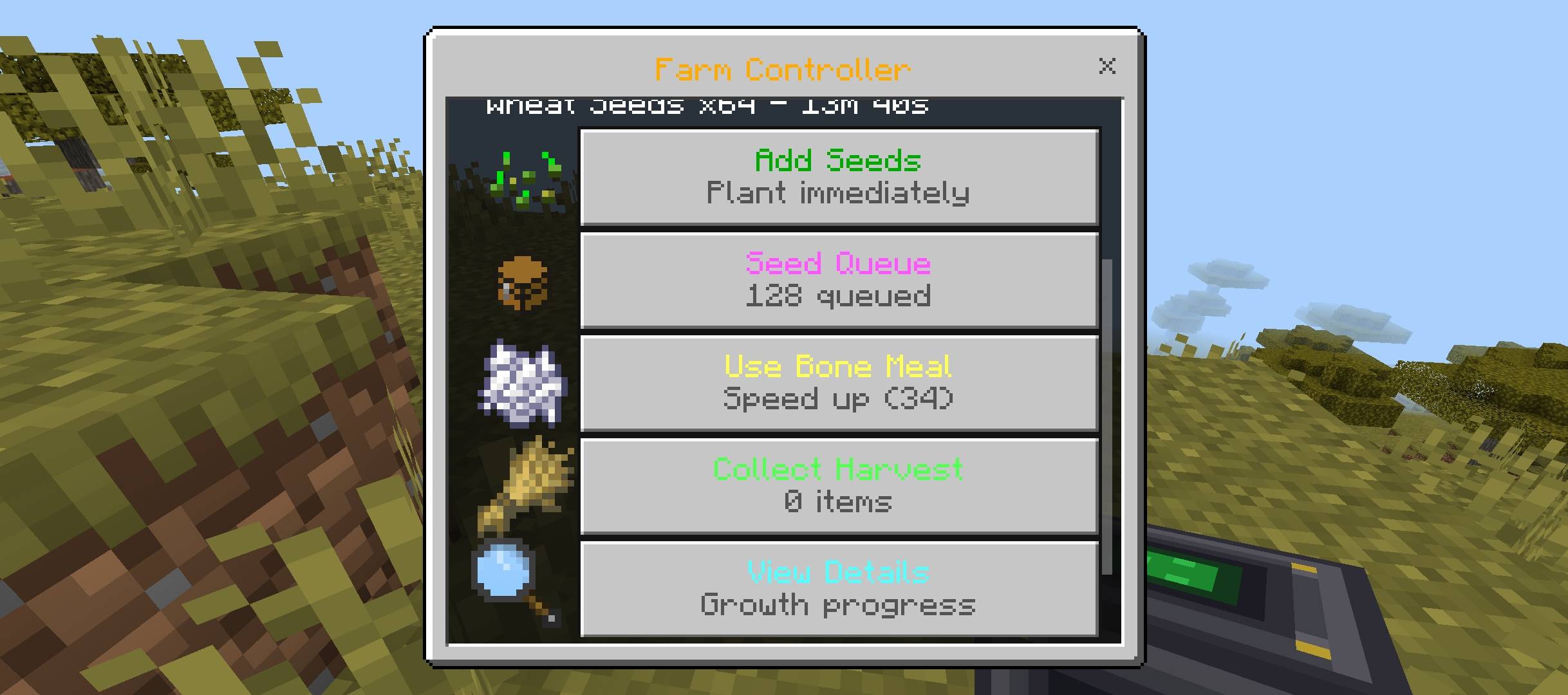
### Menu Options
| Button | Description |
|--------|-------------|
| **Add Seeds** | Plant seeds immediately (64 max) |
| **Seed Queue** | Queue seeds for auto-planting (256 max) |
| **Use Bone Meal** | Speed up all growing crops (-2 min each) |
| **Collect Harvest** | Take all harvested items |
| **View Details** | See growth progress, queue, storage |
| **Guide** | Learn how everything works! |
---
## Supported Seeds
### Vanilla Seeds (Optimized Defaults)
| Seed | Growth Time | Produces |
|------|-------------|----------|
| Wheat Seeds | 20 min | Wheat + Bonus Seeds |
| Carrot | 20 min | 2-4 Carrots |
| Potato | 20 min | 2-4 Potatoes |
| Beetroot Seeds | 20 min | Beetroot + Bonus Seeds |
| Melon Seeds | 30 min | 3-7 Melon Slices |
| Pumpkin Seeds | 30 min | 1 Pumpkin |
| Nether Wart | 15 min | 2-4 Nether Wart |
| Sweet Berries | 10 min | 2-3 Sweet Berries |
| Torchflower Seeds | 20 min | 1 Torchflower |
| Pitcher Pod | 20 min | 1 Pitcher Plant |
| Cocoa Beans | 20 min | 2-3 Cocoa Beans |
### Add-on Seeds (Auto-Detected!)
The Farm Controller automatically detects seeds from **ANY add-on**!
**How Auto-Detection Works:**
1. Items with "seed", "seeds", "pod", "spore" in the name
2. Plantable items like carrots, potatoes, berries
3. Auto-guesses the harvest item from the seed name
4. Unknown seeds use 20-minute default growth time
**Examples of Compatible Add-ons:**
- Farmer's Delight
- Simple Farming
- Any custom crop/farming add-on
- Basically anything with seeds!
---
## Anti-Duplication Safeguards
This add-on implements multiple layers of protection against item duplication:
### 1. One-Time Crop Scanning
Crops are counted **only once** when the farm is configured. The count never increases without manual reconfiguration.
### 2. Processing Lock
A 5-second cooldown prevents rapid re-entry exploits. If a player enters the chunk multiple times quickly, production is only calculated once.
### 3. Time Clamping
- Maximum offline time: 168 hours (7 days)
- Maximum cycles per crop type: 1000
- No negative time values allowed
### 4. Full Cycles Only
Production is calculated based on **complete growth cycles only**. Partial growth is not counted, preventing timing exploits.
### 5. Immediate Timestamp Update
The `lastActiveTime` is updated **immediately after processing**, before items are inserted. This prevents duplication from interrupted operations.
### 6. Mathematical Calculation
Production uses mathematical formulas instead of per-block iteration:
```
cycles = floor(elapsedTime / growthTime)
drops = cropCount × cycles × averageDropRate
```
### 7. Average Drop Rates
Drop quantities use averaged values to prevent exploitation through timing or repeated harvests.
---
## Multiplayer Safety
### Owner System
Each Farm Controller tracks its owner's player ID. While any player can trigger processing, the system uses locking mechanisms to prevent concurrent processing.
### Processing Lock
A timestamp-based lock prevents multiple players from processing the same controller simultaneously:
```javascript
if (currentTime - lastProcessing < PROCESSING_COOLDOWN) {
return; // Already processed recently
}
setBlockProperty(block, PROPERTIES.PROCESSING_LOCK, currentTime);
```
### Thread Safety
All state modifications happen atomically within the same script tick, preventing race conditions.
---
## Performance Optimization
### No Per-Block Iteration
Instead of checking each crop block on player return, the system uses stored crop counts and mathematical calculations:
```javascript
// Instead of:
for (let x = minX; x <= maxX; x++) {
for (let z = minZ; z <= maxZ; z++) {
// Check and harvest each block
}
}
// We use:
const totalDrops = cropCount * cycles * avgDropRate;
```
### Event-Based Only
The add-on uses **zero constant tick listeners**. All processing is triggered by:
- Block placement
- Block interaction
- Player spawn (initial login only)
### Efficient Data Storage
Farm data is stored in dynamic properties as JSON strings, minimizing memory usage:
- Farm bounds: 50-100 bytes
- Crop counts: 100-300 bytes
- Chest location: 30-50 bytes
---
## Expansion Compatibility
### Adding Custom Crops
Edit the `CROP_REGISTRY` object in `scripts/main.js`:
```javascript
const CROP_REGISTRY = {
// Existing crops...
// Add your custom crop:
"my_addon:custom_crop": {
maxStage: 7, // Maximum growth stage
growthTime: 1200, // Seconds for full growth
seed: "my_addon:custom_seeds",
drop: "my_addon:custom_item",
dropCount: { min: 1, max: 3 },
seedDrop: { min: 0, max: 2 },
propertyName: "growth" // Block state property name
}
};
```
---
## Configuration
Edit the `CONFIG` object in `scripts/main.js` to customize behavior:
```javascript
const CONFIG = {
MAX_FARM_SIZE: 100, // Maximum farm dimension
MAX_OFFLINE_HOURS: 168, // Maximum offline time (7 days)
MAX_CYCLES_PER_CROP: 1000, // Prevent overflow
PROCESSING_COOLDOWN: 5000, // 5 seconds between processes
SELECTION_TIMEOUT: 120000, // 2 minutes to select corners
SELECTION_ITEM: "minecraft:stick"
};
```
---
## Dynamic Property Schema
The add-on uses the following dynamic properties on Farm Controller blocks:
| Property | Type | Description |
|----------|------|-------------|
| `lomipe:farm_bounds` | string (JSON) | Min/max coordinates of farm area |
| `lomipe:crop_counts` | string (JSON) | Crop type → count mapping |
| `lomipe:linked_chest` | string (JSON) | Chest location coordinates |
| `lomipe:last_active` | number | Unix timestamp of last processing |
| `lomipe:owner_id` | string | Player ID who placed the block |
| `lomipe:is_configured` | boolean | Whether farm is fully configured |
| `lomipe:processing_lock` | number | Timestamp of last processing attempt |
---
## Troubleshooting
### "No supported crops found"
- Ensure crops are actually planted (not just farmland)
- Check that crop types are in the supported list
- Verify selection includes the Y-level where crops are planted
### "No chest found"
- Place a chest within 5 blocks of the controller
- Supported containers: Chest, Trapped Chest, Barrel
### Items overflow
- The chest is full; empty it or add more storage
- Consider using a hopper system to extract items
### Production seems wrong
- Check elapsed time since last harvest
- Remember: only FULL growth cycles count
- Maximum offline time is 7 days
---
## License
MIT License - Free for personal and commercial use.
---
## Credits
Created by **Lomipe**
For support or suggestions, visit the CurseForge page.
Farm Controller Team