Elevators
It adds the ability to instantly teleport between same colored elevators on different Y levels ranging from bedrock all the way up to the build limit in any dimension.

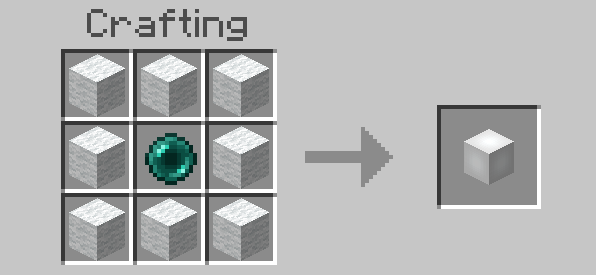
Crafting Recipie
All elevators can be crafted with 8 of the same wool color as the elevator color you want, and one ender pearl in the center
Features
- Jump to teleport up
- Sneak to teleport down
- Multiple mob teleporting
- Directional Teleporting
- 16 Elevator colors
Teleporting
Jumping teleports you to the nearest +Y Elevator
Sneaking teleports you to the nearest -Y Elevator
They work in any dimension, from the bottom of the world to the build limit
When trying to teleport to an elevator, if a non-transparent block is either one or two blocks above it, you will get the message "Elevator Obstructed". This is to prevent suffocating and being pushed away from the elevator. See the list below for all blocks that don't cause this message.
When teleporting, all entities are automatically moved closer to the center of the elevator, if they are too close to the edge, to prevent colliding with surrounding blocks.
Supported Non-Obstrucing Blocks
- Air
- Scaffolding
- Vines
- Twisting Vines
- Weeping Vines
- Web
- All torches
- Item Frames
- Water
- Banners
- All rails
- Tripwire Hook
- Tripwire
- Redstone
- Lever
- Fire
- Powder Snow
- Hanging Roots
- Pale Hanging Moss
- Spore Blossom
- Skulk Vein
- Glow Lichen
- Resin Clump
- Ladder
- Leaf Litter
- Cactus Flower
- All carpets (wool, moss, pale moss)
- All signs (not hanging signs)
- All pressure plates
- All buttons
- All coral
- 1 Snow Layer
Multiple Entity
When multiple entities are on top of the elevator, every entity will travel with the player.
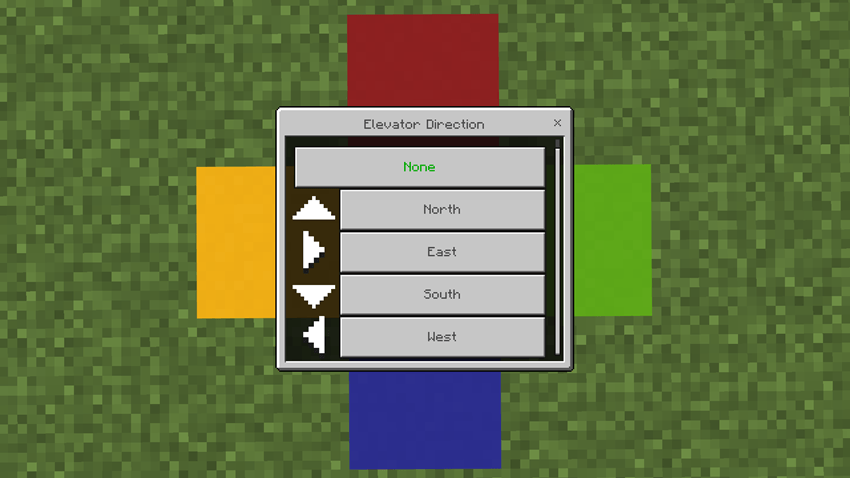
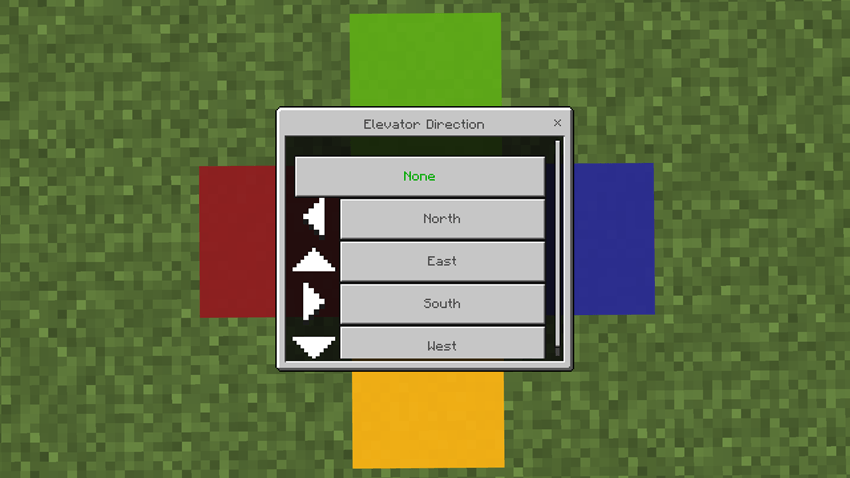
Directional Teleporting UI
Interact with an elevator to open the direction UI
This is to select which direction a player will face when they teleport to this Elevator
The arrows on the left point which way that direction is
Configs
To open the config UI, press the "Config" button in the elevator UI. Only players with the tag "elevators:op" are able to see this button, or open the UI. The "elevators:op" tag will be automatically added to the very first player to join the world.
<figure class="image">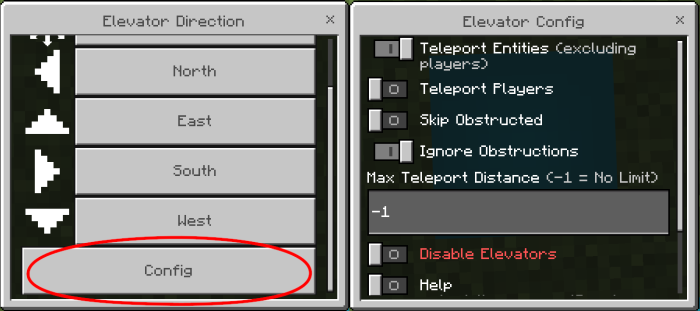 </figure>
Options
Disabled
Disables the use of elevators
Teleport Entities
Allows entities to teleport along with players (excluding other players)
Teleport Players
Allows other player to teleport along with players
Max Teleport Distance
The maximum distance two elevators can be placed apart to work (surface to surface of elevators). Supported values are -1 and any number above 2.
Skip Obstructions
If an elevator is obstructed it will skip it, and move on the the next one
This does nothing if Ignore Obstructions is also enabled
Ignore Obstructions
The player will still be teleported even if there are obstructions
Scoreboard
All of these are saved to a scoreboard. You can edit them here without having to use the config UI, but cheats will need to be enabled. If the scoreboard is updated using a the scoreboard command, "/reload" needs to run to update the addon.
/scoreboard players set <id> elevators:config <number>
IDs: disabled, teleportEntities, teleportPlayers, maxTeleportDistance, skipObstructed, ignoreObstructions
Installation
- Download the mcaddon and open it
- Experiments are NOT needed
- This DOES NOT use player.json
The Elevators Team