Digital Miner
- By
Are you tired of long and tiring mining, then use a Digital Miner to collect all the minerals and blocks you want.
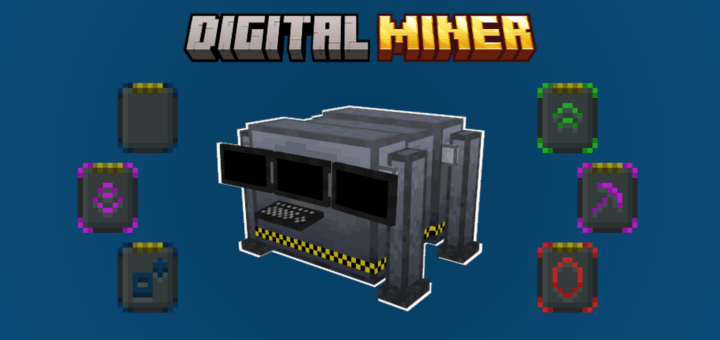
Digital Miner - MCPEDL v1.0.png
Description
Digital Miner Addon v1.0
The Digital Miner Addon is a technology addon, but it's not difficult to use or create.
It's compatible with addons that add blocks to the world.

- Craft:
> Digital Miner:
To start on this addon you will need a hammer.

With the Hammer you can create "Iron Dust" and "Coal Dust".


By combining these two dusts you can create a "Steel Dust" and smelting it in a furnace you get a "Steel Nugget".


With 9 Steel Nuggets you can create 1 Steel Ingot;
With 9 Steel Ingot create 1 Steel Block.


Tips: Coal, Iron and Gold Dust can be placed in the furnace as fuel or ore (a small duplication of ores, so to speak).


Alright, after this, you can start a long jorney;
The Digital Miner need some components to be created, like:
- 4 Steel Plates;
- 1 Monitor;
- 1 Digital Processor;
- 1 Machine Engine;
- 1 Laser Drill.

See how to make all components below on the spoiler:
- Monitor:
Monitor is maked with:
- 4 Steel Ingots;
- 4 Integrated Circuits;
- 1 Diamond Glass.

The Diamond Glass is simple to create, 4 diamonds and 1 glass.

For the Integrated Circuit you will need, Capacitors and Steel Nuggets


- Digital Processor:
The Digital Processor is a little more complicated, because it'll use 4 Advanced Circuits, 1 Steel Plate, 2 Diamond Plates and 2 Gold Plates.

To craft the Advanced Circuit need 4 Diamond Plates, 2 Integrated Circuits, 2 Redstone Enriched Quartz and 1 Amthyst Shard.

Plates and quartz craft is more simple.


- Machine Engine:
It's the easiest craft of this addon, only 3 Steel Blocks, 2 Redstone Blocks, 1 Coal Block and 1 Blast Furnace.

- Laser Drill:
Laser Drill is easy too, 1 Diamond Glass, 1 Light Generator, 1 Steel Plate, 2 Redstone Enriched Quartz and 2 Steel Ingot.


> Ore Scanner:
Were you shocked by the cost of the Digital Miner? Don't worry, I guarantee you'll be able to more than triple those resources in just a few minutes after you get it.
But I know it would be difficult to collect all these ores, so make an Ore Scanner to help (Read how it work below).

> Upgrades:
The Upgrades helps you increase the Digital Miner efficiency.
The base for any Upgrade is a Template, it's make with:
- 2 Coal Dusts;
- 2 Gold Plates;
- 2 Steel Ingots;
- 1 Steel Plate;
- 1 Diamond Plate;
- 1 Integrated Circuit.

See how to create upgrades on the spoiler below:
> Speed:
The speed upgrade reduce the time between each Miner operation:
- Tier 1: 15 Seconds;
- Tier 2: 10 Seconds;
- Tier 3: 5 Seconds;
- Tier 4: 1 Second.
Speed Upgrade Tier 1:

Speed Upgrade Tier 2:

Speed Upgrade Tier 3:

Speed Upgrade Tier 4:

> Stack:
The stack upgrade increase the amount of blocks broken per Miner execution:
- Tier 1: 2 Blocks per Execution;
- Tier 2: 4 Blocks per Execution;
- Tier 3: 6 Blocks per Execution;
- Tier 4: 8 Blocks per Execution.
Stack Upgrade Tier 1:

Stack Upgrade Tier 2:

Stack Upgrade Tier 3:

Stack Upgrade Tier 4:

> Fortune:
The fortune upgrade increase the number of items generated by each block broken by the Miner:
- Tier 1: Fortune 1;
- Tier 2: Fortune 2;
- Tier 3: Fortune 3.
Fortune Upgrade Tier 1:

Fortune Upgrade Tier 2:

Fortune Upgrade Tier 3:

> Silk Touch:
The silk touch upgrade allows the Miner to collect the blocks with the enchantment silk touch:
Silk Touch Upgrade:

> Anchor:
The Anchor Upgrade load the chunks around the miner so that it can continue working even when you're away.
Anchor Upgrade:

- How to Configure your Digital Miner:
Before you start, make sure you place a chest behide the Digital Miner for it works well.

> Main Painel:
When you interact with the Miner, a screen will appear saying:
- The amount of blocks found to mine;
- A button to Start or Stop the mine;
- A button to set filters;
- A button to install upgrades;
- A button to configure the Miner;

> Filter Painel:
The filter screen have some infos about the current filters and 3 buttons, one to add a type of a block, other to add a tag of a block or remove some current filter.

On the "Add Type" panel you can select:
- "Select Type": Where you can select the block ID using a list of all blocks from all addons installed in the world;
- "Write type": Where you can write the block ID, if you know (if identifier isn't specified, "minecraft:" will be used);
- "Type In Hand": Use the block ID of the item in your hand (It is preferable to use this if you already have a block of that type in hand and do not know its ID).

- Select Type ID:
A list of all addons installed in your world.


- Write Type ID:

On the "Add Tag" panel you can select:
- "Select Tag": Where you can select one of the predefined tags (if you want a specific tag, use the next option).
- "Write Tag": Where you can write the block Tag, if you know.

- Select Tag:

- Write Tag:

Finally, on the "Remove Filter" you can remove the previous IDs or Tags.

> Upgrades Painel:
Here you can install or remove your upgrades.
- Install Upgrade by Interact

- Intall Upgrade by Painel

- Remove Upgrade:

> Settings Painel
There are some options to change such as:
- The radius within which the Miner can operate.
- The maximum altitude at which the Miner operates.
- The minimum altitude at which the Miner operates.

- Turning on the Digital Miner:
Now returning to the initial screen you can click on the "Start Mine" and be happy :)
Wait for Digital Miner to pick up all the filter blocks that are in an area of 64x64 blocks.


This is the result after less than 5 minutes of operation (with the best upgrade).

If you need to stop the Miner to change the filters or because you are already satisfied or want to see how many blocks are left to collect, just interact with the machine again and now the "Start" button will have become the "Stop" button.

- Ore Scanner:
Ore Scanner has a simple operation, crouch down (Shift) and use the Ore Scanner item to open a panel with a ore list, select which ores doyou want to find and submit.
It has a range of 32x32.

- Other Infos:
- This addon don't disable Achievements;
- This addon don't use Experimental;
- This addon don't use player.json;
- This addon is compatible with other addons;
- This addon is compatible with Bedrock Awakening v0.4.3.
Digital Miner Team

Owner