Border Expansion
Every time you collect a new item, the border expands
WARNINGS:
My World Border Addon MUST be installed in order for this mod to work
What this does
Every time you collect a new* item the border expands for all players. You'll also get a notification in chat, telling you who collected the item, the name of the item, and the new border size.
* New items are items with a different typeId from items collected previously. This means each wool color is counted as new. But the bed is only counted once, as it only has one typeId.
I reccomend playing this with 4-6 players, things tend to get done faster with more players added.
But you might realize a potential problem, how are you going to remember which items you've collected? Well that's where the item browser comes in.
The Item Browser
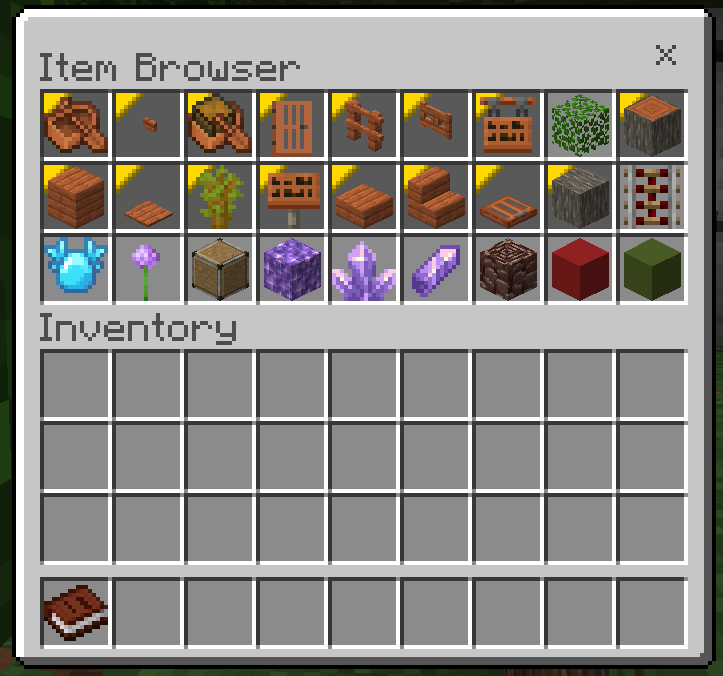
FIrst off, you'll notice that some of these items are highlighted yellow and tinted darker. These are items you've already collected. There are multiple things you can do on this page, for example, no matter which page you're on you'll always see a red and green concrete block in the bottom right. Pressing* the red one will bring you to the previous (or final) page. The green one will bring you to the next (or first) page. Pressing* any other item will request it in chat, stating "USERNAME has requested ITEM".
* Pressing on mobile requires you to swap the item in your inventory, please only do this with an empty slot. Otherwise, the item you swapped will be gone.
Ways to open
The most basic way to open the item browser is by right clicking the book you are given at the start of the game. This item will also be given to you upon respawning. So long as you keep it held, it will remember the page you were on.
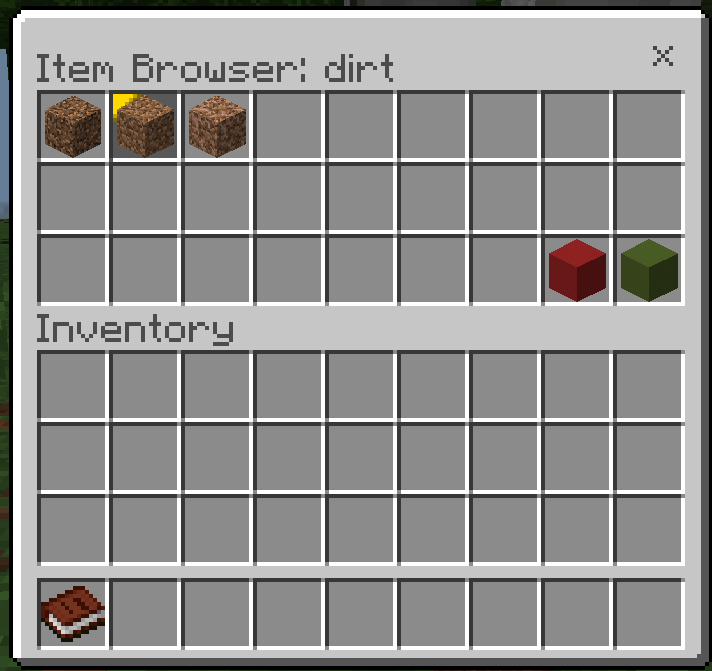
But maybe you want to search for something specific, such as dirt. Well, thats where the /itembrowser command comes in. Using it allows you to specify whether or not to include collected items, and most importantly, a specific string required to be in items typeId. If you need to use spaces, make sure to put the searchTerm in quotes.
In this example, I used "/itembrowser true dirt"
Border Expansion Team