Auto Machines 2.0 - Survival Automation
- By
Automate woodcutting, quarry mining and farming with solar-powered machines, speed upgrades, wireless storage and automatic chest output.
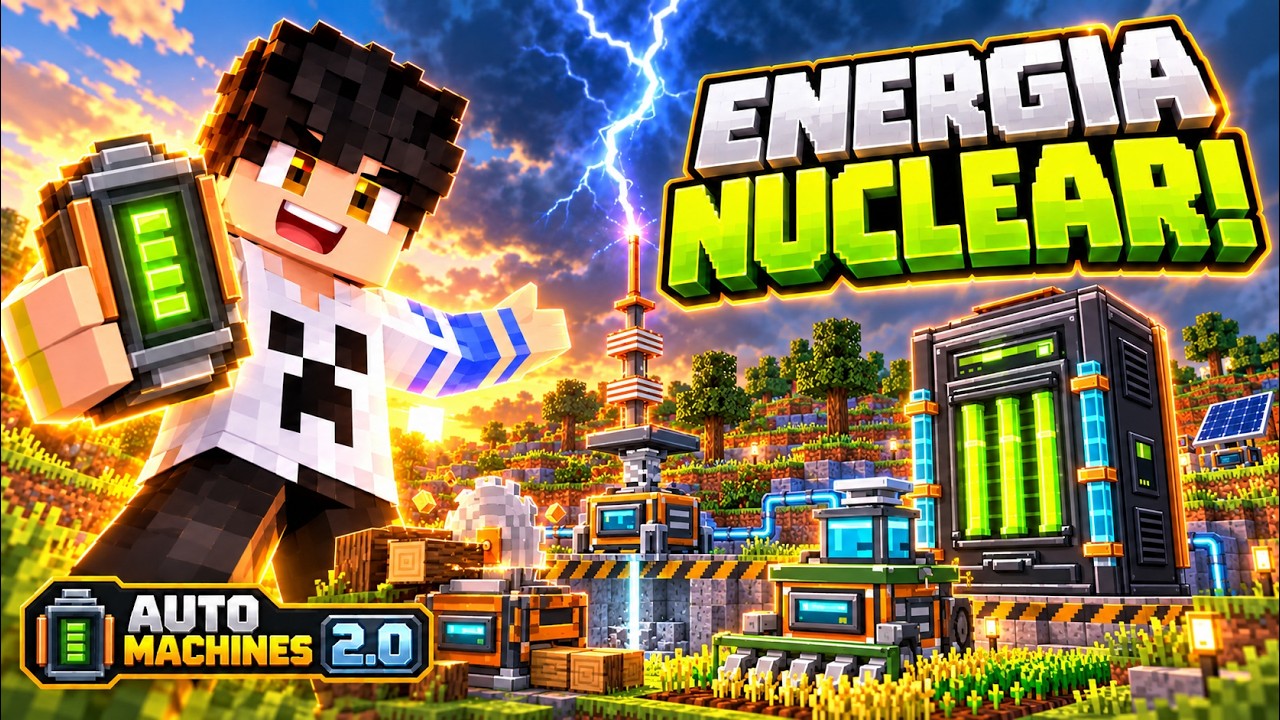
Description
Watch Auto Machines in action
Watch the Auto Machines 2.0 showcase on YouTube · Portuguese-language showcase of the 2.0 update.
Auto Machines 2.0 — Industrial Evolution
From your first machine to a connected industrial base.
Turn everyday survival work into an industrial project. Harvest wood, excavate a quarry, automate crops and deliver resources to your chests. Power the system with sunlight, uranium or storms, store the energy and build a water-cooling network to support your reactor.
Auto Machines connects survival progression with machines you can craft, configure and watch at work. Moving parts, animated panels, work beams and visible transfer effects make your production line part of the base itself.
Latest release: 2.0.1 — Industrial Evolution
Created by CROMOS.GG for Minecraft Bedrock Edition.
Join our Discord — support, feedback and community · Official CurseForge project
HARVEST → GENERATE → CONNECT → COOL → STORE
Grow from a single machine into a connected industrial base.
13 craftable machines · 31 crafting recipes · Three menu languages
The 2.0 finish
- Nuclear equipment redesigned: the Reactor and Uranium Processor feature rebuilt steel surfaces, aligned copper trim, clear green panels and coordinated cooling details.
- New held-item artwork: the Reactor, Processor, Nuclear Fuel Cell and Depleted Cell now have 128 × 128 icons. Fuel-cell casings follow the Solar and Storm Battery design family.
- Machines you can watch at work: animated displays, processing parts and coolant details bring the installation to life. The reactor changes color as it heats up and signals alert states. Nuclear surfaces use a 128-pixel-per-block texture density.
- Choose your direction: sneak-interact with the Machine Wrench to rotate a machine 90°. Pause the Mining Machine first; rotating rebuilds its frame and restarts its scan while retaining the selected width, inventory, battery and upgrades.
- Crafting made easier: all recipes have explicit recipe-book unlock conditions. Nuclear fuel also has an equal-cost recipe that accepts its nine ingredients in any order.
Latest fix — More complete quarry excavation
Version 2.0.1 fixes vegetation incorrectly stopping entire mining columns. Supported vanilla grass, flowers, ferns and leaves are now cleared without collecting those plant items, allowing the machine to continue through supported terrain and ores below.
Already have a quarry? Update both packs and enable your existing Mining Machine with a charged battery and room for output. On its first run with the fix, it revisits columns skipped by the old logic. You do not need to dismantle the machine or rebuild its frame; previously excavated air produces no duplicate resources or mining energy cost.
Quarry dimensions follow the interior of the selected boundary, rather than the world's 16 × 16 chunk grid. Lava, containers and unsupported/protected blocks retain their column protection. Keep the complete work area loaded.
Everything added since 1.3.1
- More ways to power your base: Battery Bank, Nuclear Reactor, Lightning Tower, Storm Accumulator and Storm Charging Station.
- A complete uranium progression: ore, processing, pellets, fuel cells and a dedicated uranium block.
- Radiation equipment: a four-piece Hazmat Suit, a Dosimeter, exposure warnings and reactor alarms.
- Automatic reactor cooling: an electric Water Pump, visible Water Pipes and a passive 16,000 mB Water Reservoir.
- Higher-capacity batteries: Storm Batteries store 6,000 EU and work with compatible machines.
- A refreshed industrial look: revised machine surfaces, upgrade finishes, animated displays, held-item icons and a new pack icon.
- Better controls and quarry behavior: container-style machine screens, Portuguese/English/Spanish controls, vegetation replacement and mining beneath water.
The Lumber, Mining and Farming Machines, wireless Storage, solar power and three speed upgrades were already present in 1.3.1 and remain part of the addon.
Production machines — Put your resources to work
Lumber Machine
Collect supported logs and Nether stems, clear matching foliage without filling storage with leaves, and replant using the replacement saplings or fungi you supply.
- Choose a 17 × 17, 25 × 25 or 33 × 33 work area.
- Provide the replacement species you want: oak stays oak, acacia stays acacia.
- Cutting does not require spare saplings; replanting does.
- Dark oak and pale oak need four matching saplings and a valid 2 × 2 planting space.
Keep the work area away from wooden builds: supported logs inside it may be harvested too.
Mining Machine
Build a quarry with an automatic frame, moving mining head, gantry and vertical work beam. Collect supported terrain and ores across a 7 × 7, 15 × 15, 23 × 23 or 31 × 31 interior, with depths of 16, 32, 64 blocks or down to bedrock.
Supported vanilla vegetation is cleared without collecting plant drops, so it no longer causes the whole column below to be skipped.
Water remains in the world while the scan continues beneath it. Lava, bedrock, containers and unsupported/protected blocks still stop their columns. The automatic boundary clears supported vegetation and common natural terrain along the frame path, on the boundary layer and the layer immediately above. Its height stays fixed, and removed terrain drops its corresponding materials near the machine. Containers, machines, ores, liquids and unsupported obstacles remain protected. Mining uses fixed addon drops, without Fortune or XP generation.
Farming Machine
Plant, harvest mature crops and replant wheat, carrots, potatoes and beetroot using dedicated planting reserves. Work areas are 17 × 17, 25 × 25 or 33 × 33. Output stays separate from the battery and planting supplies.
Prepare normal farmland, water and lighting. This machine does not till soil, irrigate fields or accelerate crop growth.
Iron, Diamond and Netherite speed upgrades
Upgrade individual producers through three speed tiers. Higher tiers replace lower tiers and change the supported machines' material finishes. A Netherite upgrade can be installed directly; actual production still depends on battery charge, available work, storage space and loaded areas.
Power your base — Solar, nuclear and storms
Solar Panel and Battery Bank
The Solar Panel generates energy in the Overworld during daylight with a clear view of the sky. Its panel changes angle with the time of day. Connect energy cables to installed machine batteries; an internal panel battery can store surplus and provide night-time power.
The Battery Bank stores 10,000 EU, receives energy from compatible generators and supplies connected batteries. More machines share the available supply, so expand generation and storage as your base grows.
Nuclear generation
Find uranium ore in newly generated Overworld terrain, process raw uranium into pellets and craft fuel cells. The Uranium Processor uses an installed battery; the Nuclear Reactor converts fuel and coolant into energy, with a 20,000 EU internal reserve.
Monitor fuel, water and temperature through the controls. Thermal visuals, animated panels and warning sounds show the reactor's operating state. Water is required for generation, and safety shutdowns must be reset through the wrench controls after the relevant condition is resolved.
Explore new terrain to find newly generated uranium ore. Existing explored chunks do not automatically gain the ore.
Radiation protection
Uranium materials and nearby radioactive blocks can cause addon radiation exposure. Wear the complete four-piece Hazmat Suit for protection against this system. The Dosimeter provides exposure feedback and Geiger-style clicks when held in the main hand or offhand.
Exposure warnings appear independently of the Dosimeter. Partial suits do not provide the complete suit's protection.
Lightning Tower and Storm Accumulator
Build a tall lightning-capture installation with a native lightning-rod antenna and an open view of the sky. Enabled equipment can capture nearby natural lightning within its supported 64-block horizontal range, subject to available storage and loaded areas.
Route captured energy through the addon's energy cables into a 100,000 EU Storm Accumulator. Receiving indicators and transfer pulses make the network's activity visible.
Storm Charging Station and batteries
Connect the accumulator to a Storm Charging Station, insert a battery and store that energy for your machines. Rechargeable Solar Batteries hold 1,000 EU; Storm Batteries hold 6,000 EU. Compatible machine slots and charging systems respect the installed battery's capacity.
Wireless item links do not carry electricity. Keep generators, accumulators and machines connected by actual loaded energy-cable paths.
Automatic water cooling — Build the reactor's support system
Source water → Electric Water Pump → Water Pipes → Water Reservoir → Water Pipes → Nuclear Reactor
- Place the pump by a source block. It can detect source water in its base cell, directly below or beside the base. Flowing water does not count as a source.
- Install a charged battery. Use the pump's wrench menu to install/remove a normal or Storm Battery. Connect energy cables if you want automatic recharging.
- Set the flow. Choose 25%, 50%, 75% or 100%. Higher flow uses more energy; pumping consumes energy when water is delivered.
- Connect a reservoir. The passive tank stores up to 16,000 mB. It has no battery and no power switch. Its controls report stored water, input and output.
- Feed the reactor. Build a continuous pipe route from the reservoir to the reactor body. Reservoir and reactor body-height connections are supported, including upper connections.
Connected reservoirs receive and provide water automatically. The reactor still accepts manual water-bucket refueling. Stored water can continue supplying the reactor when the pump stops, until the reserve runs out.
Water Pipes show transfer activity and flow sections. The reservoir shows four fill-height bands with animated vanilla-style water. Reservoir water is opaque in this release; pipe water remains translucent. These are custom visual liquids inside equipment, not the world's native water shader.
Water sources are renewable and are not removed from the lake. Pipe networks support up to 64 loaded segments and equipment belonging to the same owner.
Wireless Storage — Deliver production into your chests
Install a Wireless Module in a supported producer and select an owned Storage Machine within 64 blocks, in the same dimension. Output moves wirelessly into Storage's 54 inventory slots; installed batteries and reserved planting supplies stay in their machines.
For automatic chest delivery, place a chest directly against any horizontal side of the Storage Machine, at the same base height. When Storage is enabled, ordinary items are exported into it. Full or unavailable destinations leave the remaining items at the source.
Wireless sends consume energy from the producer. Use the available storage filters and keep both ends loaded.
Machine controls and presentation
- Container-style screens: real inventory slots on supported machines, plus compact status panels.
- Wrench controls: interact with the Machine Wrench to manage settings, batteries, areas and dismantling. Sneak with the wrench to rotate 90°; sneak-interaction without it still accesses settings. Pause a quarry before rotating it.
- Three menu languages: choose Portuguese, English or Spanish through the machine controls.
- Readable labels: friendly machine titles replace technical identifiers; names may appear when targeted.
- Active machinery: animated displays, work beams, upgrade finishes, thermal indicators, original sounds and visible transfer effects.
These machines use custom anchored entities rather than ordinary full solid blocks. Keep them and their networks loaded; they do not force chunks to remain active.
Crafting guide — New equipment
Updated visual recipe cards: current addon artwork, vanilla ingredient textures and verified crafting layouts. Click any card for the full-size image, or browse all 20 cards in the crafting album.
All 31 recipe definitions include explicit recipe-book unlock conditions. The layouts below are generated from the release's actual recipe files. Each row represents one row of the crafting grid; a dash is an empty slot. Smaller recipes can be positioned within the crafting grid normally.
Battery Bank

| Iron Ingot | Copper Ingot | Iron Ingot |
| Block of Copper | Block of Copper | Block of Copper |
| Iron Ingot | Redstone Dust | Iron Ingot |
Dosimeter

| Iron Ingot | Copper Ingot | Iron Ingot |
| Redstone Dust | Glass | Redstone Dust |
| Iron Ingot | Copper Ingot | Iron Ingot |
Hazmat Boots

| Iron Ingot | — | Iron Ingot |
| Yellow Wool | — | Yellow Wool |
Hazmat Chestplate

| Yellow Wool | — | Yellow Wool |
| Iron Ingot | Copper Ingot | Iron Ingot |
| Yellow Wool | Yellow Wool | Yellow Wool |
Hazmat Helmet

| Iron Ingot | Copper Ingot | Iron Ingot |
| Yellow Wool | Glass | Yellow Wool |
Hazmat Leggings

| Yellow Wool | Yellow Wool | Yellow Wool |
| Iron Ingot | — | Iron Ingot |
| Yellow Wool | — | Yellow Wool |
Lightning Tower

| — | Block of Copper | — |
| Iron Ingot | Block of Copper | Iron Ingot |
| Iron Ingot | Block of Redstone | Iron Ingot |
Nuclear Fuel Cell

| Iron Ingot | Processed Uranium Pellet | Iron Ingot |
| Processed Uranium Pellet | Glass | Processed Uranium Pellet |
| Iron Ingot | Processed Uranium Pellet | Iron Ingot |
Nuclear Fuel Cell — flexible alternative

At a 3 × 3 crafting table, use 4 Iron Ingots + 4 Processed Uranium Pellets + 1 Glass in any order, filling the nine slots. Produces one Nuclear Fuel Cell, at the same cost as the original layout above. Raw Uranium is not a substitute for processed pellets.
Nuclear Reactor

| Block of Iron | Diamond | Block of Iron |
| Block of Copper | Blast Furnace | Block of Copper |
| Block of Iron | Block of Redstone | Block of Iron |
Storm Accumulator

| Iron Ingot | Block of Copper | Iron Ingot |
| Rechargeable Solar Battery | Block of Redstone | Rechargeable Solar Battery |
| Iron Ingot | Block of Copper | Iron Ingot |
Storm Battery

| Iron Ingot | Copper Ingot | Iron Ingot |
| Redstone Dust | Rechargeable Solar Battery | Redstone Dust |
| Iron Ingot | Copper Ingot | Iron Ingot |
Storm Charging Station

| Iron Ingot | Copper Ingot | Iron Ingot |
| Redstone Dust | Rechargeable Solar Battery | Redstone Dust |
| Iron Ingot | Iron Ingot | Iron Ingot |
Uranium Block

| Processed Uranium Pellet | Processed Uranium Pellet | Processed Uranium Pellet |
| Processed Uranium Pellet | Processed Uranium Pellet | Processed Uranium Pellet |
| Processed Uranium Pellet | Processed Uranium Pellet | Processed Uranium Pellet |
Processed Uranium Pellet × 9

Uranium Block → 9 Processed Uranium Pellet
Uranium Processor

| Iron Ingot | Copper Ingot | Iron Ingot |
| Redstone Dust | Furnace | Redstone Dust |
| Iron Ingot | Copper Ingot | Iron Ingot |
Water Pipe × 16

| Iron Ingot | Glass | Iron Ingot |
| — | Glass | — |
| Iron Ingot | Glass | Iron Ingot |
Water Pump

| Iron Ingot | Copper Ingot | Iron Ingot |
| Redstone Dust | Bucket | Redstone Dust |
| Iron Ingot | Iron Ingot | Iron Ingot |
Water Reservoir

| Iron Ingot | Glass | Iron Ingot |
| Glass | — | Glass |
| Iron Ingot | Glass | Iron Ingot |
Uranium processing

Raw Uranium → Uranium Pellet is a machine process in the powered Uranium Processor, not a crafting-table recipe. Fuel cells are crafted from the resulting pellets. Depleted cells are reactor output.
Crafting guide — Original machines and tools
The following recipe cards use earlier machine artwork. Their ingredient layouts are unchanged in this release. Click a card to view the full image.
Lumber Machine

Mining Machine

Farming Machine

Solar Panel

Storage Machine

Rechargeable Solar Battery

Energy Cable — 16 per craft

Wireless Module

Machine Wrench

Update 1 — Iron

Update 2 — Diamond

Update 3 — Netherite

Installation and updating
- Import the release .mcaddon file into Minecraft Bedrock Edition.
- Activate its Behavior Pack and Resource Pack together in the world settings.
- Close and reopen the world after updating so models, textures and interfaces reload.
Updating from 2.0.0: 2.0.1 keeps the same pack identities, machine identifiers and saved-state formats. Back up your world, replace both packs and reopen it. Enable an existing quarry to trigger its one-time review of old skipped columns.
Updating a 1.3.1 world: make a copy first. This release uses a different pack identity from the old 1.3.1 pair, so disable the old pair and enable the new pair on that copy. Do not run both Auto Machines versions together. Existing machine identifiers are retained, but a complete 1.3.1-world migration has not been verified in-game.
Target version: Minecraft Bedrock 1.26.52. The earlier reservoir fix was confirmed in-game by the creator. The 2.0.1 package passed automated gameplay regressions and static asset/archive checks. The new nuclear artwork and latest quarry correction still need final in-game confirmation. Other devices, older versions and combinations with third-party packs have not all been validated. Nuclear values and radiation are fictional gameplay systems.
Before dismantling
Use the wrench controls and remove installed batteries and contents first. Pause powered machinery where required. For a reservoir, stop the pump or disconnect its input, empty the tank and dismantle it; the reservoir itself has no power switch.
Built by CROMOS.GG
Creator: CROMOS.GG
YouTube: Cromos GG
CurseForge: CromosGG
Join the Discord community · Watch the showcase
Selected assets adapt Minecraft vanilla reference textures; the original vanilla artwork belongs to Mojang Studios. Addon systems, integration and publication by CROMOS.GG.
Auto Machines 2.0 - Survival Automation Team

Owner