


Auction House + Shop V4.4
- By
best.png

MCPEDL.png
Description
How to enable admin features:
• do first /scoreboard objectives add Money dummy
• Use /tag @s add admin or /tag @s add op for extra customization and admin-only commands.
If this addon gets 4 star or lower, I will stop updating it
(This will be the last update I’ll be releasing.)
⚠️ REQUIRED: Enable this first in Experiments
• Upcoming Creator Features
• Beta APIs
🗃️ Auction House + Shop V4.4 Features
• Balance Increased to Quadrillion
• My Balance in Shop and Auction House
• My Balance Viewer Updated Full Amount
🗃️ Auction House + Shop V4.4 Features
• Duplication Bug Fix – Fixed the duplication issue in the Auction House.
• Lock/Unlock Removal – Removed the lock and unlock mechanics for a smoother experience.
• Enhanced Security – Improved security for Auction House buy and reclaim actions to prevent exploits.
• Quick Sell Command – Added a new command: /ahsell 500 lets you instantly place the item you’re holding into the Auction House in a quick session.
• New Icon Registry – Introduced a registry for items without dedicated icons, expanding from 75 unique icons to 102.
• Shop Item Icon Improvement – If an item you’re trying to put in the shop has no icon, you can now manually choose one from the preset icons.
🗃️ Auction House + Shop V4.3 Features
• Auto Storage Entity – Automatically spawns a storage entity, no need to manually add it.
• Auto Currency Setup – Automatically adds the default currency scoreboard (Money) without typing /scoreboard objectives add money dummy.
• Currency Viewer – Viewer is off by default, but operators can enable it in /ahmenu.
• Bug Fix – Fixed the Auction House issue present in V4.2.
🗃️ Auction House + Shop V4.2 Features
• Auction House Chest Grid UI Added(Chest UI by Herobrine643928) – you can switch back in /ahmenu.
• Auction House Timer – Items placed in the Auction House are no longer permanent. A timer is now applied (default: 10 minutes per item). This can be configured in /ahmenu → Auction Settings.
• Auction House Settings – New settings menu inside /ahmenu for managing timers, reputation, and statistics.
• Listing Slot Customization – Configure how many items a player can list by default. You can also set a base price if you want extra slots to be buyable.
• Search & Sort System – Auction House now supports sorting by Newest, Oldest, Lowest Price, Highest Price, Reputation, and Most Popular.
• Reputation Mechanic – Reputation is used only for sorting, but the more players buy from you, the higher you rank when Reputation sort is active.
• Reputation Leaderboard – You can view which player has the highest reputation in /ahmenu → Auction Settings.
• Most Bought Item Tracker – Auction Settings also shows the most purchased item in the Auction House.
🗃️ Auction House + Shop V4.1 Features:
• Test Mode for Secret Settings – Added a new test mode in the ZYD Item Shop’s secret settings, allowing you to test your own shop setup.
• Enchanted Book Fix – Enchantments on enchanted books now properly show up in the ZYD Item Shop.
🗃️ Auction House + Shop V4 Features:
• Custom Shop Category – Create your own category for NBT items (enchanted books, shulker boxes, enchanted tools, spawners, etc.).
• NBT Item Support – Full NBT data is saved, including enchantments and item details.
• Lore Requirement – Add lore to spawners using /lore while holding the item, so the shop can recognize them properly.
• Shulker Box Limitation – Shulker boxes placed in the custom category cannot be sold (may be added later if requested).
• Stack Purchases – Buy more than 64 items at once (works only on stackable items).
• Operator Full Access – Operators can access shops as if they were the owner, with full control.
• Operator Rotation Control – Operators can change the rotation/facing of shops.
• Secret Settings Unlock – Spam crouch to open hidden shop settings.
• Operator Teleport – Operators can teleport to any shop in the world.
• Currency Customization – Change shop currency to Diamonds, Emeralds, or any item you want. Affects both Item Shop and Auction.
• NPC Spawner – Spawn or summon NPCs linked to the shop/auction house, even if those systems are disabled. NPCs can also be used for decoration or roleplay.
• Bug Fixes & Improvements – General stability and performance updates.
• ZYD Shop Item – Set up your own shop anywhere, anytime.
1 free slot by default; buy more slots to expand.
Choose your currency (Diamonds, Emeralds, Scoreboard, etc.).
Operators bypass limits and can create unlimited shops.
Notifications show who bought from you, how much they spent, and when.
Offline sales supported earnings can be collected later.
Logs track buyers, time, and quantity.
Limited storage space to prevent abuse as a chest.
🗃️ Auction House + Shop V3.2 Features:
• You can now use your own scoreboard Currency in /ahmenu and Edit Currency
🗃️ Auction House + Shop V3.1 Features:
• New Custom Storage Entities, no need for chest boats and mule chest.
• Height Fix: Default spawn height changed to Y=320.
• Cleaner UI: Removed "Storage Type" info and "Auto Setup & Spawn" button.
• Better Info: Added short button descriptions, current spawn location, and a warning if old storage entities still exist.
🗃️ Auction House + Shop V3 Features
• Fence & TNT Protection – Auction House fence cannot be broken or interacted with, plus TNT/explosions within 10 blocks are blocked.
• Chest Mule Storage – Switched from chest boats to chest mules. Mules can be given resistance and invisibility, making them safe unless they fall into the void.
• Global Price Control – Adjust all buy/sell prices at once. Run sales or bonus events easily.
• Global Stocks System – Choose between shared stock (first come, first serve), per‑player restock every 5 minutes (rarity‑based), or unlimited supply.
• /sellall Command – Sell all items in your inventory instantly with one command. Perfect after farming or mining.
• Paper Export & Import – Save your shop layout to paper and import it later. Makes backups, sharing, and switching shop setups easy.
🗃️ Auction House + Shop V2 Features
• Shop – Browse categories, search items, add favorites, and manage stock.
• Buy / Sell – Instant buy and sell directly from the shop UI.
• Add Item (OP only) – Quickly add or edit items, set buy/sell prices, icons, and rarities.
• Edit Mode – In‑game editor for prices, stock, and item visibility.
• Favorites – Save frequently used items for fast access.
• Search – Fast search bar to find items by name or ID.
• Auction House (AH) – Full listing system with timestamp sorting, custom icons, and death protection.
• AH Sell – Support for spawners, enchanted tools/books, potions, and shulker boxes with contents.
• Slot Upgrades – Buy extra listing slots via scoreboard money.
• Claim System – Offline‑proof pending earnings you can claim later.
• Sync & Repair – Auto‑sync listing counts and repair desyncs between registry and storage.
• Admin AH Menu – Auto Setup & Spawn, Bedrock Shield, Storage Location, Spawn Chest Storage, View All Storage.
• Storage Tools – Spawn chest boats, add ticking area, and auto‑eject riders.
• Unlock Tools – Smart unlock and emergency force‑unlock for locked/keep‑on‑death items.
• Listing Limits – Per‑player active listing tracking and admin repair tools.
• Safety – Death checks block UI actions while dead to prevent issues.
🗃️ Useful Commands / Actions
• /shop – Open the shop UI.
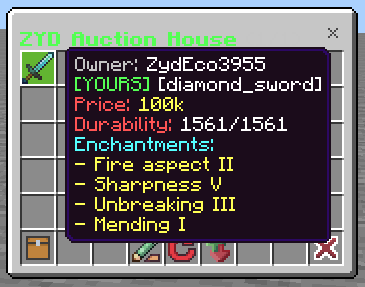
• /ah – View Auction House listings.
• /ahsell – Start selling an item in AH (supports shulkers/spawners/enchanted).
• /ahmenu – Admin configuration menu for storage and setup.
• /zyd:sellall – Sell all inventory items instantly.
• /zyd:settings – Toggle Shop/Auction features (OP only).
• /tag @s add op or /tag @s add admin – Grant yourself admin privileges for testing.
• Scoreboard setup example: /scoreboard objectives add Money dummy (use your objective ID if different).
• /sellhand – Sell Items only you are holding.
📢 Note:
• Bug Fixes
• Enhance Gameplay
• New Command
• New Features
• Potions Icons
🎥 Youtube Video Tutorial:
https://youtu.be/wYHbWKU6uWs?si=5fNKKXhHWaIrwAaD
🎥 Import and Export Mobile Tutorial:
https://www.youtube.com/watch?v=A2i5nkyF6Qk
(TEMPORARY)
📁 Download Link [26.40x]: ZYD Commands V4 Pre-Alpha
Link Removed: https://www.mediafire.com/file/wxt3pruaunydftk/ZYD_Commands_V4_Pre-Alpha.mcaddon/file
ZYD Commands V3 - Download here in the comment section:
https://www.youtube.com/watch?v=MgRj33goGR4
🗃️ Auction House + Shop V4.4 Features
• Balance Increased to Quadrillion
• My Balance in Shop and Auction House
• My Balance Viewer Updated Full Amount
📢 ZYD Commands V4 Pre-Alpha Update:
• Balance Increase to Quadrillion
• Faction System not yet finished (I Disabled it)
• Now Supports 26.40+
• You can now Disable some features if you dont like them
💬 Ask me anything in the comments below!
The Auction House + Shop V4.4 Team
