Atomic's FFA Weapons
- By
MCPEDL
Description
Atomic’s FFA Weapons
Bring powerful custom abilities into your Minecraft Bedrock FFA, PvP arena, realm, or server!
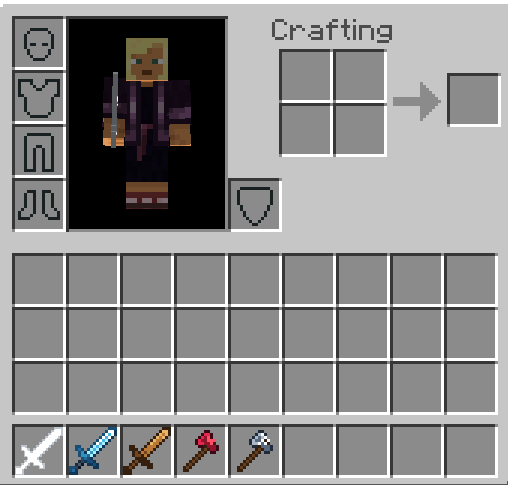
Atomic’s FFA Weapons adds five vanilla-styled weapons, each with its own ability, effects, cooldown, and action-bar status display.
Weapons
Web Axe
Activate the axe, then hit another player within 15 seconds to trap them in a cobweb for 15 seconds—or until the web is destroyed.
Cooldown: 45 seconds
Freeze Sword
Activate the sword, then hit another player within 10 seconds to completely freeze them for 5 seconds.
Cooldown: 1 minute 30 seconds
Dash Sword
Launch yourself forward in the direction you are looking, complete with visual and swoosh sound effects.
Cooldown: 60 seconds
Heart Axe
Gain six additional hearts alongside regeneration and golden-apple-style effects.
Cooldown: 45 seconds
Log Blade
Send a huge animated rolling log across the ground. Players struck by it take heavy damage and strong knockback.
Cooldown: 2 minutes
Using Abilities
Crouch and right-click while holding a weapon whose ability is ready.
The action bar displays the selected weapon and its current status:
- READY when the ability can be activated
- The remaining time when the ability is on cooldown
Weapons cannot be crafted. They are available through the Creative inventory or with /give.
Administration
Players with the admin tag can access the FFA configuration menu:
/ffa:configA function-based fallback is also included:
/function ffa/configThe configuration menu lets administrators set the maximum Y-level where weapon abilities can be used, helping prevent abilities from being activated inside protected spawn areas.
Available Versions
The download includes builds for:
- Regular Minecraft Bedrock
- Blurry’s P 1.0.8
- Blurry’s X 2.1 based on the unlocked Beta 5 / Experimental 4 build
The Blurry’s editions integrate Atomic’s FFA Weapons directly into their respective PvP packs.
Important: Blurry’s X 2.1 uses an unlocked Beta 5 / Experimental 4 version.
Support
Made by Q&A Studios.
Join our Discord for support, updates, and bug reports:
discord.gg/SbTSJHVC3y
When reporting a bug, please include your Minecraft version, the addon build you are using, and a screenshot of any content-log errors.
Atomic's FFA Weapons Team